> ## Documentation Index
> Fetch the complete documentation index at: https://opencals.com/docs/llms.txt
> Use this file to discover all available pages before exploring further.
# Fluently — language school template
> Free, open-source language school website template. Next.js 15, group classes with level variants and live seats left, private lessons, a free trial, teachers, campuses plus an online classroom with a Join button, Stripe checkout and passwordless accounts, built on the Opencals Storefront API.
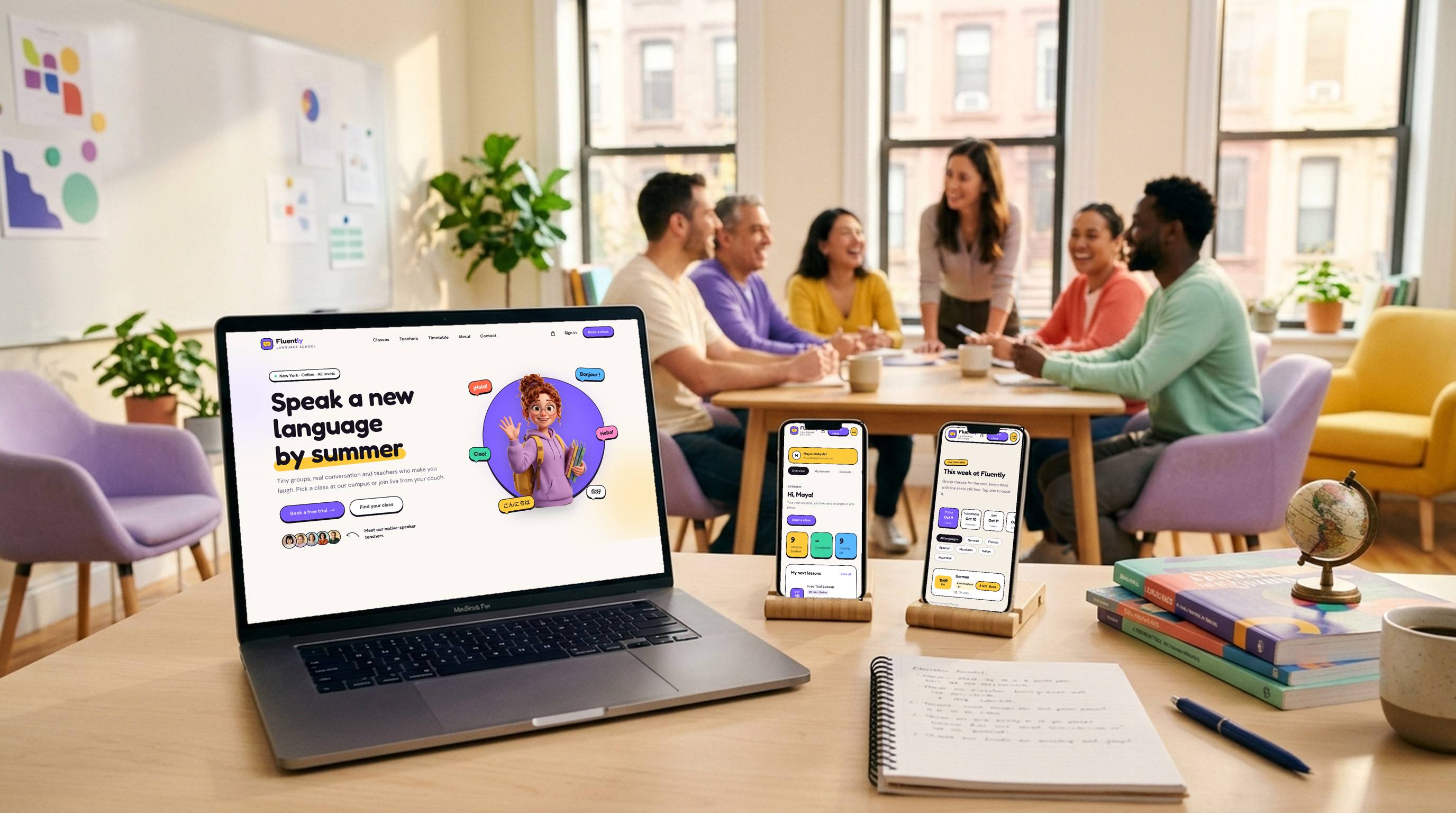
A complete language-school website you can clone and deploy today. Fluently
is built for **schools and courses**: group classes with levels, private 1:1
lessons, a free trial, teachers, campuses and a live **online classroom**. Start
here for a language, music, coding, art or tutoring school. It runs on the same
[Storefront API](/docs/api-reference/introduction) and typed
[TypeScript SDK](/docs/guides/storefront-sdk) as [Haar](/docs/open-source/haar),
[Frisor](/docs/open-source/frisor), [Clear Care](/docs/open-source/clarity),
[VOLT](/docs/open-source/volt) and [NOIR Drive](/docs/open-source/noir).
It's set in New York (USD, `America/New_York`) with two campuses and an online
classroom, teaching Spanish, French, German, Italian, Japanese and Mandarin. The
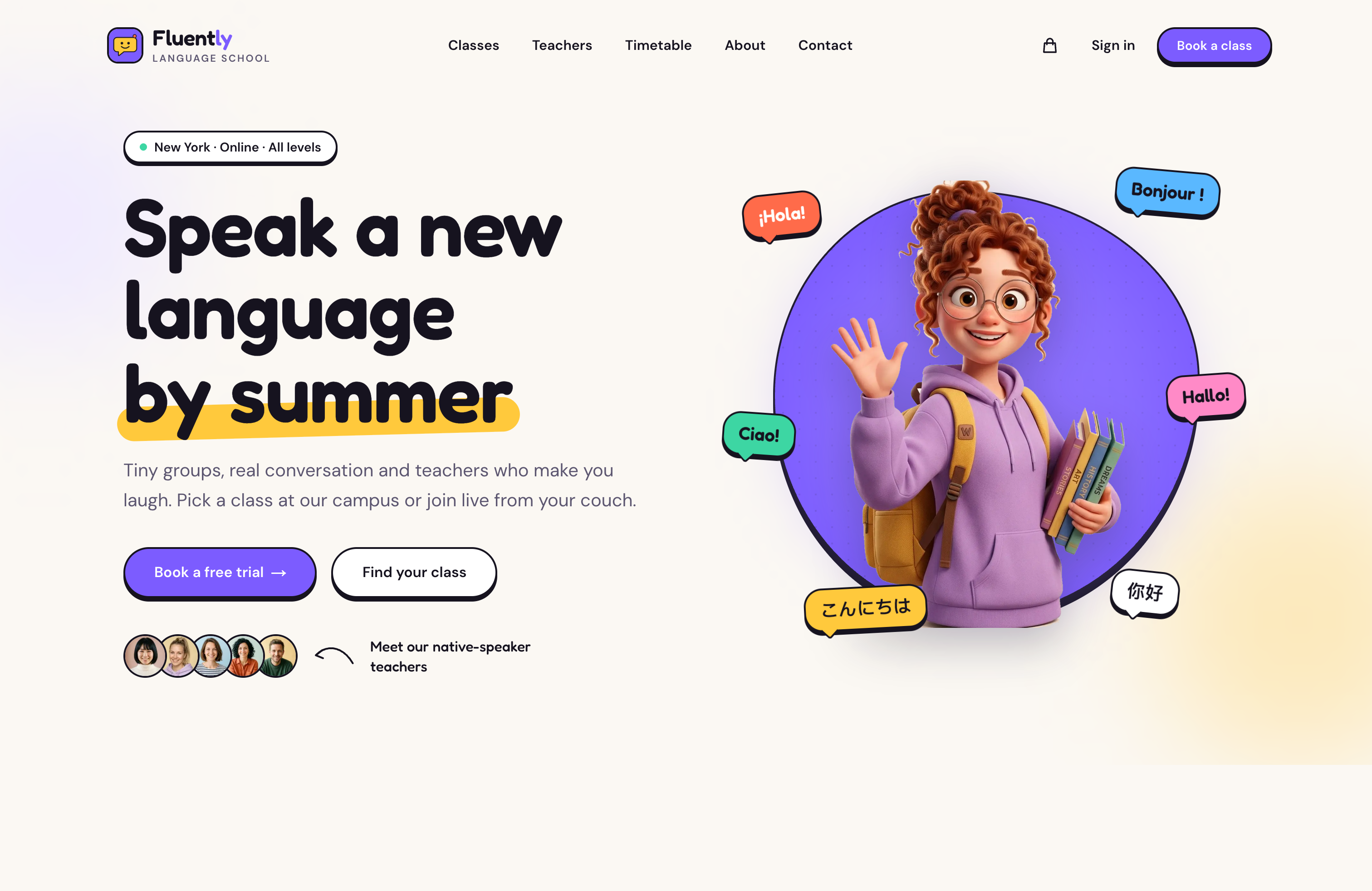
design is friendly and colorful: chunky sticker buttons, speech-bubble chips and
3D mascots next to real photos.
template-fluently.vercel.app
letsopencals/template-fluently (MIT)
One-click deploy
classes-and-lessons reference
 ## The school model
This is the part worth copying even if you never ship Fluently itself. It uses
existing Opencals features only, and the template reads everything from the
data, so nothing about languages is hard-coded.
| Piece | How it's modelled |
| - | - |
| A subject (a language) | A collection. A separate `start-here` collection holds the trial and conversation club |
| A group class | A product with `maxAttendees > 1`, assigned to its teachers |
| Levels (A1, A2, B1) | Variants of the group class, each with its own slug and price |
| A private lesson | A 1-seat product whose variants are lengths (45 / 60 min) |
| The free trial | A 1-seat product priced `0`, booked without a card |
| Online vs campus | Derived from the class's location types: all `ONLINE` means an online group |
| Teachers | Staff members; their languages and campuses come from their class and location assignments |
| Seats left | `maxAttendees - attendees` on each availability slot |
| The online classroom | The `ONLINE` location's `link`, returned on the booked appointment's location |
| Colors | Each product's dashboard color picks its swatch |
## What's inside
## The school model
This is the part worth copying even if you never ship Fluently itself. It uses
existing Opencals features only, and the template reads everything from the
data, so nothing about languages is hard-coded.
| Piece | How it's modelled |
| - | - |
| A subject (a language) | A collection. A separate `start-here` collection holds the trial and conversation club |
| A group class | A product with `maxAttendees > 1`, assigned to its teachers |
| Levels (A1, A2, B1) | Variants of the group class, each with its own slug and price |
| A private lesson | A 1-seat product whose variants are lengths (45 / 60 min) |
| The free trial | A 1-seat product priced `0`, booked without a card |
| Online vs campus | Derived from the class's location types: all `ONLINE` means an online group |
| Teachers | Staff members; their languages and campuses come from their class and location assignments |
| Seats left | `maxAttendees - attendees` on each availability slot |
| The online classroom | The `ONLINE` location's `link`, returned on the booked appointment's location |
| Colors | Each product's dashboard color picks its swatch |
## What's inside
 | Feature | Notes |
| - | - |
| Home | Mascot hero with real teacher portraits, stats counted from your data, language tiles, a format switcher, a level-finder quiz, testimonials and FAQ |
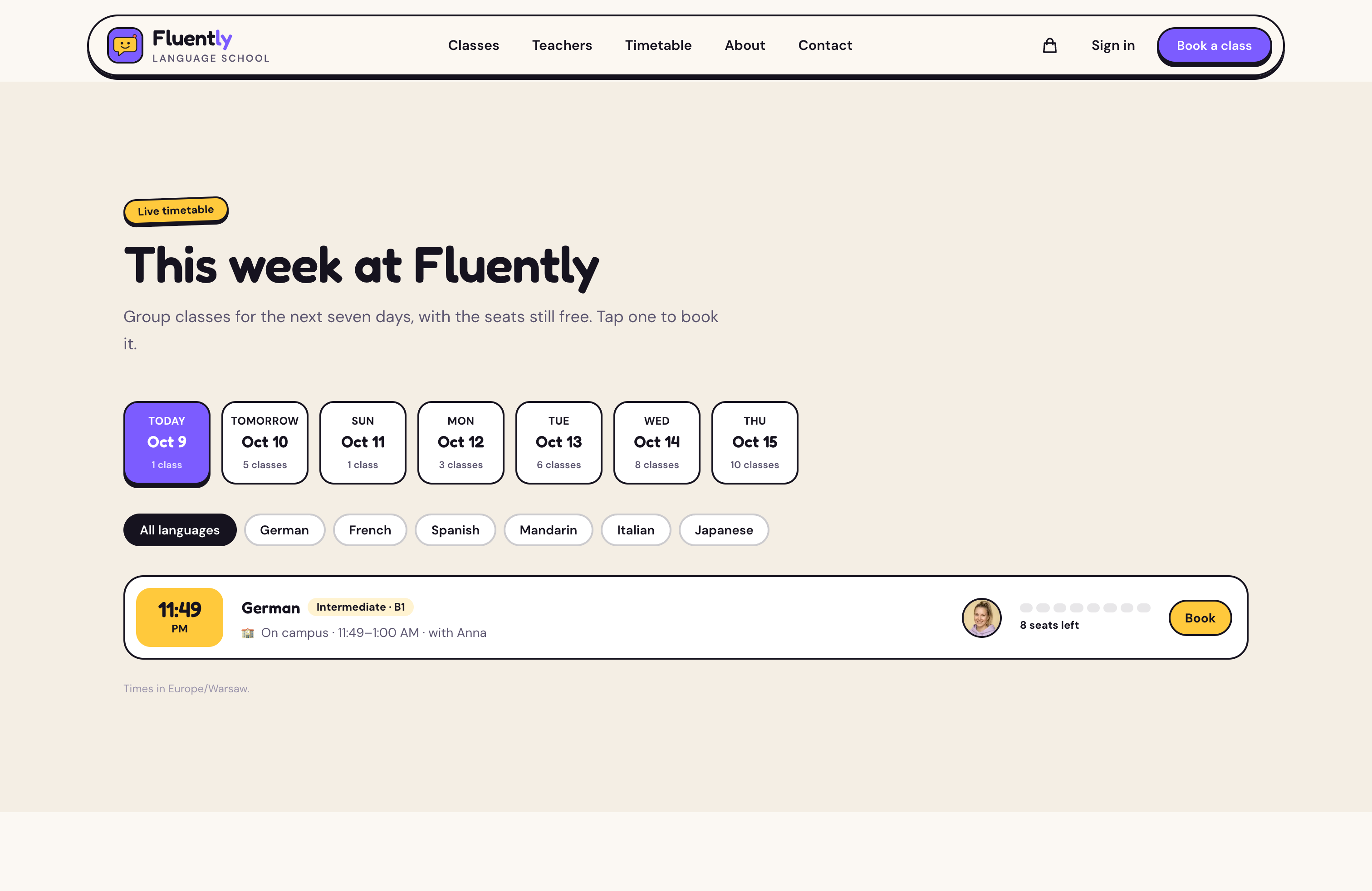
| This week timetable | Next seven days of group sessions across every class, with seats left, language filters and one-click booking (one cached availability call per level) |
| Classes | Catalog filtered by language, format and level, with shareable URLs |
| Language and teacher pages | Per-language classes, private lessons and teachers; teacher profiles with "Book with {name}" |
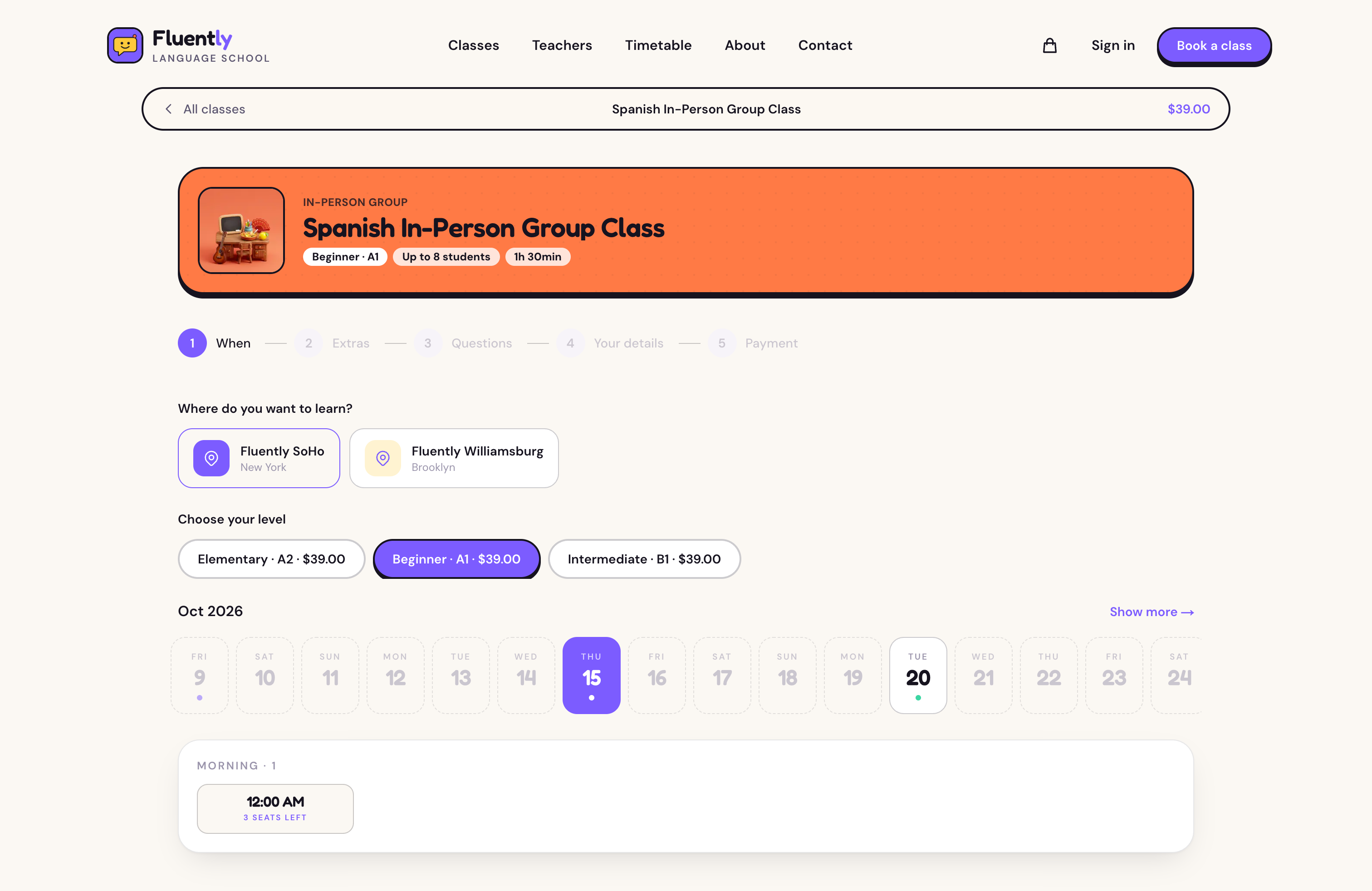
| Booking | Online or campus, level or length, teacher, extras, placement questions, details, payment. Deep links: `/booking/?date=&staff=&location=` |
| Online lessons | A Join lesson button on online bookings, live from 15 minutes before the start |
| Cart & Stripe checkout | Cart + Checkout + Payment endpoints, with the no-payment path for the free trial |
| Passwordless accounts | 6-digit email login (password fallback), one-time email links via `/link/[token]` |
| SEO | Per-page metadata, Open Graph, `LanguageSchool` and `FAQPage` structured data, `robots.txt`, `sitemap.xml` |
| Stack | Next.js 15, TypeScript, Tailwind v4, Framer Motion, `@opencals/storefront-sdk` v0.3.14 |
## Get started
```bash theme={"theme":{"light":"github-light","dark":"github-dark-default"}}
git clone https://github.com/letsopencals/template-fluently.git
cd template-fluently
npm install
```
Create a store in the [Opencals dashboard](https://opencals.com) and choose
the **Fluently** dataset preset (`language_school`). It seeds the six
languages, campus and online group classes with level variants, private
lessons, the free trial, teachers, both campuses, the online classroom with
its link, extras and placement questions. Then grab a Storefront API key
(see [Authentication](/docs/authentication)) and set `OPENCALS_API_KEY`,
`AUTH_SECRET` and `NEXT_PUBLIC_SITE_URL` in `.env.local`.
```bash theme={"theme":{"light":"github-light","dark":"github-dark-default"}}
npm run dev
```
Your classes, teachers and timetable render immediately.
Push to your own repo and [deploy to Vercel](https://vercel.com/new/clone?repository-url=https%3A%2F%2Fgithub.com%2Fletsopencals%2Ftemplate-fluently\&env=OPENCALS_API_KEY,AUTH_SECRET\&envDescription=API%20key%20from%20your%20Opencals%20dashboard%20and%20a%20random%20secret%20for%20auth\&project-name=fluently\&repository-name=template-fluently),
or host anywhere Next.js runs.
Pages are server-rendered, so their API calls carry no browser `Origin`.
Leave **allowed origins** empty on the key you give this template, or those
calls are rejected.
Set **Storefront Base URL** in your dashboard (Settings → API) to your
deployed domain. Every customer link (view, reschedule, cancel, leave
feedback) is built as `{storefrontBaseUrl}/link/{token}`, so if it still
points at localhost those emailed links go nowhere.
## Make it yours
MIT-licensed: rebrand it, restructure it, or use it for client work. All copy
lives in `lib/site-config.ts`: hero, format descriptions, the level quiz, how it
works, testimonials, FAQ and values. Every colour and font is a Tailwind v4
`@theme` token in `app/globals.css`:
```css theme={"theme":{"light":"github-light","dark":"github-dark-default"}}
@theme {
--color-bg: #FBF8F3; /* warm paper */
--color-ink: #16131F; /* ink + outlines */
--color-primary: #7C5CFF; /* grape */
--color-sun: #FFC93C; /* sunflower accent */
}
```
Building a different school site with an AI agent? The
[build-booking-site skill](/docs/ai-agents/build-booking-site-skill) has a
`classes-and-lessons` reference with the full pattern.
This documentation is built and hosted on [Mintlify](https://mintlify.com), a developer documentation platform.
| Feature | Notes |
| - | - |
| Home | Mascot hero with real teacher portraits, stats counted from your data, language tiles, a format switcher, a level-finder quiz, testimonials and FAQ |
| This week timetable | Next seven days of group sessions across every class, with seats left, language filters and one-click booking (one cached availability call per level) |
| Classes | Catalog filtered by language, format and level, with shareable URLs |
| Language and teacher pages | Per-language classes, private lessons and teachers; teacher profiles with "Book with {name}" |
| Booking | Online or campus, level or length, teacher, extras, placement questions, details, payment. Deep links: `/booking/?date=&staff=&location=` |
| Online lessons | A Join lesson button on online bookings, live from 15 minutes before the start |
| Cart & Stripe checkout | Cart + Checkout + Payment endpoints, with the no-payment path for the free trial |
| Passwordless accounts | 6-digit email login (password fallback), one-time email links via `/link/[token]` |
| SEO | Per-page metadata, Open Graph, `LanguageSchool` and `FAQPage` structured data, `robots.txt`, `sitemap.xml` |
| Stack | Next.js 15, TypeScript, Tailwind v4, Framer Motion, `@opencals/storefront-sdk` v0.3.14 |
## Get started
```bash theme={"theme":{"light":"github-light","dark":"github-dark-default"}}
git clone https://github.com/letsopencals/template-fluently.git
cd template-fluently
npm install
```
Create a store in the [Opencals dashboard](https://opencals.com) and choose
the **Fluently** dataset preset (`language_school`). It seeds the six
languages, campus and online group classes with level variants, private
lessons, the free trial, teachers, both campuses, the online classroom with
its link, extras and placement questions. Then grab a Storefront API key
(see [Authentication](/docs/authentication)) and set `OPENCALS_API_KEY`,
`AUTH_SECRET` and `NEXT_PUBLIC_SITE_URL` in `.env.local`.
```bash theme={"theme":{"light":"github-light","dark":"github-dark-default"}}
npm run dev
```
Your classes, teachers and timetable render immediately.
Push to your own repo and [deploy to Vercel](https://vercel.com/new/clone?repository-url=https%3A%2F%2Fgithub.com%2Fletsopencals%2Ftemplate-fluently\&env=OPENCALS_API_KEY,AUTH_SECRET\&envDescription=API%20key%20from%20your%20Opencals%20dashboard%20and%20a%20random%20secret%20for%20auth\&project-name=fluently\&repository-name=template-fluently),
or host anywhere Next.js runs.
Pages are server-rendered, so their API calls carry no browser `Origin`.
Leave **allowed origins** empty on the key you give this template, or those
calls are rejected.
Set **Storefront Base URL** in your dashboard (Settings → API) to your
deployed domain. Every customer link (view, reschedule, cancel, leave
feedback) is built as `{storefrontBaseUrl}/link/{token}`, so if it still
points at localhost those emailed links go nowhere.
## Make it yours
MIT-licensed: rebrand it, restructure it, or use it for client work. All copy
lives in `lib/site-config.ts`: hero, format descriptions, the level quiz, how it
works, testimonials, FAQ and values. Every colour and font is a Tailwind v4
`@theme` token in `app/globals.css`:
```css theme={"theme":{"light":"github-light","dark":"github-dark-default"}}
@theme {
--color-bg: #FBF8F3; /* warm paper */
--color-ink: #16131F; /* ink + outlines */
--color-primary: #7C5CFF; /* grape */
--color-sun: #FFC93C; /* sunflower accent */
}
```
Building a different school site with an AI agent? The
[build-booking-site skill](/docs/ai-agents/build-booking-site-skill) has a
`classes-and-lessons` reference with the full pattern.
This documentation is built and hosted on [Mintlify](https://mintlify.com), a developer documentation platform.