> ## Documentation Index
> Fetch the complete documentation index at: https://opencals.com/docs/llms.txt
> Use this file to discover all available pages before exploring further.
# VOLT — padel & squash club template
> Free, open-source padel and squash club booking website template. Next.js 15, a multi-court booking grid with custom durations, coach-led training, Stripe checkout, passwordless accounts — built on the Opencals Storefront API.
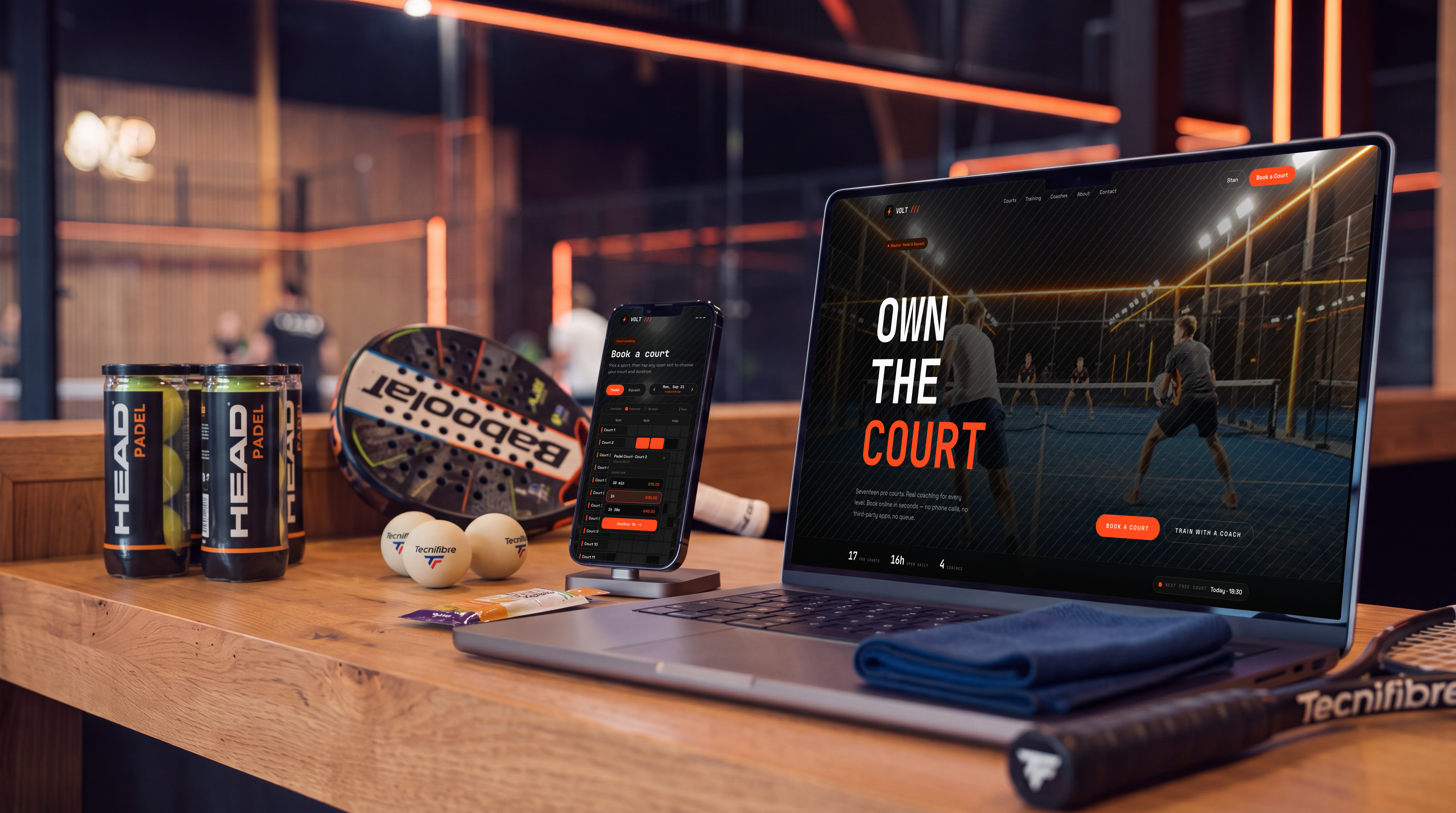
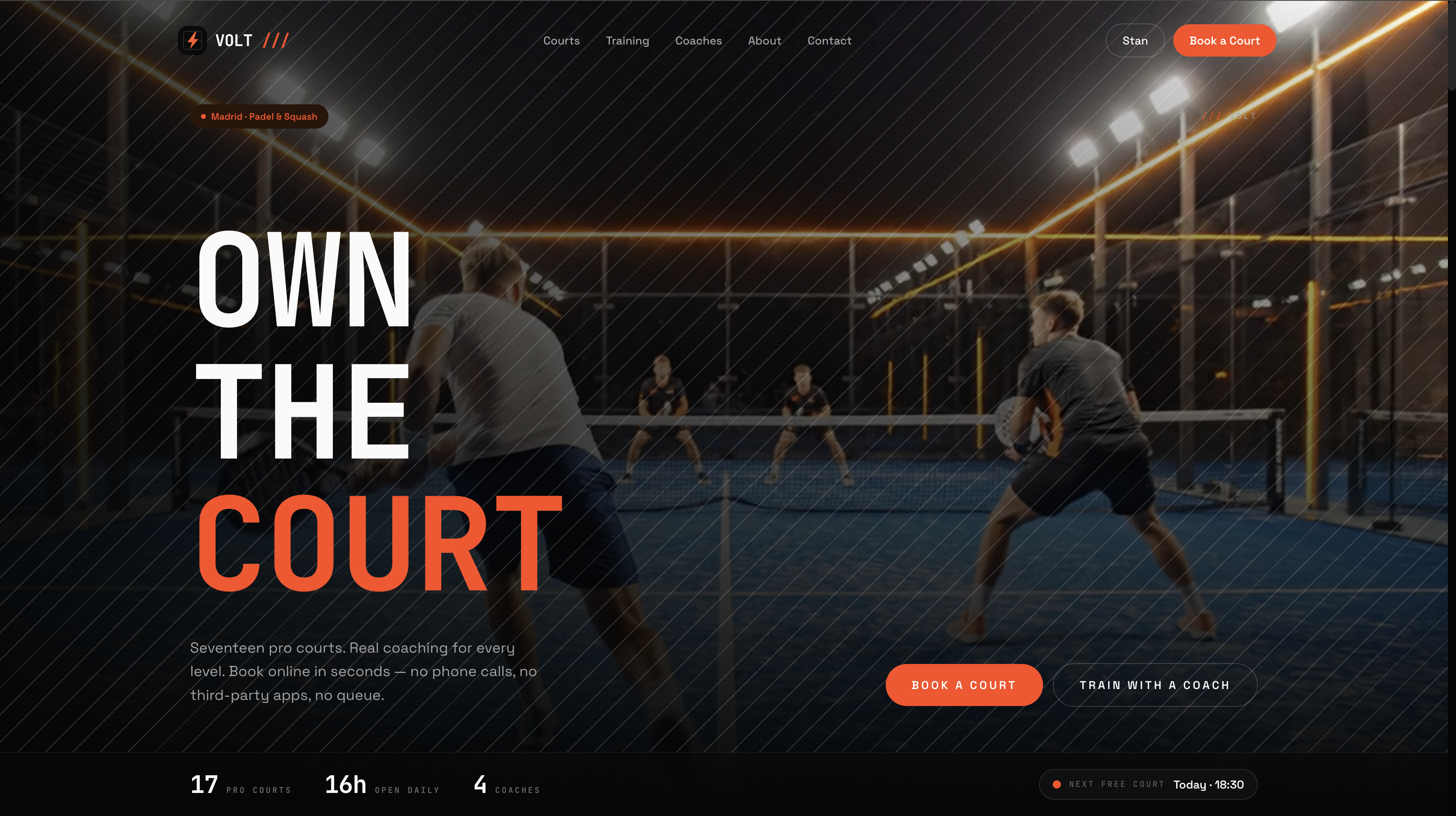
A complete padel & squash club booking website you can clone and deploy today.
VOLT is the first template built around **staffless resources** rather than
staff-led appointments: courts are independent, exclusively-booked units, so
this is the one to start from if you are booking courts, bays, lanes, studios
or rooms rather than people. It runs on the same
[Storefront API](/docs/api-reference/introduction) and typed
[TypeScript SDK](/docs/guides/storefront-sdk) as [Haar](/docs/open-source/haar),
[Frisor](/docs/open-source/frisor) and [Clear Care](/docs/open-source/clarity).
Two booking surfaces sit over one store: an in-page **court booking grid** for
rentals, and a classic **coach-led training flow** for lessons and group
classes.
template-volt.vercel.app
letsopencals/template-volt (MIT)
One-click deploy
 ## The court booking grid
The centrepiece. One grid shows **every court and every open slot** for a day
at once — courts down the rows, time across the columns — with a Padel /
Squash toggle that changes which courts fill the grid. Each court is its own
resource, so booking one leaves every other court free.
## The court booking grid
The centrepiece. One grid shows **every court and every open slot** for a day
at once — courts down the rows, time across the columns — with a Padel /
Squash toggle that changes which courts fill the grid. Each court is its own
resource, so booking one leaves every other court free.
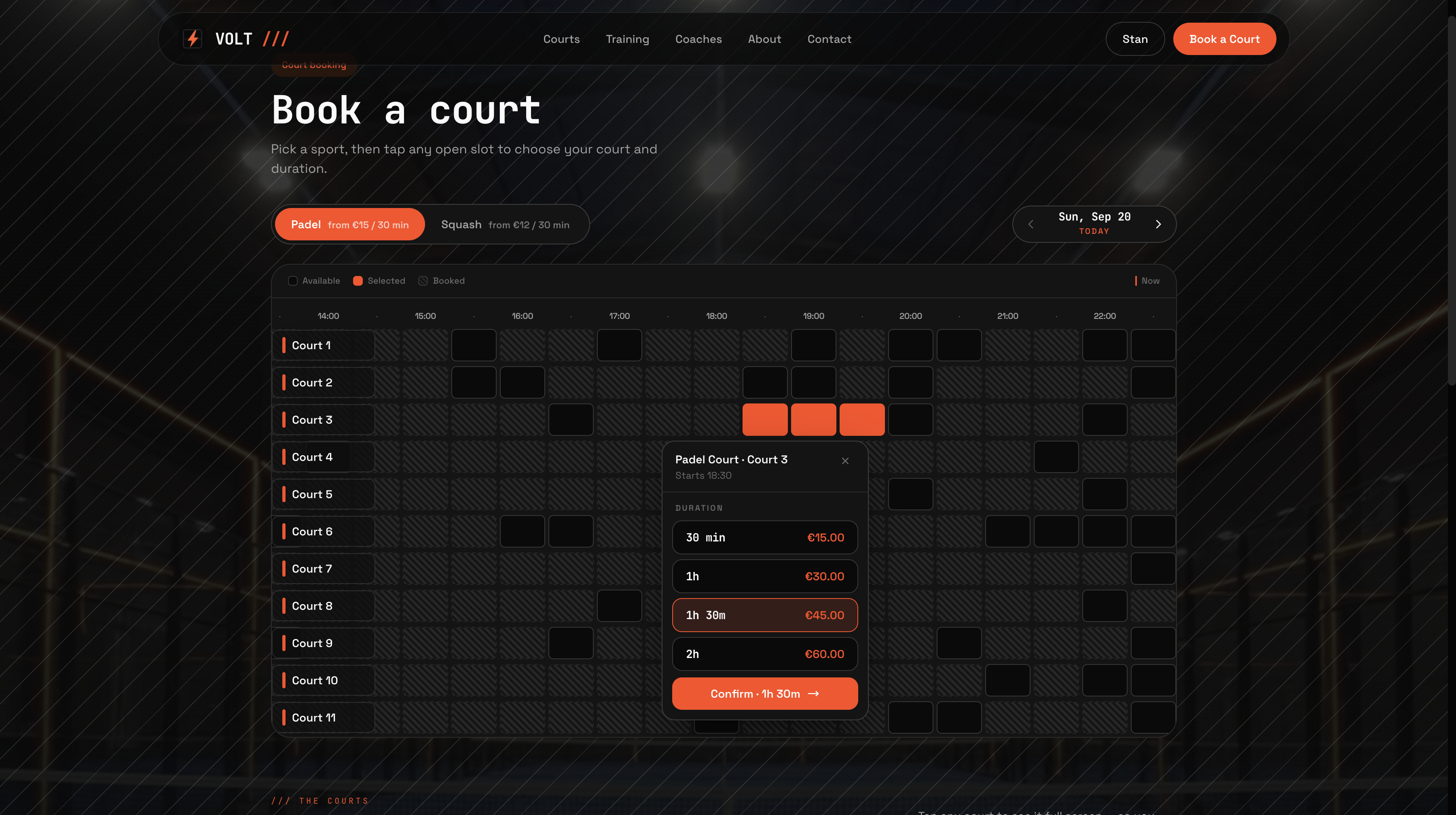 Courts book in 30-minute steps up to two hours. The grid walks each court's row
for runs of consecutive free slots and composes them into the 30 / 60 / 90 /
120-minute options actually available from the cell you tapped, pricing each
one live. Hovering a duration highlights the spanned cells; a Confirm button
commits. That logic lives in a `use-court-grid` hook rather than in the page,
which is the first place to look if you price peak hours differently or cap
rental length.
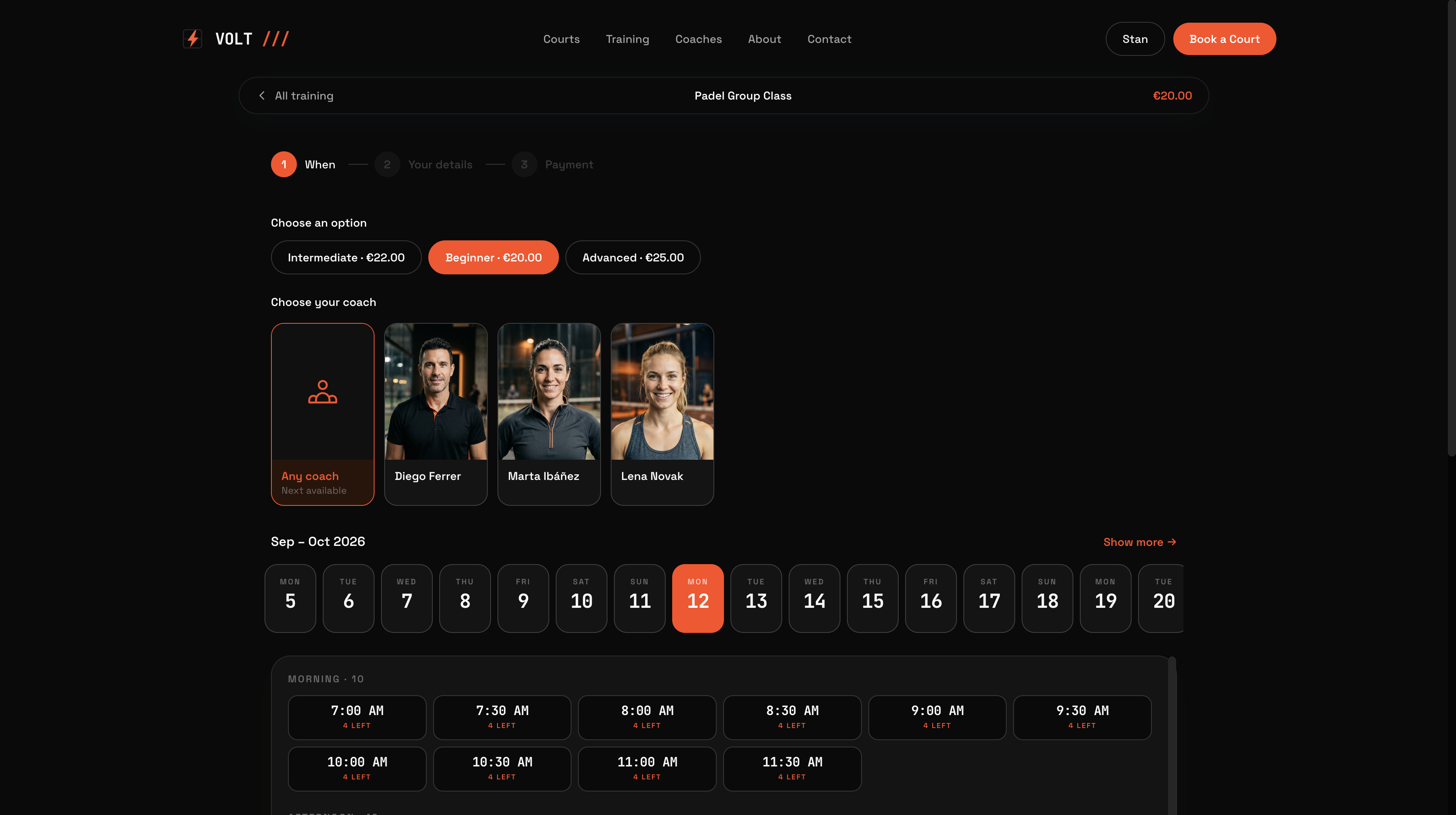
## Coach-led training
A separate flow over the same store, for lessons and classes. Filter the
catalog by sport, level (Starter → Advanced) and format (1-on-1 or group), pick
a coach — or **"Any coach — next available"**, which leads the picker — then a
date and time. Group classes show live **"N left"** capacity and disappear when
they fill.
Courts book in 30-minute steps up to two hours. The grid walks each court's row
for runs of consecutive free slots and composes them into the 30 / 60 / 90 /
120-minute options actually available from the cell you tapped, pricing each
one live. Hovering a duration highlights the spanned cells; a Confirm button
commits. That logic lives in a `use-court-grid` hook rather than in the page,
which is the first place to look if you price peak hours differently or cap
rental length.
## Coach-led training
A separate flow over the same store, for lessons and classes. Filter the
catalog by sport, level (Starter → Advanced) and format (1-on-1 or group), pick
a coach — or **"Any coach — next available"**, which leads the picker — then a
date and time. Group classes show live **"N left"** capacity and disappear when
they fill.
 ## Two resource models, one store
This is the part worth copying even if you never ship VOLT itself.
| Model | Rule | Capacity | Reads as |
| ------------------- | ----------------------------- | ------------------------- | --------------------------------------- |
| Courts (rentals) | `Self` — staffless resource | `maxAttendees: 1` | "Padel Court 3 — 90 min" |
| Trainings (lessons) | `Staff` — assigned to a coach | `maxAttendees: 1` or more | "Intermediate Group — with Coach Marta" |
Orders and appointment detail read naturally either way, so nothing downstream
has to decode a court that was faked as a staff member.
## What's inside
| Feature | Notes |
| ------------------------ | ------------------------------------------------------------------------------------------------------------------------------------- |
| Multi-court booking grid | Products + Appointments endpoints — every court and slot for a day in one view, padel/squash toggle |
| Custom durations | 30-minute steps to two hours, composed from consecutive free slots and priced live |
| Two sports, one store | Product Collections endpoints — a third sport is a data change, not a code change |
| Coach-led training | Staff Members endpoints — filter by sport, level and format; "Any coach" first |
| Group capacity | Live "N left" counts from `maxAttendees` |
| Add-ons at checkout | Racket and ball rental out of the box |
| Custom questions | Checkout questions configured in the dashboard, saved to the appointment |
| Cart & Stripe checkout | Cart + Checkout + Payment endpoints, deposits supported |
| Passwordless accounts | Self-Service endpoints — 6-digit email login (password fallback), auto-login after checkout, one-time email links via `/link/[token]` |
| Video-ready hero | Upgrades to a looping video when `public/videos/hero.mp4` exists, still image otherwise |
| SEO | Per-page metadata, Open Graph, `SportsActivityLocation` structured data, `robots.txt`, `sitemap.xml` |
| Stack | Next.js 15, TypeScript, Tailwind v4, Framer Motion, `@opencals/storefront-sdk` |
## Get started
```bash theme={"theme":{"light":"github-light","dark":"github-dark-default"}}
git clone https://github.com/letsopencals/template-volt.git
cd template-volt
npm install
```
Create a store in the [Opencals dashboard](https://opencals.com) — choose the
**VOLT Padel & Squash** dataset preset to seed the club's courts, coaches,
training classes, add-ons and venue — then grab a Storefront API key (see
[Authentication](/docs/authentication)) and set `OPENCALS_API_KEY` and
`AUTH_SECRET` in `.env`.
```bash theme={"theme":{"light":"github-light","dark":"github-dark-default"}}
npm run dev
```
Your real courts, coaches and availability render immediately.
Push to your own repo and
[deploy to Vercel](https://vercel.com/new/clone?repository-url=https%3A%2F%2Fgithub.com%2Fletsopencals%2Ftemplate-volt\&env=OPENCALS_API_KEY,AUTH_SECRET\&envDescription=API%20key%20from%20your%20Opencals%20dashboard%20and%20a%20random%20secret%20for%20auth\&project-name=volt\&repository-name=template-volt),
or host anywhere Next.js runs.
Set **Storefront Base URL** in your dashboard (Settings → API) to your
deployed domain. Every customer link — view, reschedule, cancel, leave
feedback — is built as `{storefrontBaseUrl}/link/{token}`, so if it still
points at localhost those emailed links go nowhere.
## Make it yours
MIT-licensed: rebrand it, restructure it, or use it as a starting point for
client work. All club-specific copy lives in `lib/site-config.ts` — club name,
the two sports and their price hints, hero, coaches, gallery, stats,
testimonials, FAQs, address and hours. Every colour and font is a Tailwind v4
`@theme` token in `app/globals.css`, so components keep working when you change
values:
```css theme={"theme":{"light":"github-light","dark":"github-dark-default"}}
@theme {
--color-bg: #0A0A0A; /* near-black page background */
--color-primary: #FF4A1C; /* electric-orange accent */
--font-display: 'JetBrains Mono', ui-monospace, monospace;
}
```
Keep the accent aligned with your store's storefront primary colour so booking
emails match the site. Agencies can run one codebase against multiple stores —
each deployment points at a different API key. To go deeper than theming,
follow the [booking page tutorial](/docs/guides/build-a-booking-page) to see the API
calls behind each screen.
## Two resource models, one store
This is the part worth copying even if you never ship VOLT itself.
| Model | Rule | Capacity | Reads as |
| ------------------- | ----------------------------- | ------------------------- | --------------------------------------- |
| Courts (rentals) | `Self` — staffless resource | `maxAttendees: 1` | "Padel Court 3 — 90 min" |
| Trainings (lessons) | `Staff` — assigned to a coach | `maxAttendees: 1` or more | "Intermediate Group — with Coach Marta" |
Orders and appointment detail read naturally either way, so nothing downstream
has to decode a court that was faked as a staff member.
## What's inside
| Feature | Notes |
| ------------------------ | ------------------------------------------------------------------------------------------------------------------------------------- |
| Multi-court booking grid | Products + Appointments endpoints — every court and slot for a day in one view, padel/squash toggle |
| Custom durations | 30-minute steps to two hours, composed from consecutive free slots and priced live |
| Two sports, one store | Product Collections endpoints — a third sport is a data change, not a code change |
| Coach-led training | Staff Members endpoints — filter by sport, level and format; "Any coach" first |
| Group capacity | Live "N left" counts from `maxAttendees` |
| Add-ons at checkout | Racket and ball rental out of the box |
| Custom questions | Checkout questions configured in the dashboard, saved to the appointment |
| Cart & Stripe checkout | Cart + Checkout + Payment endpoints, deposits supported |
| Passwordless accounts | Self-Service endpoints — 6-digit email login (password fallback), auto-login after checkout, one-time email links via `/link/[token]` |
| Video-ready hero | Upgrades to a looping video when `public/videos/hero.mp4` exists, still image otherwise |
| SEO | Per-page metadata, Open Graph, `SportsActivityLocation` structured data, `robots.txt`, `sitemap.xml` |
| Stack | Next.js 15, TypeScript, Tailwind v4, Framer Motion, `@opencals/storefront-sdk` |
## Get started
```bash theme={"theme":{"light":"github-light","dark":"github-dark-default"}}
git clone https://github.com/letsopencals/template-volt.git
cd template-volt
npm install
```
Create a store in the [Opencals dashboard](https://opencals.com) — choose the
**VOLT Padel & Squash** dataset preset to seed the club's courts, coaches,
training classes, add-ons and venue — then grab a Storefront API key (see
[Authentication](/docs/authentication)) and set `OPENCALS_API_KEY` and
`AUTH_SECRET` in `.env`.
```bash theme={"theme":{"light":"github-light","dark":"github-dark-default"}}
npm run dev
```
Your real courts, coaches and availability render immediately.
Push to your own repo and
[deploy to Vercel](https://vercel.com/new/clone?repository-url=https%3A%2F%2Fgithub.com%2Fletsopencals%2Ftemplate-volt\&env=OPENCALS_API_KEY,AUTH_SECRET\&envDescription=API%20key%20from%20your%20Opencals%20dashboard%20and%20a%20random%20secret%20for%20auth\&project-name=volt\&repository-name=template-volt),
or host anywhere Next.js runs.
Set **Storefront Base URL** in your dashboard (Settings → API) to your
deployed domain. Every customer link — view, reschedule, cancel, leave
feedback — is built as `{storefrontBaseUrl}/link/{token}`, so if it still
points at localhost those emailed links go nowhere.
## Make it yours
MIT-licensed: rebrand it, restructure it, or use it as a starting point for
client work. All club-specific copy lives in `lib/site-config.ts` — club name,
the two sports and their price hints, hero, coaches, gallery, stats,
testimonials, FAQs, address and hours. Every colour and font is a Tailwind v4
`@theme` token in `app/globals.css`, so components keep working when you change
values:
```css theme={"theme":{"light":"github-light","dark":"github-dark-default"}}
@theme {
--color-bg: #0A0A0A; /* near-black page background */
--color-primary: #FF4A1C; /* electric-orange accent */
--font-display: 'JetBrains Mono', ui-monospace, monospace;
}
```
Keep the accent aligned with your store's storefront primary colour so booking
emails match the site. Agencies can run one codebase against multiple stores —
each deployment points at a different API key. To go deeper than theming,
follow the [booking page tutorial](/docs/guides/build-a-booking-page) to see the API
calls behind each screen.