

Fluently: a free, open-source language school booking template

A lot of small language schools I've seen book students the same way: a lovely Instagram, a website with a contact form, and then a teacher replying by email with three possible times. The student picks one, someone copies it into a calendar, and the school finds out on Monday that two people were promised the last seat in the Tuesday A2 group.
Fluently is a full school website where the seat count is real. A student picks a language, a level, campus or online, sees exactly how many places are left in each session, and books and pays in one go. It's MIT licensed, it's on GitHub, and the classes, teachers, capacity and checkout come from Opencals, so you aren't building a timetable engine.
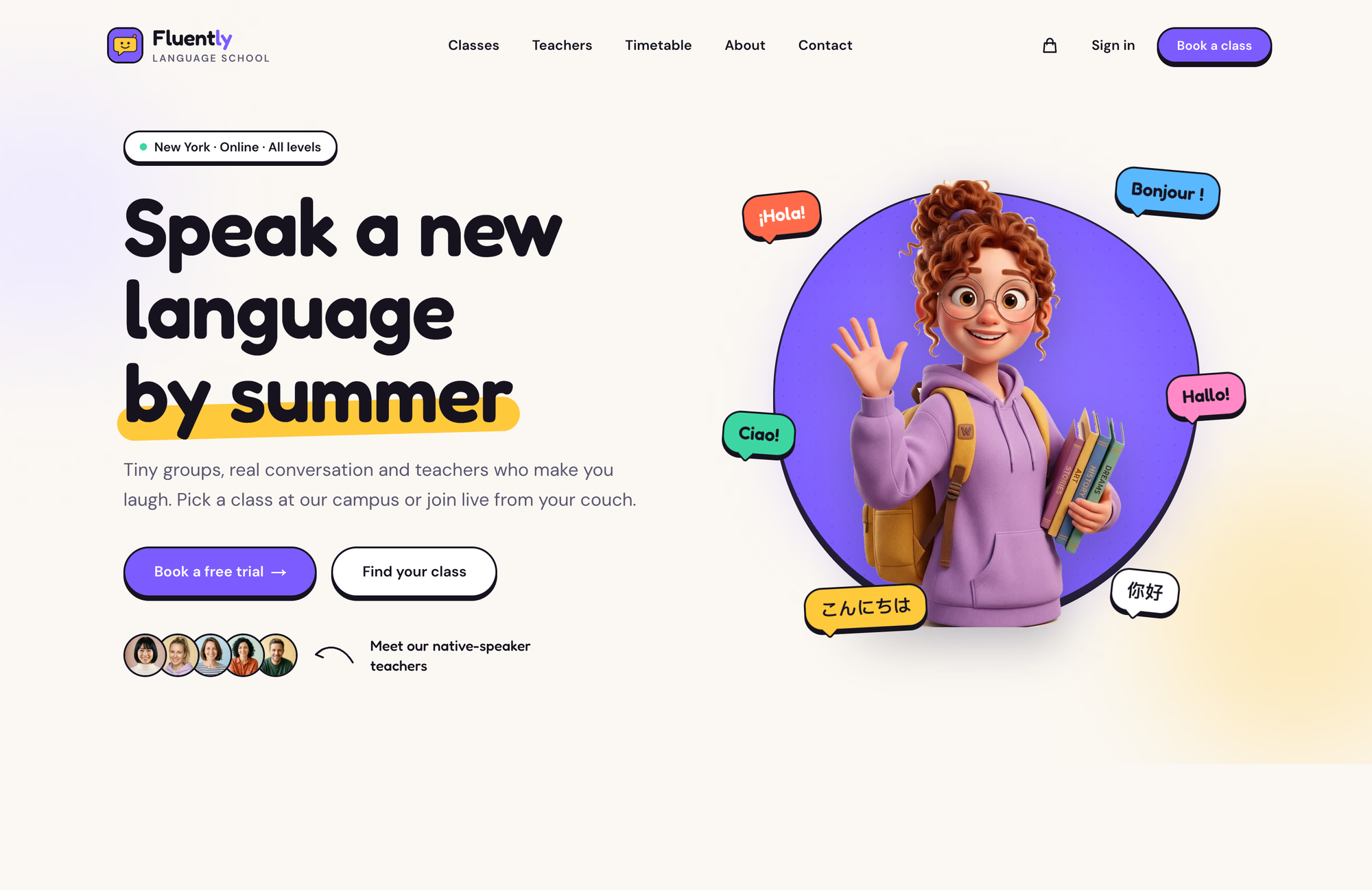
The demo school is fictional: two New York campuses (SoHo and Williamsburg), a live online classroom, six languages, eleven teachers and twenty classes. All of it is data you replace.
Fluently is a Next.js 15 frontend you own (MIT) on a booking backend you don't run (the Opencals Storefront API). Group classes with live seats, level variants, private 1:1 lessons, online lessons with a Join button, a free trial that needs no card, and student accounts. Nothing is hard-coded to languages, so it works for a music, coding or tutoring school too. Live demo at template-fluently.vercel.app.
The timetable is the homepage
The section I'd point a school owner at first is halfway down the homepage: This week at Fluently. It's every group session for the next seven days, with a day strip that tells you how many classes run each day, language filters, and a seats-left count on every row.
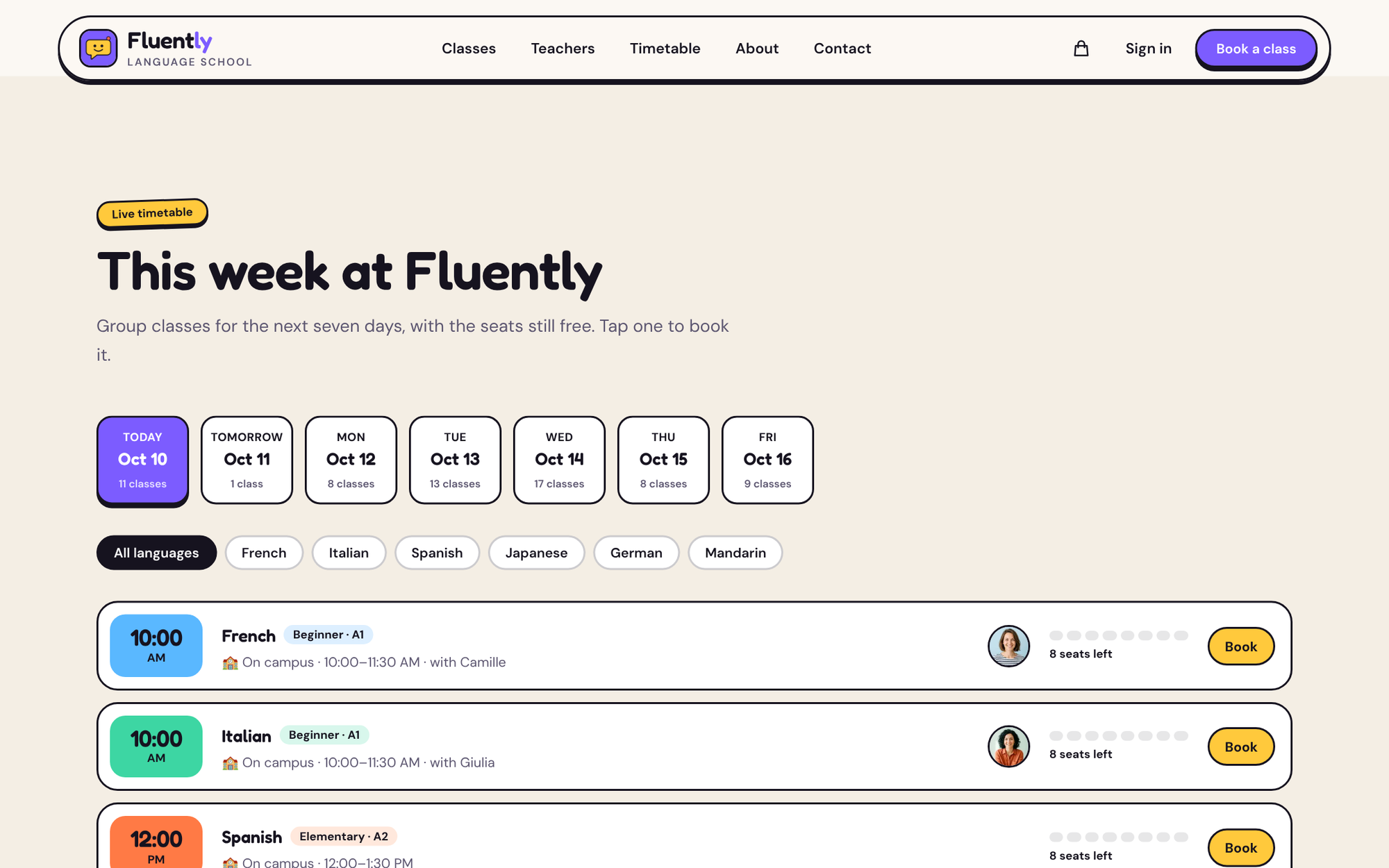
It's there because of how people actually decide to take a class. A student who's been meaning to learn Italian for two years doesn't start by choosing a level. They start with is there something Tuesday evening? The timetable answers that before they've had to think about A1 versus A2, and each row deep-links into booking with the date, teacher and campus already chosen:
/booking/<variant-slug>?date=2026-11-03&staff=<teacher-id>&location=<location-id>
The stat tiles above it (languages, teachers, campuses, maximum group size) are counted from your store, not typed into the config. If a number is zero, the tile hides. A two-teacher school won't end up advertising "0 campuses".
A class with eight chairs
Capacity is the whole problem for a school, so it's worth being exact about how Fluently models it.
A group class is one product with maxAttendees above one. In the demo, an in-person group is up to 8 students for 90 minutes, a live online group is up to 10 for an hour, and the Conversation Club takes 12. Every slot carries live availability from Opencals, so the "8 seats left" on the timetable and the "2 seats left" in the booking flow are the same number, and it drops the moment someone pays. When it reaches zero the session stops being bookable. There's no spreadsheet to reconcile.
A private lesson is the same product with one seat, and a variant per length: 45 or 60 minutes. A $0 one-seat product is the free trial. Three formats, one data model, which is why the template doesn't need special cases for any of them.
Levels are variants, languages are collections
The catalog is built from three things you already have in an Opencals store.
Subjects are collections. Each visible collection becomes a language with its own page at /languages/[slug]. A special start-here collection, holding the free trial and the Conversation Club, is shown as Try it first rather than as a seventh language.
Levels are variants. "Spanish In-Person Group Class" is one product with variants for Beginner · A1, Elementary · A2 and Intermediate · B1. That keeps the catalog at twenty cards rather than sixty, and it's why the level chips in the booking flow are one tap apart.
Teachers are staff. Assign a class its teachers in the dashboard and the template works out each teacher's languages, campuses and whether they teach online from those assignments. Book with Camille on a teacher profile opens the booking with her preselected.
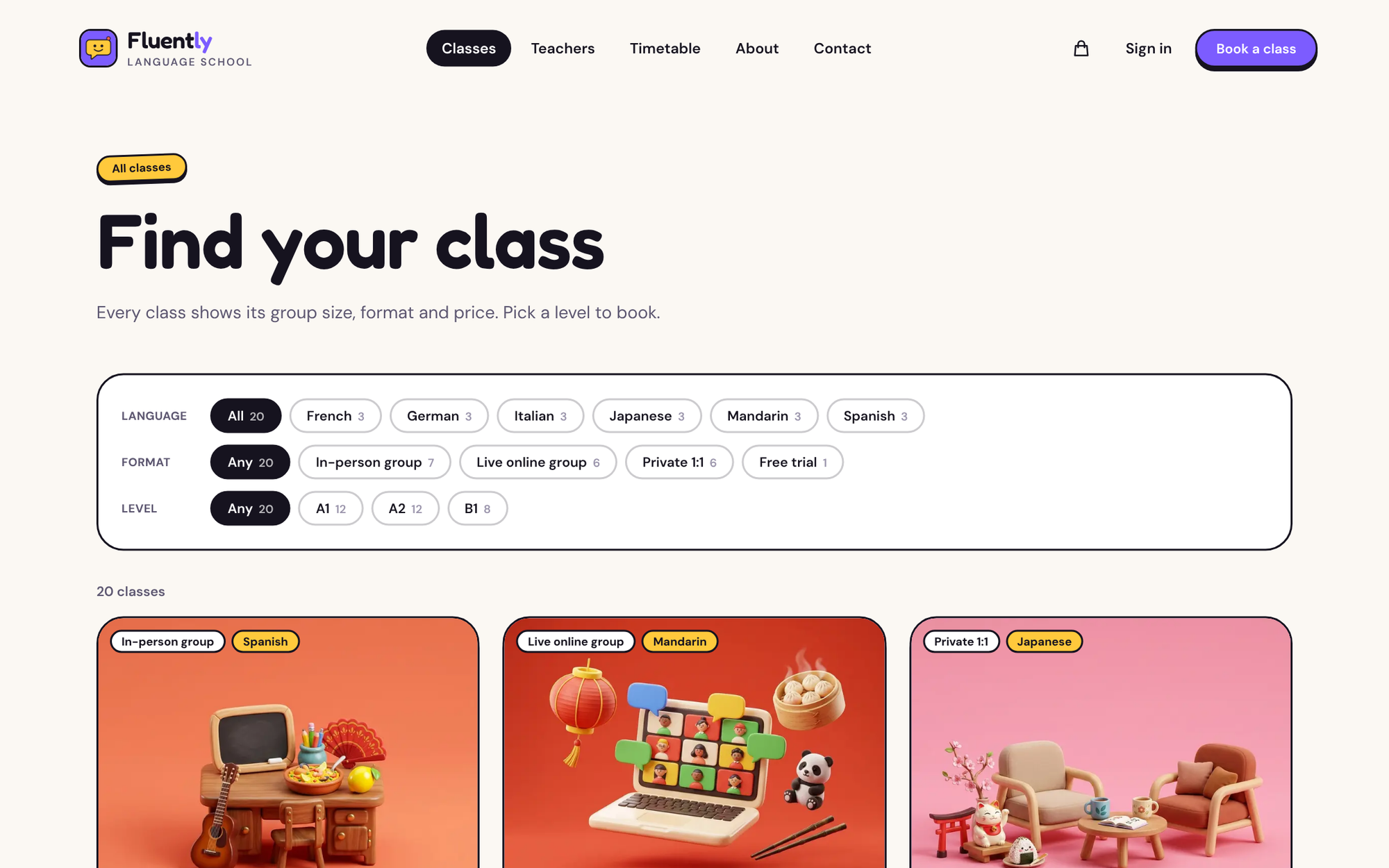
The /classes filters (language, format, level) are shareable URLs like /classes?language=spanish&format=online&level=A2, so a teacher can send a student a link to exactly the right list. Class colors come from each product's color in the dashboard, so adding Portuguese gets you a new swatch without touching code.
Online is just another location
Format isn't a field you set. It's derived. A group class whose locations are all ONLINE is an online group; anything with a campus is in person. Private lessons can be offered at both.
The online classroom itself is a location with a link: you put the meeting URL on the Online location, the student sees it on their booked lesson, and a Join lesson button in their account switches on 15 minutes before the start. The confirmation page exports the lessons to the student's calendar as an .ics file, which matters more than it sounds for a class that repeats at the same time every week.
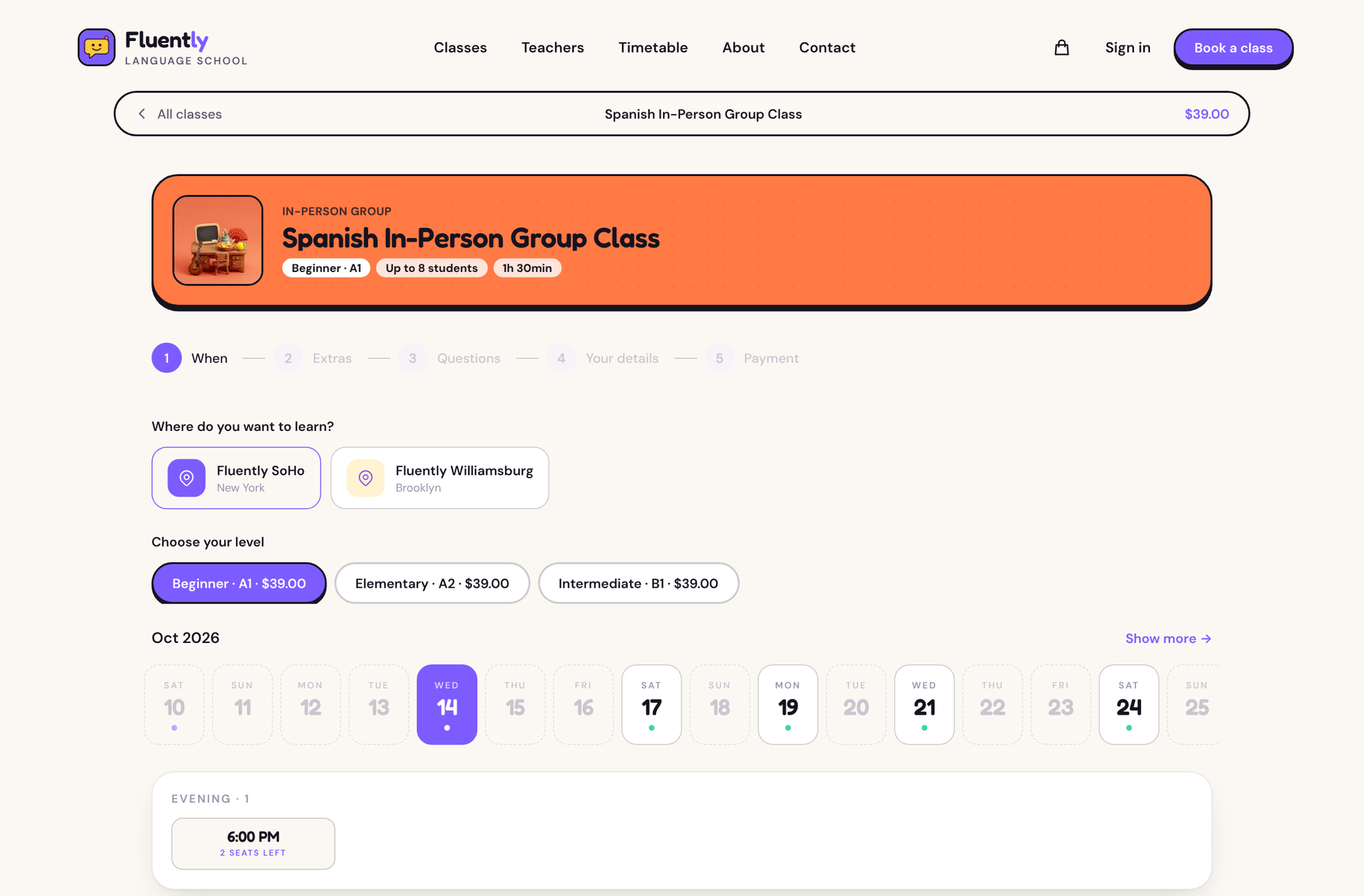
The booking flow itself is when → teacher → extras → questions → details → payment, with a header that keeps the format, level, group size and length in view throughout. Campus or online comes first, because for an in-person student that's the deciding factor.
A free trial that never asks for a card
The trial is twenty minutes online with a teacher, priced at $0. Because it costs nothing, it books without a card: name, email, a time, done. That's the right default for a school. The student who books a trial is the one who hasn't decided yet, and a card form at that point is the quickest way to lose them.
Next to it is a five-question level check ("Can you introduce yourself and say where you are from?") that recommends a level and links to the trial. Paid classes use Stripe Elements, with a pay-at-the-school fallback for anyone who'd rather settle at reception.
Accounts are passwordless by default: the student types their email and gets a six-digit code. From there they see upcoming and past lessons, the teacher, the campus or the online link, and can reschedule or cancel within the class policy.
The same build works for a music school
Nothing about languages is hard-coded. Swap the six languages for piano, guitar, voice and drums, swap campus groups for ensemble classes, and the private 45- and 60-minute lessons are already the shape a music teaching studio needs. A coding bootcamp, an art school or a maths tutoring centre fits the same way: subjects as collections, levels or lengths as variants, tutors as staff.
The copy that does say "language" lives in lib/site-config.ts, next to the hero, the format descriptions, the level quiz, the how-it-works steps, testimonials and FAQs. Design tokens are in app/globals.css:
@theme {
  --color-bg: #FBF8F3;        /* warm paper */
  --color-ink: #16131F;       /* ink + outlines */
  --color-primary: #7C5CFF;   /* grape */
  --color-sun: #FFC93C;       /* sunflower accent */
}
The playful look (Fredoka headings, chunky sticker buttons with hard shadows, 3D mascots) is the part most schools will change, and token names are stable across every Opencals template, so you can repaint it without hunting through components. The mascots and how-it-works props ship in public/; class images, teacher portraits, the logo and the banner come from your store.
What Fluently doesn't do for a school
These are the gaps you'll notice in the first term.
It books one session at a time. There's no term enrolment, no "join the whole ten-week A1 course" button and no lesson pack in the template. A student who wants every Tuesday books every Tuesday. For a school that sells by the term, that's the biggest thing to plan around.
The level check is a suggestion. It's five questions in the config that recommend a level. Nothing is scored against a real placement test and nothing is saved to the student's record.
One classroom link by default. In the demo, the meeting URL sits on the Online location, so every online lesson points at the same room. If each teacher runs their own meeting room, you'll want to set that up differently.
It's the student side only. There's no teacher login, no attendance register, no homework and no progress tracking in the template. Teachers see their schedule in the Opencals dashboard.
And the standing two: Opencals itself is not open source, only the templates and the SDK are, and the free Dev Store runs in test mode, so it can't take real payments until you move to a live store.
Paying for the engine
The template costs nothing. The backend is a paid hosted service (prices from opencals.com/pricing, checked 10 October 2026):
| Elastic | Build your plan | |
|---|---|---|
| Base price | $0.99 per booking, no monthly fee | $14.98/month incl. 300 bookings |
| After that | $0.99 each | $0.20 per extra booking |
| Group classes | Included | Group appointments add-on, $7.49/month |
| Fits | A small school, or quiet months | A school past roughly 25 bookings a month |
A group timetable adds up faster than a one-to-one diary: ten classes a week with six students each is around 240 student bookings a month. At that volume the monthly plan is the obvious one; Elastic is for getting started, or for a school that mostly teaches privately.
From fork to first student
Create a Dev Store with the Fluently preset
Sign up at app.opencals.com, create a Dev Store and choose the Fluently preset when it asks for a dataset. It seeds the six languages, campus and online groups with A1–B1 levels, private lessons, the free trial and Conversation Club, the teachers, both campuses and the online classroom, so the site looks like the demo.
Generate a Storefront API key
In your Opencals account settings, generate a Storefront API key. It starts with sfk_. Leave its allowed-origins list empty: the template calls the API from the server, which sends no Origin header.
Deploy to Vercel
Use the button below. Vercel asks for OPENCALS_API_KEY and AUTH_SECRET: paste the sfk_ key and any random string. Set NEXT_PUBLIC_SITE_URL to your domain for the sitemap and structured data, and add a Stripe publishable key when you want card payments.
Point the emails at your domain
In your Opencals dashboard (Settings → API), set Storefront Base URL to your deployed site. Every student link in Opencals emails (view, reschedule or cancel a lesson, leave feedback, verify email) is built as {storefrontBaseUrl}/link/{token}.
LanguageSchool and FAQPage structured data, Open Graph cards, robots.txt and a sitemap covering every language, teacher and class are configured out of the box. The rest of the stack is Next.js 15 with the App Router, Tailwind CSS v4, Framer Motion, react-hook-form with Zod, NextAuth.js v5 and the Opencals Storefront SDK v0.3.14.
Fluently on GitHub
The full source, MIT licensed, with the school data model in the README.
Fluently live demo
Open the timetable, pick a class and book it end to end in test mode.

VOLT: padel club template
Group training with live capacity, next to a court booking grid.
Opencals for developers
The Storefront API, SDK and every template.
If you run a school, Fluently is a fair test of whether your timetable can live on your own site instead of in a teacher's inbox. If you build for schools, it's a working reference for group capacity on a headless backend, and the term-enrolment gap above is the obvious place to add something of your own.
Frequently Asked Questions
Get started
Ready to transform your service business?
Join 150+ businesses already using Opencals. Start on a free development store with every feature unlocked, and only pay once you go live.