

Haar: a free, open-source booking website for salons

When we shipped the Opencals Storefront API, we didn't want the first thing developers saw to be a blank file and a docs tab. So we built a real site on the API and open-sourced the whole thing.
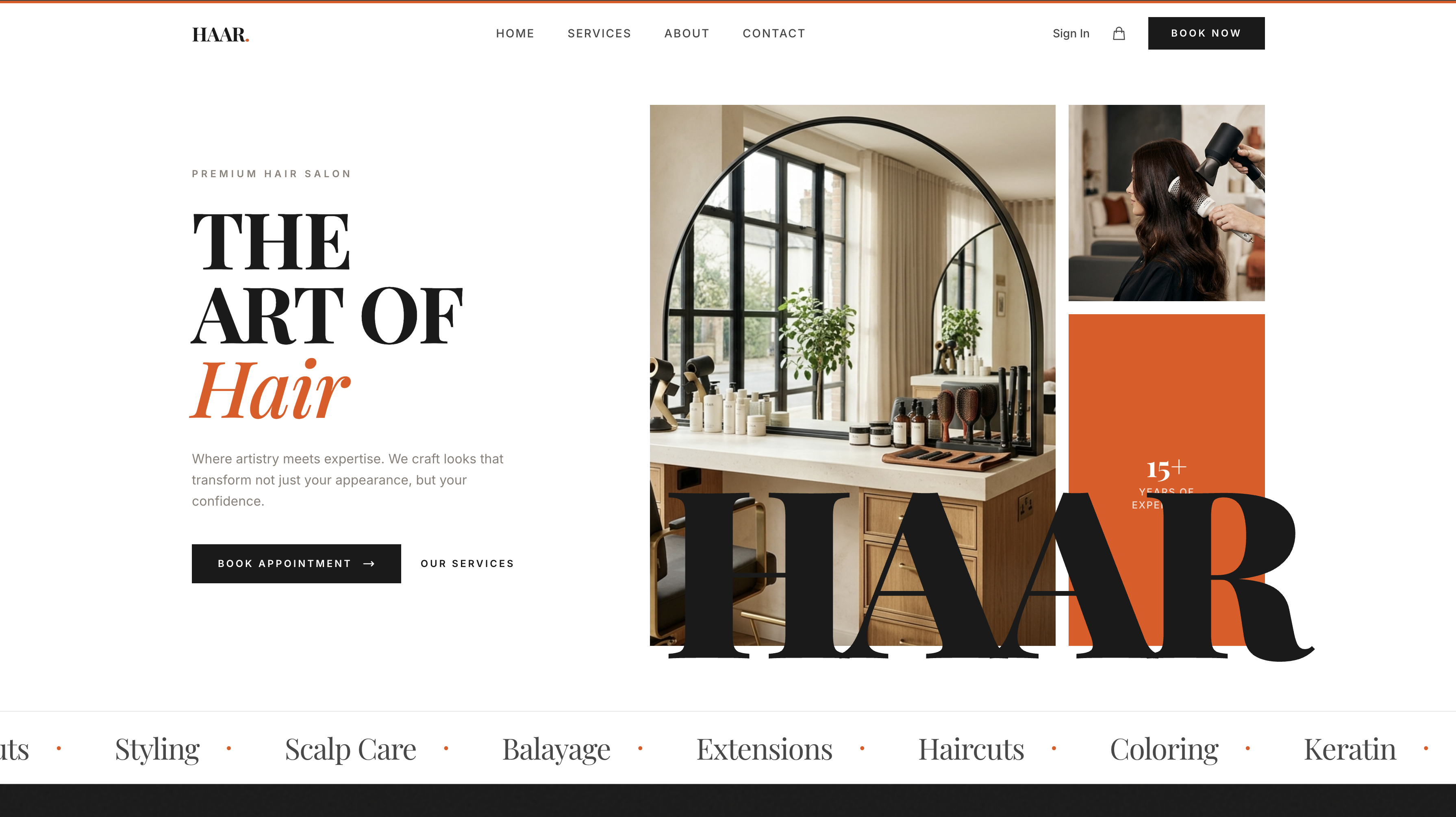
It's called Haar — a production-ready booking website for a beauty salon, free and MIT-licensed on GitHub. You can see it live, clone it, rebrand it in an afternoon, and deploy your own. It's also the reference implementation for the API: if you want to know how to wire a real booking flow, read how Haar does it.
Haar is a free, open-source salon booking site built with Next.js and the Opencals Storefront SDK. Online booking, staff and location selection, Stripe checkout, and customer accounts — all working out of the box. Clone it, add an API key, deploy to Vercel, and you have a fully functional booking business. Rebranding is one config file.
What you get
Haar isn't a landing page with a "book now" button that goes nowhere. It's the whole thing.
A real booking flow
Customers browse services, pick a location and a staff member, choose a date and a time slot, enter their details, and pay — in one smooth, animated flow. Services can have variants (a 'Haircut' with Standard and Premium options), each with its own price, duration, and assigned staff.
Multi-location and staff-aware
A global location selector in the header, staff filtered by location, and per-location availability. The kind of logic that's painful to build by hand is already wired to the API — pick a location, the services and time slots update accordingly.
Checkout, accounts, and the boring-but-essential parts
Multi-step Stripe checkout with custom questions. Customer accounts where people sign in, see upcoming appointments, browse order history, and reschedule or cancel. Mobile-first responsive design. SEO handled — per-page metadata, Open Graph and Twitter cards, JSON-LD structured data, robots.txt, and a sitemap, all configured.
Live in three steps
No code required. If you want the full development setup, skip to the For developers section below.
No-code: deploy to Vercel in five minutes
Create a free Opencals account
Sign up at app.opencals.com/sign-up and create a Dev Store. When prompted for a dataset, choose "HAAR Salon" — it seeds your store with sample services, staff, and locations so your site looks exactly like the live demo from minute one. Free forever, no credit card required.
Get your API key
In your Opencals account settings, generate a Storefront API key. It starts with sfk_. Copy it — you'll need it in the next step.
Deploy to Vercel
Click the Deploy button in the Haar README on GitHub. Paste your sfk_ key when Vercel asks for environment variables. Vercel builds the site in about two minutes and you're live — the same booking site running at template-haar.vercel.app, now under your own account.
For developers
If you prefer to work locally first, scaffold the project with one command:
npx create-next-app -e https://github.com/letsopencals/template-haar
cd haar-salon
cp .env.example .env   # add your sfk_ key
npm run dev
Open http://localhost:3000 and you have the full site running against your dev store. From here, edit lib/site-config.ts to rebrand it, or start reading the source to understand how the booking flow is wired.
Use the same API key
The sfk_ key you get in step 2 works for both the Vercel deploy and local development. One key, two environments.
Rebranding is one file
This is the part we're proud of. Every salon-specific thing — the name, tagline, logo, homepage hero, testimonials, team members, contact details, hours, footer and social links — lives in a single lib/site-config.ts. Edit that one file and the whole site is rebranded.
Colors are CSS custom properties in app/globals.css:
@theme {
  --color-accent: #E8530E;   /* your brand color */
  --color-cream: #F5F0EB;
  --color-charcoal: #1A1A1A;
  --font-display: 'Playfair Display', Georgia, serif;
  --font-body: 'Inter', system-ui, sans-serif;
}
Change the accent, swap the fonts, update the config — and Haar stops looking like Haar and starts looking like your business. No find-and-replace through twenty components.
For agencies
This is the fast lane for client work. Take Haar, rebrand it to a salon, barbershop, or spa client in an afternoon, point it at their Opencals store, and ship a custom booking site for a fraction of the build time. It's MIT-licensed — client work built on it is yours.
It's also the reference implementation
If you're building your own front end instead of using the template, Haar is the best documentation we have. Want to see how to render an availability picker that respects staff and location? How to manage a cart and run a multi-step Stripe checkout? How to gate the account pages behind customer auth? It's all in there, in readable Next.js, calling the same Storefront API you'll be using.
The project structure is conventional — contexts for cart, checkout, location, and timezone state; hooks for API requests and date formatting; a thin lib/opencals.ts that sets up the SDK client. Nothing exotic.
This is the first of many
Haar is a beauty salon, but it's a starting point, not the whole plan. The booking engine underneath is industry-agnostic, so the next templates are mostly a matter of design and copy: barbershops, tattoo studios, spas, rentals, fitness and class booking. Each one is a new free template on GitHub and a new way to show what you can build on Opencals.
If you build something with it — a client site, a different vertical, a wild customization — we'd genuinely like to see it.
View the live demo
The full booking site, running.
Get the template on GitHub
Free, MIT-licensed. Clone and deploy.
Storefront API docs
The API powering the booking engine.
Storefront SDK on npm
@opencals/storefront — the JS/TS SDK.
Get a free API key
Dev keys are free. No credit card.
Developer portal
Docs, guides, and API reference.
Frequently asked questions
Frequently Asked Questions
Get started
Ready to transform your service business?
Join 150+ businesses already using Opencals. Start on a free development store with every feature unlocked, and only pay once you go live.