

NOIR Drive: a free, open-source car rental booking template

Most car rental websites I've looked at end in the same place: a nice fleet page, and then a form that says Request a quote, or a WhatsApp button. The customer picks a car, types their dates into a text box, and waits for someone to check a spreadsheet and come back with a price. For a business renting cars at a few thousand dirhams a day, that's a lot of money sitting in an inbox overnight.
NOIR Drive is a full rental website where that last step is a real booking. The customer picks a car, picks a date range against live availability, chooses delivery or collection, adds extras, uploads their licence and pays. It's MIT licensed, it's on GitHub, and the availability, checkout and accounts behind it run on Opencals, so you aren't writing a date-range solver or touching card data yourself.
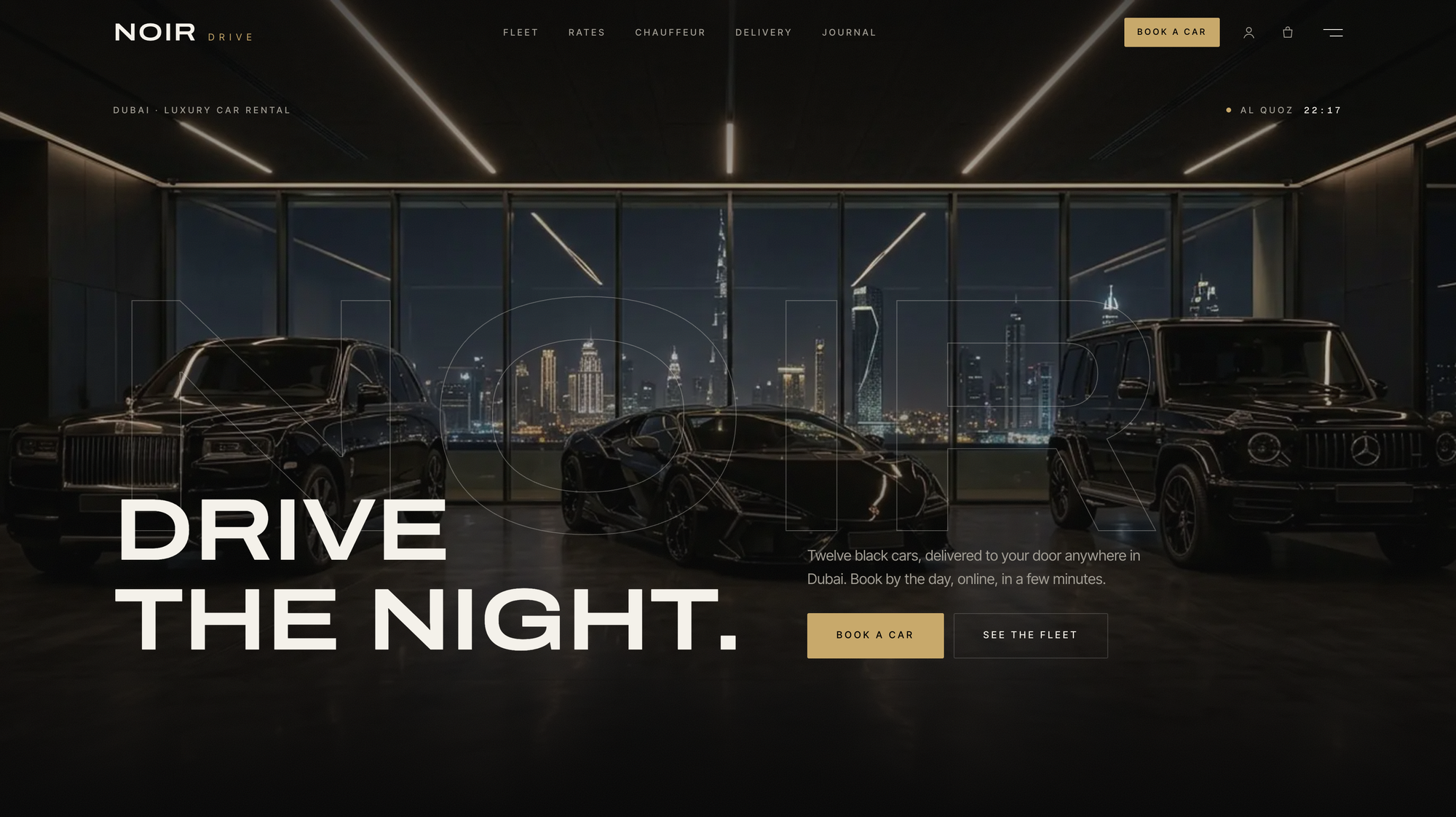
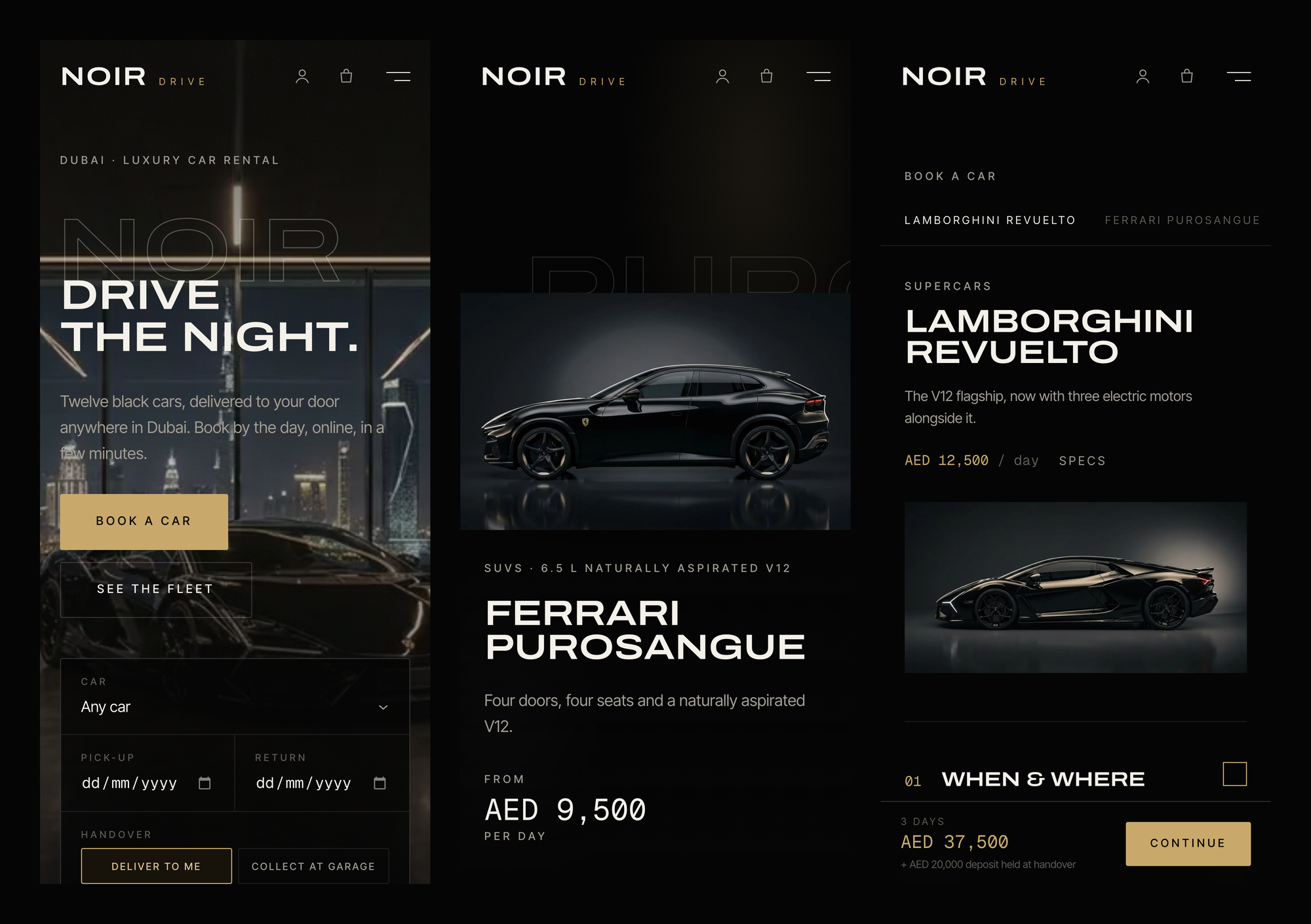
The demo is a fictional Dubai company with twelve black cars, a garage in Al Quoz and four chauffeurs. Every name, price and photo is data you replace.
NOIR is a Next.js 15 frontend you own (MIT) on a booking backend you don't have to run (the Opencals Storefront API). Cars are booked by the day across a date range, delivered or collected, with per-day and fixed extras, document uploads at checkout, and a separate chauffeur flow. Live demo at template-noir.vercel.app.
A rental is a range, not a slot
Almost every booking tool is built around slots: a 45-minute haircut at 14:15, a 90-minute court at 18:00. You ask the API for slots, it hands you a list, the customer taps one.
A car doesn't work like that. Nobody wants to see "slots" for a Ferrari. They want to say Wednesday to Saturday and find out whether it's free, and if it isn't, find out which days are. Asking an availability engine for every possible pick-up and return combination over a 30-day maximum is a silly amount of computation for an answer the customer can read off a calendar.
So NOIR flips it. The booking page asks Opencals for the car's merged availability ranges, with no duration at all, and does the containment check in the browser: does pick-up 00:00 to return 00:00 sit entirely inside one free range? That's fitsDates in lib/rental.ts, a few dozen lines of pure functions. The range calendar uses the same data to strike through booked days, and latestReturnDate stops the customer selecting a return that runs into the next booking. The server re-checks containment when the booking is actually created, so the client can be wrong and nothing bad happens.
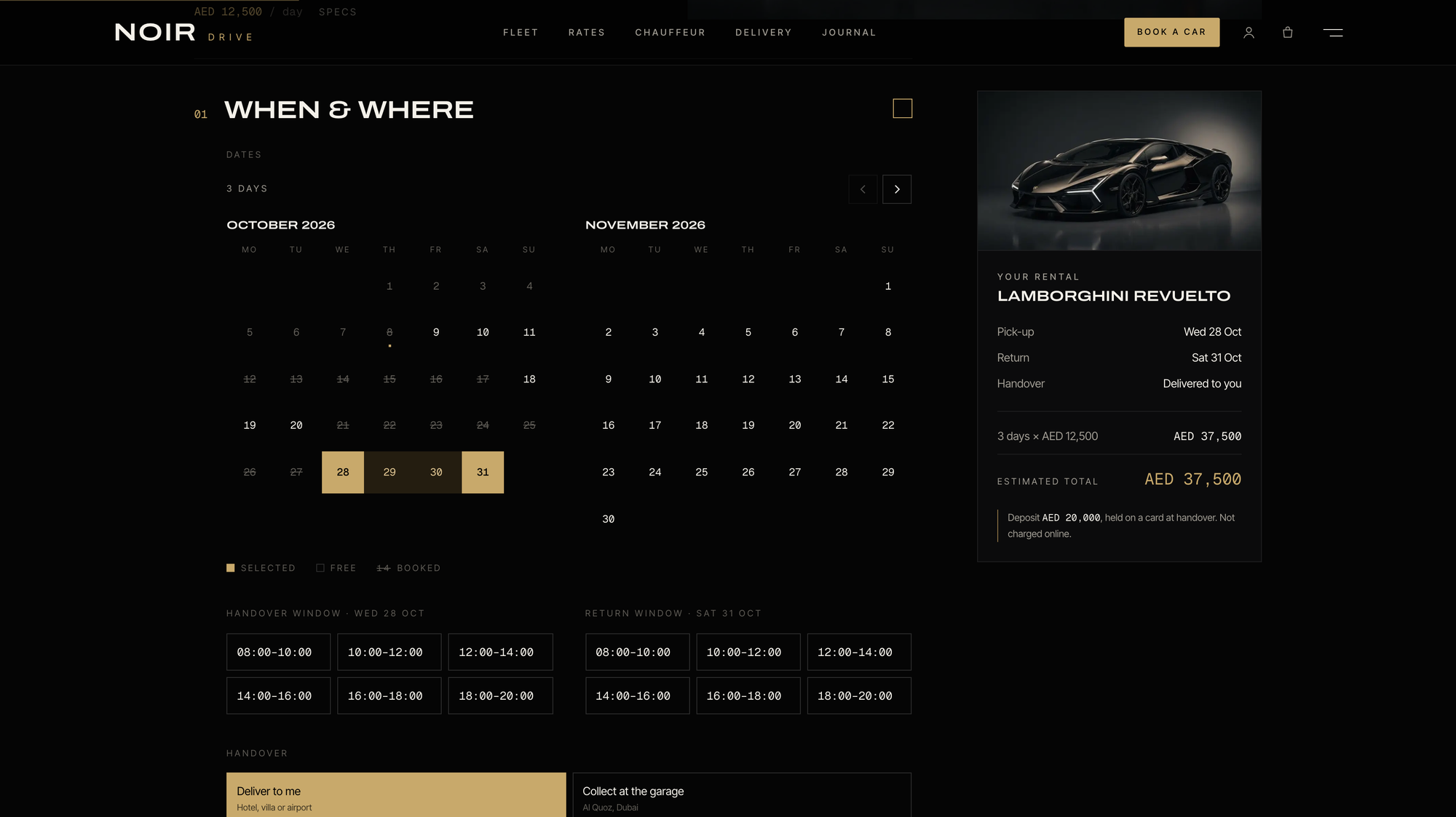
Under the hood each car is a product with a base duration of one day (86400 seconds), allowCustomDuration: true and a maxDuration of 30 days, on a schedule that runs 24/7. The price is the base unit times the number of units, which is why the summary rail above can say 3 days × AED 12,500 = AED 37,500 and be sure the engine will charge exactly that.
Why every car is its own product
The obvious way to model a fleet is one product, "Rolls-Royce Cullinan", with variants for each physical car. In Opencals that's the wrong shape: variants don't block each other. Two customers could each book "the Cullinan" for the same weekend and the engine would happily accept both.
So in NOIR each car is its own product with maxAttendees: 1, sitting in its own product pool. The pool matters more than it looks. Every car is attached to two locations, a garage you collect from and a delivery location, and without a pool a staffless product counts bookings per location. A delivery booking on Friday wouldn't stop someone collecting the same car from the garage on Friday. With the pool, one booking blocks the car everywhere.
If you run three identical G 63s, that means three products. It's a bit more admin in the dashboard, and it's honest: they are three cars, and each one has its own mileage, its own service history and its own week.
Midnight in Dubai is 20:00 in UTC
Here's the bit that will bite anyone building this from scratch. A rental day starts at local midnight in the store's timezone, but the API stores everything in UTC.
The README's own example: a Dubai booking from 10 to 13 November becomes
{ fromDate: '2026-11-09', fromTime: '20:00:00',
  toDate:   '2026-11-12', toTime:   '20:00:00' }
Dubai is UTC+4, so local midnight on the 10th is 20:00 on the 9th in UTC. Three days, three units, three times the daily rate. toAppointmentSlot does that conversion with moment-timezone, and rentalDays counts days at noon UTC on both sides so a daylight-saving change in some other store timezone can't turn a three-day rental into two days and 23 hours. There's also a one-second tolerance when merging ranges, because a 24/7 schedule stored as 00:00 to 23:59:59 leaves a seam between days that would otherwise split every range at midnight.
None of this is visible to the customer, which is the point.
The handover lives outside the booking
If the booking runs midnight to midnight, where does "deliver it to my hotel between 10:00 and 12:00" go?
Not into the slot. The handover window, the return window, a different collection address, the flight number for an airport pick-up and a preferred car for chauffeur bookings all travel as appointment customAttributes. The keys are listed in siteConfig.customAttributeKeys, they show up on the booking in the Opencals dashboard, and they're shown back to the customer in their account. The demo offers six two-hour windows between 08:00 and 20:00.
Keeping them out of the slot is what makes availability simple. A car delivered at 10:00 on Wednesday and one delivered at 18:00 on Wednesday both occupy Wednesday. Your driver's schedule is a logistics problem, and the booking engine doesn't pretend to solve it.
The same pattern covers documents. Driving licence and passport or Emirates ID uploads, date of birth and the rental terms are checkout questions set up in the dashboard, so the template has no hardcoded form fields to fork. Extras come in two kinds: per-day add-ons like the excess waiver or an additional driver, which use durationMultiplied and so cost price × days, and fixed ones like a child seat, Abu Dhabi delivery or prepaid fuel.
Twelve cars, one rates table
The marketing side of the site does what a premium rental brand needs it to: a fleet grid filtered by Supercars, SUVs and Grand tourers, with an available for your dates filter that checks live availability, and a page per car.
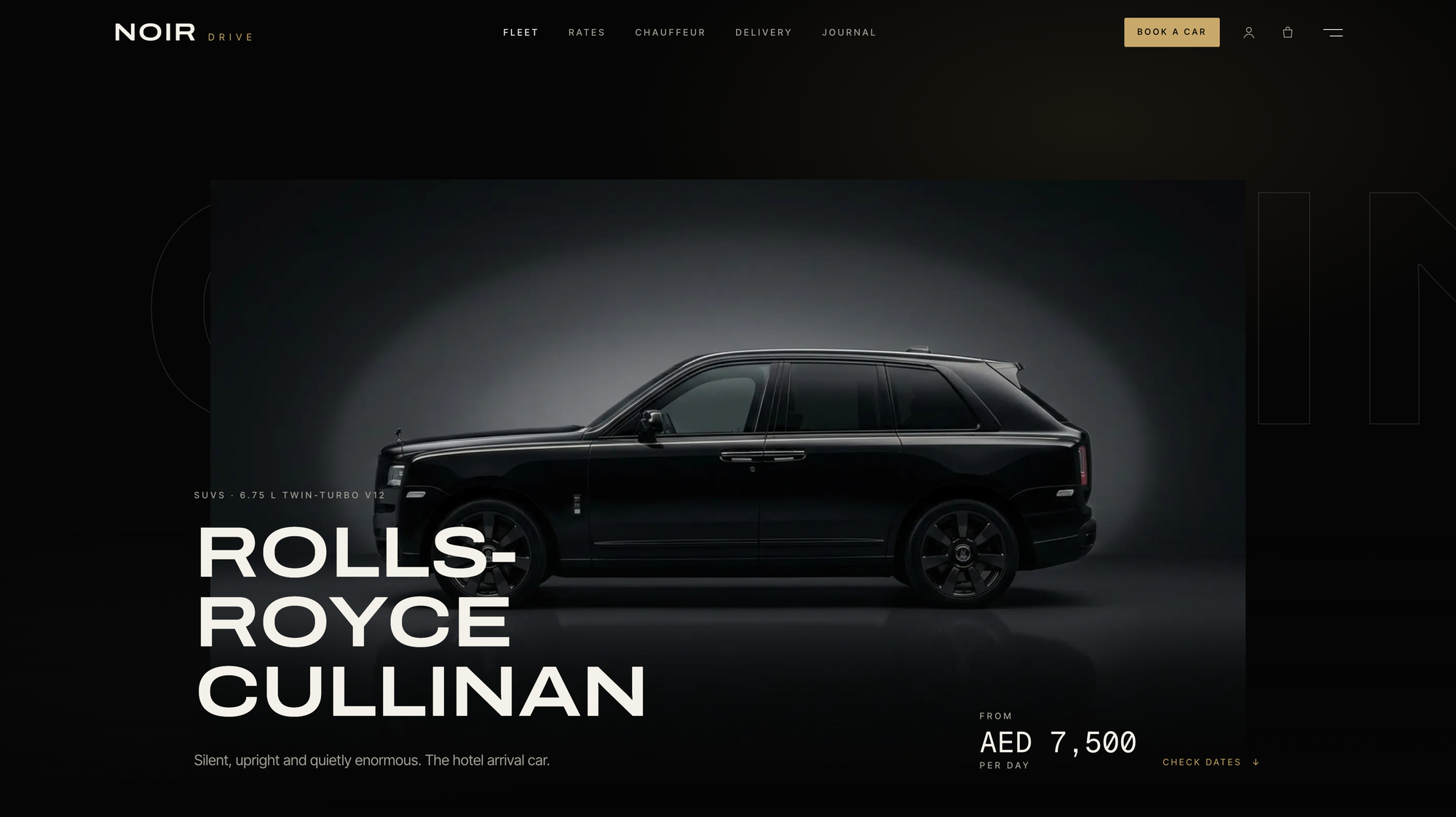
Car pages have a scroll-driven hero, a spec strip that counts up (power, 0–100, top speed, seats), a gallery, the deposit and driver requirements, a two-month availability calendar and a sticky booking card. The rates page puts the whole fleet in one table: in the demo, daily rates from AED 2,900 for the Range Rover SV to AED 12,500 for the Revuelto, deposits from AED 8,000 to AED 20,000, and 200 or 250 km included per day.
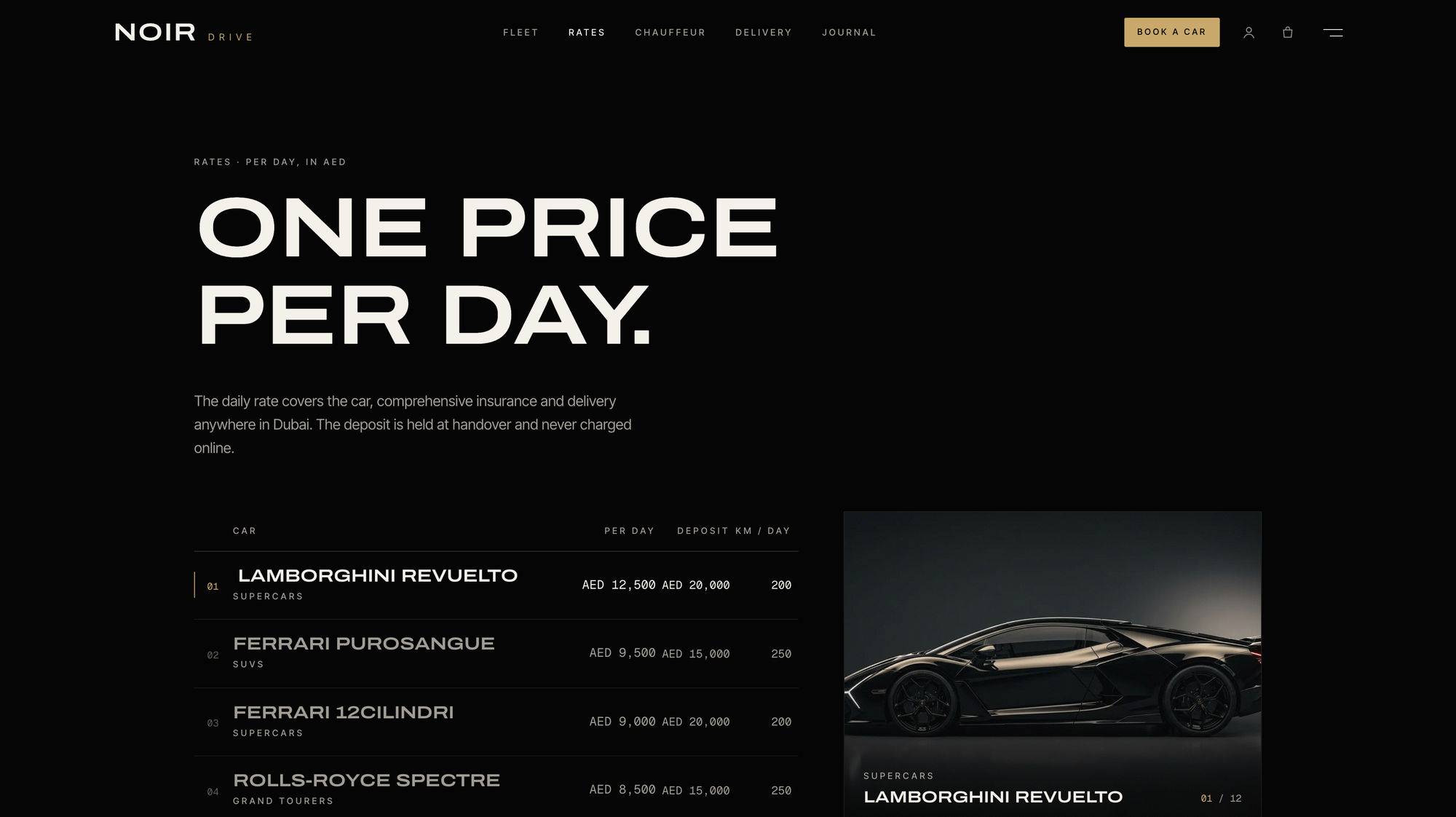
I'd keep that page even if you change everything else. Rental customers compare. Giving them one honest table with the deposit next to the price saves you the phone call where someone asks why the deposit is AED 20,000.
The motion is heavy on purpose: Lenis smooth scrolling, masked text reveals, parallax, a car that drives in. Every effect has a prefers-reduced-motion fallback, and if your brand is quieter than this one, the components/motion/ folder is where you take it out.
Chauffeurs are the one part that's an appointment
The chauffeur packages are the exception to everything above. Airport transfer, 2h, AED 650. An evening in Dubai, 4h, AED 1,800. A day in Abu Dhabi, 10h, AED 4,200. By the hour, AED 450, one to twelve hours. Those are a real person's time, so they use the ordinary staff flow: pick a time, pick a driver, add extras, fill in details, pay. The preferred car is a request in a custom attribute rather than a reservation, and the site says so in plain words: if the car is out on rental, you offer the closest match.
That split is the useful thing to take away if you're building for another rental business. Physical units go in a range model with no staff; human services go in the slot model with staff. One store, both shapes, and the order history reads correctly either way.
Where you'll still be on the phone
Rental has more paperwork around the booking than any vertical I've built a template for, and a booking site only covers some of it. These are the gaps you'll hit.
The deposit isn't taken online. NOIR shows the deposit per car and makes the customer tick a box accepting it, but the deposit itself is held on a card by your driver at handover. Nothing pre-authorises it at checkout. If you want the card hold to happen online, that's work the template doesn't do.
Nobody checks the licence for you. The uploads land on the booking for a person to look at. There's no identity verification and no automatic age check against the minimum on each car (25 for most of the demo fleet, 30 for some supercars).
Fuel, tolls, fines and damage are settled afterwards. There's no check-in inspection, no mileage capture and no automatic charge for the extra kilometres. In the demo those are "settled at cost" at the end, which in practice means you invoice the customer after the booking.
Changing dates keeps the length. From their account, a customer can move a rental to different dates with the same number of days, checked against availability, or cancel within the policy. Extending a three-day rental to five is a conversation with you, not a button.
One price per day. Price is always days × daily rate + extras. There's no weekend rate, no seasonal pricing and no long-rental discount in the template.
And the two that are true of every Opencals template: Opencals itself is not open source, only the templates and the SDK are, and the free Dev Store runs in test mode, so it can't take real money until you move to a live store.
What it costs to run behind it
The template is free. The engine it talks to is a paid hosted service, and the two plans suit rental businesses differently (prices from opencals.com/pricing, checked 10 October 2026).
Elastic is $0.99 per booking with no monthly fee and every feature included. At AED 2,900 to 12,500 a day, a dollar a booking is a rounding error, and a quiet month costs nothing. For most independent rental companies this is the plan.
Build your plan is $14.98 a month including 300 bookings, then $0.20 each, with features priced as add-ons. A rental site needs at least the Flexible duration add-on ($9.98/month) for multi-day bookings, and Customer self-service ($14.99/month) if you want customers changing dates from their account. That's $39.95 a month before you've taken a booking, so it only beats Elastic once you're past about 40 rentals a month.
Swapping Dubai for your city
Two files carry nearly all the business-specific work. lib/site-config.ts holds the copy: name, wordmark, currency and timezone, fleet categories, per-car specs and deposits in fleetContent, handover windows, delivery zones, FAQs, testimonials, the journal routes and contact details. Car photos, chauffeur portraits, the hero image and the logo come from your Opencals store, not the repo, so changing a car is a dashboard job.
app/globals.css holds the design tokens as Tailwind v4 @theme properties. The names are shared across every Opencals template, so components keep working when the values change:
@theme {
  --color-bg: #050505;          /* page black */
  --color-ink: #F4F1EA;         /* warm ivory text */
  --color-primary: #C8A96B;     /* champagne accent */
}
The stack is deliberately ordinary:
| Layer | What it uses |
|---|---|
| Framework | Next.js 15 (App Router) |
| Styling | Tailwind CSS v4, every radius squared to 2px |
| Type | Archivo (expanded), Inter Tight, Geist Mono |
| Motion | Framer Motion + Lenis |
| Forms | react-hook-form + Zod |
| Payments | Stripe Elements, with cash and no-payment fallbacks |
| Auth | NextAuth.js v5, passwordless by default |
| Booking data | Opencals Storefront SDK v0.3.14 |
AutoRental and Product structured data, Open Graph cards, robots.txt and sitemap.xml ship configured.
Live by this afternoon
Create a Dev Store with the NOIR Drive preset
Sign up at app.opencals.com, create a Dev Store and pick the NOIR Drive preset (category Car rental) when it asks for a dataset. It seeds the twelve cars on a 24/7 schedule, the garage and delivery locations, the extras, the checkout questions and the four chauffeurs, so the site renders like the demo.
Generate a Storefront API key
In your Opencals account settings, generate a Storefront API key. It starts with sfk_ and is scoped to that store.
Deploy to Vercel
Use the button below. Vercel asks for OPENCALS_API_KEY and AUTH_SECRET: paste the sfk_ key and any random string. Add a Stripe publishable key when you want card payments, then set url in lib/site-config.ts to your domain.
Set the Storefront Base URL before the first real booking
In your Opencals dashboard (Settings → API), set Storefront Base URL to your deployed domain. Every emailed link (view booking, change dates, cancel, leave feedback) is built as {storefrontBaseUrl}/link/{token}. Left on localhost, they go nowhere.
NOIR Drive on GitHub
The full source, MIT licensed, with the rental model written up in the README.
NOIR Drive live demo
Pick a car and a date range and run the booking end to end in test mode.

VOLT: padel club template
The other staffless-resource template: courts booked by duration on a grid.
Opencals for developers
The Storefront API, SDK and every template.
If you run a rental company, the question NOIR puts to you is whether the step where a customer commits money should happen on your site, today, or in your inbox tomorrow. If you build sites for rental companies, it's a working reference for range-based booking on a headless backend, and the README spells out the model so you can lift it into your own design.
Frequently Asked Questions
Get started
Ready to transform your service business?
Join 150+ businesses already using Opencals. Start on a free development store with every feature unlocked, and only pay once you go live.