

METTLE: a free boutique gym template that books and charges for every session

I looked at what a "gym website template" books before we built this one. In November 2026 the search results are Dorik, Wix and Webflow template galleries and Framer themes. Rep Strength, a free Framer template for a gym and PT studio, has a class timetable from its CMS and a "free session" page with a native Framer form whose submissions go to email, a webhook or a Google Sheet. Gymnax on Webflow has a classes page and lists no booking feature. They look like gyms. Nobody can pay for a class on them.
METTLE is the template we built for the part those leave out. It's a free, MIT-licensed Next.js site for a boutique gym whose classes, personal training, recovery suites and testing are booked and paid on the site, through Opencals, the booking and checkout engine we build. If you run (or build sites for) a strength, boxing or conditioning gym that sells drop-ins, PT and extras, it's our pick for that job. If your gym runs almost entirely on monthly memberships, read where METTLE stops first.
METTLE is a free boutique gym website template (Next.js 15, MIT licence) with real booking on the Opencals API. Members see every class of the day on one clock, book personal training at 30, 60 or 90 minutes, add a cold plunge or glove hire to a class, and pay once by card or at the desk. "Training Blocks" are real automatic discounts: load A$100 into one order for 10% off, A$250 for 15%. The demo runs a Melbourne gym with two sites, an online studio and twelve coaches. The template is free; bookings run on a free Opencals development store for testing, then cost $0.99 each or $14.98 a month for 300 (checked November 2026).
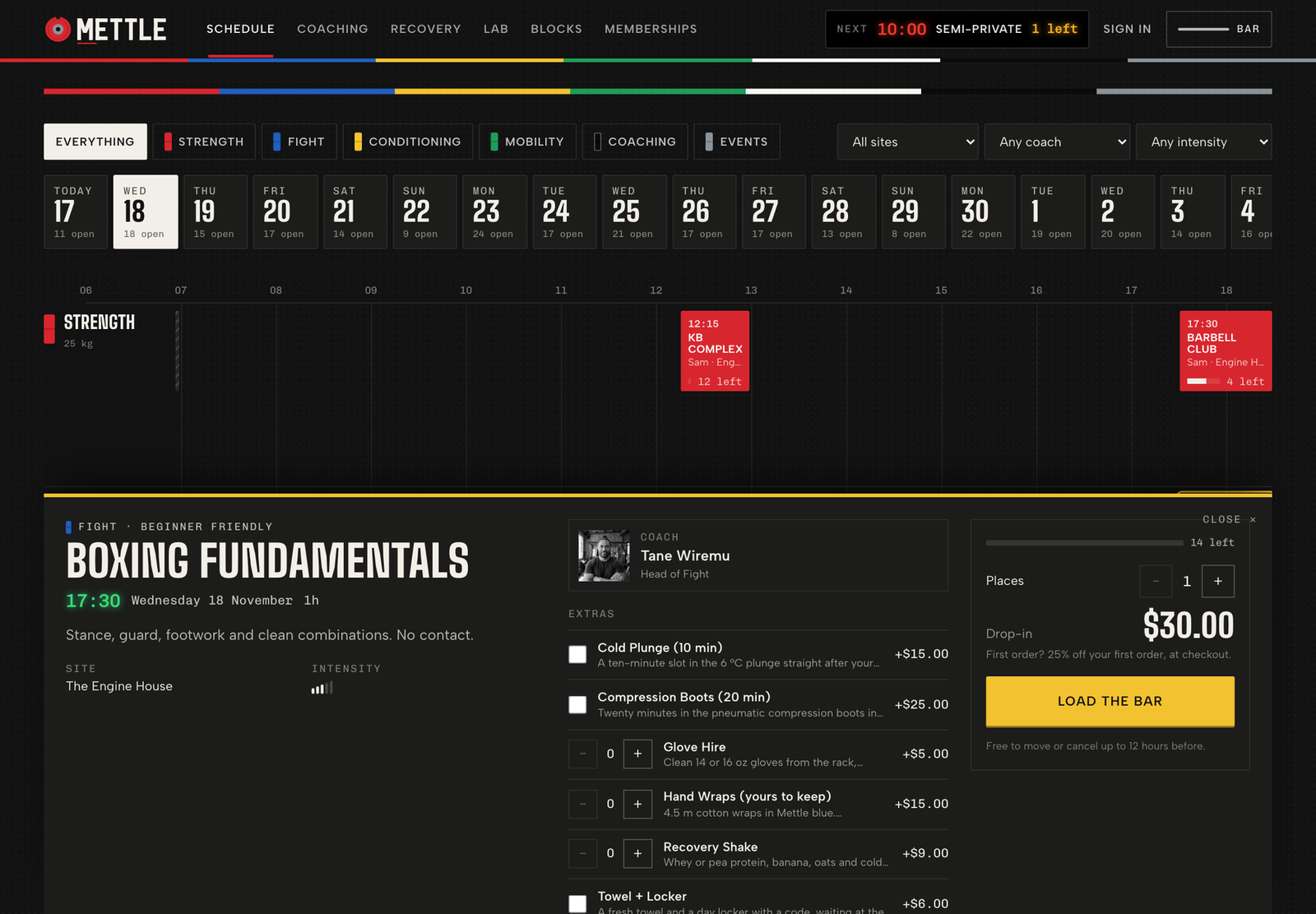
The Floor puts every class of the day on one clock
Most gym timetables are a table you scroll: Monday, then Tuesday, then a wall of class names. METTLE's schedule, which it calls the Floor, puts the whole day on one horizontal clock from 06:00 to 22:00 with a lane per discipline: strength, fight, conditioning, mobility, semi-private coaching and events. Each session is a block in its discipline's colour, as wide as it is long, with the coach, the site and a bar showing how full it is.
The colours are calibrated bumper-plate colours (red, blue, yellow, green), and the whole site uses them as its language: the class blocks, the plates on the cart, the stripes on the confirmation. On a phone the lanes turn into an hour-by-hour list, which is how the repo's own cover shows it: a chalky hand holding a phone with 06:00 Barbell Club in red and 06:00 Engine Room in yellow.
Tap a session and a panel docks under the board. It holds what a member needs to decide in one place: the coach, the site, the intensity, any entry requirement, places for friends, the price and the extras. In the demo (prices in Australian dollars) a Boxing Fundamentals class is A$30 drop-in, and the extras are priced like a front desk would price them:
| Extra on a class | Demo price (AUD) |
|---|---|
| Cold plunge, 10 min | A$15 |
| Compression boots, 20 min | A$25 |
| Recovery shake | A$9 |
| Towel and locker | A$6 |
| Glove hire | A$5 |
| Hand wraps (yours to keep) | A$15 |
That's the part a Framer timetable can't do: the A$30 class becomes an A$56 visit with a plunge, a towel and glove hire, and the member pays for all of it before they arrive.
Full classes still show. The Opencals availability API stops returning a slot once it's full, which on a naive timetable makes Tuesday's 06:00 simply vanish. METTLE learns each class's weekly pattern and draws the missing session as Full, hatched black, with a link to the next one that has space. The logic is in lib/timetable.ts and has tests. Everything sits in the URL too, so /schedule?s=<series>@<start> opens a session directly, which is handy for an Instagram story link.
PT, recovery and the Lab share one booking rack
One-to-one sessions are a different shape from classes: the member picks a person and a length, not a seat. METTLE books personal training, padwork, ring hire, the recovery suites and the Lab through one screen it calls the slot rack: pick the service, the option (PT tier, padwork length, suite, site), the coach or "first free", the length, then a day and a time.
Personal training is one product per coach tier with a 30-minute base that stretches to 60 or 90, and the price scales per half hour (the demo starts at A$55 for 30 minutes). Because the coach is a staff member on both the PT product and their classes, Opencals won't let Jo be booked for PT at 17:00 while Jo is coaching Barbell Club at 17:00. That's the double-booking bug that breaks home-made gym sites, and you don't have to write it.
Recovery has no coach at all. The demo sells a six-place contrast suite (50 minutes, A$35), private infrared suites (A$40 for 40 minutes) and open floor (A$25 for two hours), each booked like a room.
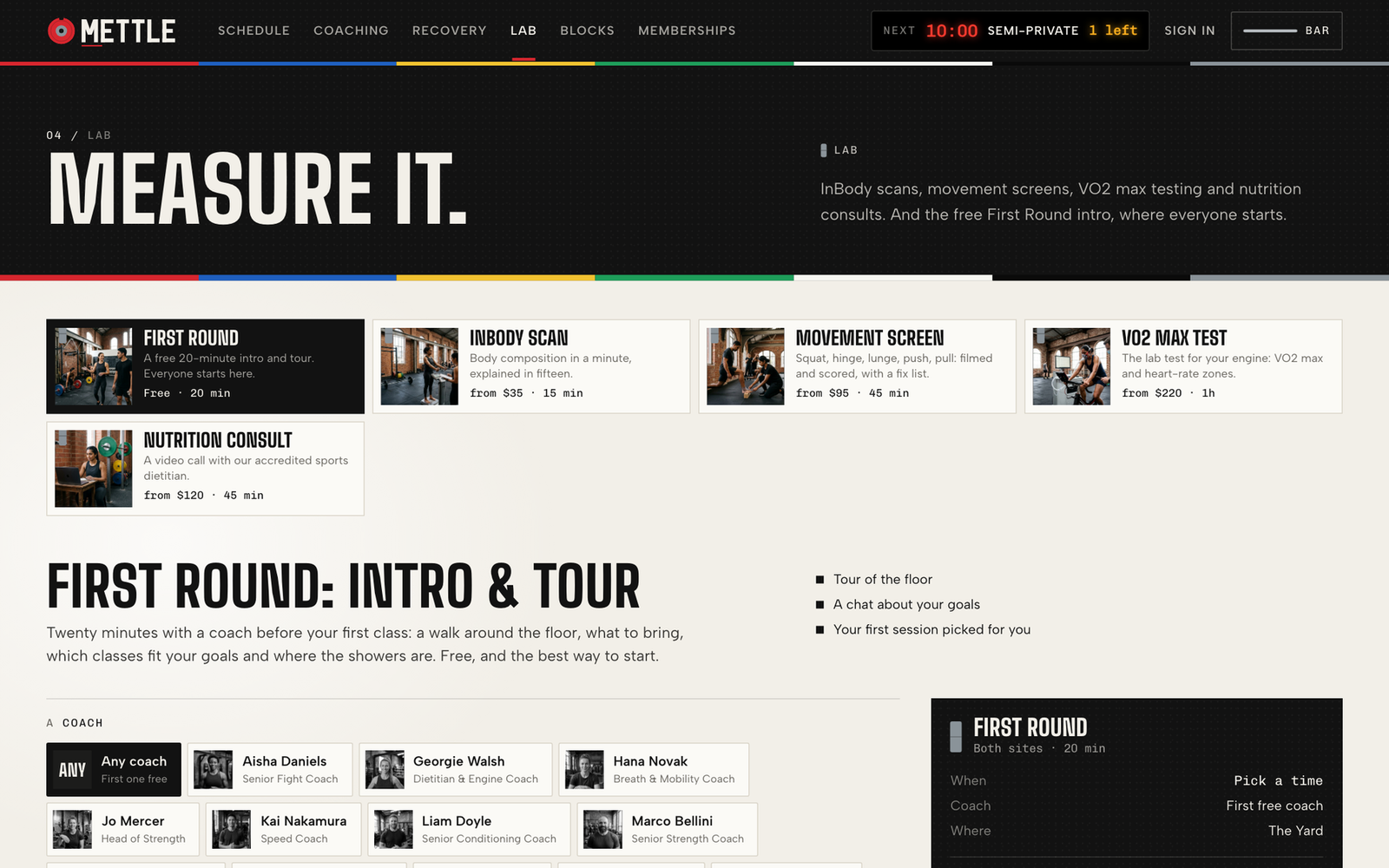
The Lab is the bit I'd copy for any gym. It sells testing as bookable products: an InBody scan (A$35, 15 minutes), a movement screen (A$95, 45 minutes), a VO2 max test (A$220, one hour), a nutrition consult (A$120) and a free 20-minute First Round intro with a coach. The First Round needs no payment at checkout, so it works as the "free trial session" call to action that most gym sites wire to a contact form, except it lands in the coach's calendar.
Training Blocks turn a cart into a programme
This is the feature I'd point a gym owner at first, because it uses the cart to sell more sessions without a membership.
The cart is drawn as a barbell. Every session you book racks a plate in its discipline's colour, and the scale under the bar marks two thresholds: A$100 in one order gets 10% off, A$250 gets 15%. Those are real automatic minimum-purchase discounts in the Opencals store, not something the template calculates, so the totals always come from the cart.
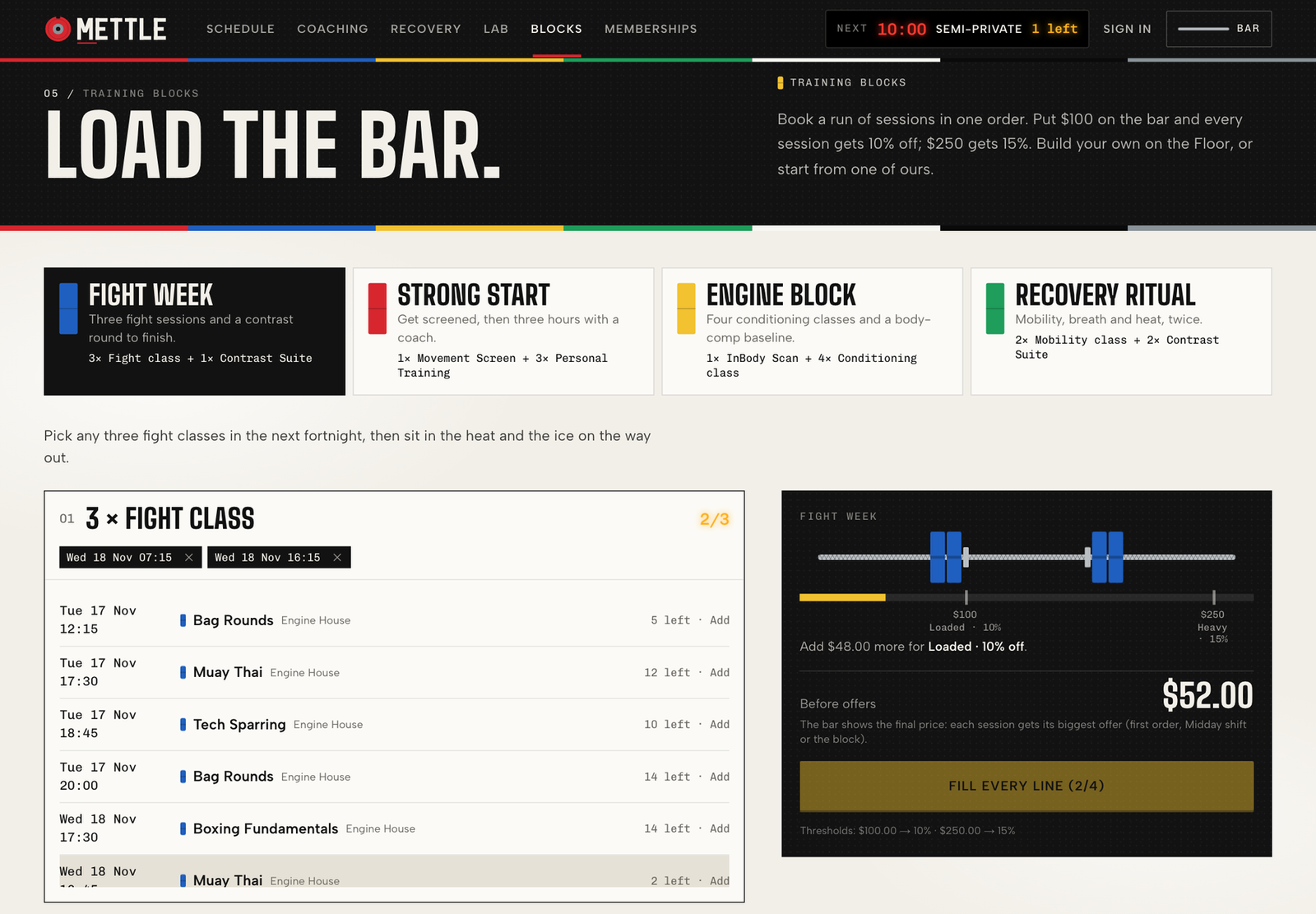
On top of that, /blocks offers four curated programmes you fill from the Floor and book in one order:
- Fight Week: three fight classes and a contrast suite
- Strong Start: a movement screen and three PT sessions
- Engine Block: an InBody scan and four conditioning classes
- Recovery Ritual: two mobility classes and two contrast suites
Offers don't stack. Each session gets its biggest one: 25% off a first order, 20% off midday sessions (the "Midday shift" offer), the block discount or the code METTLE10. If you've ever tried to explain to a developer why a first-timer shouldn't get 25% plus 15% plus 10%, you'll appreciate that the store decides this, not the front end.
Members leave with a race bib and keep a plate stack
After checkout (details, then "Clearance" with the PAR-Q health waiver, injuries, fight experience and goal, then payment by Stripe or at the desk), the confirmation is a race bib pinned at the corners: the booking number, the member's name and a colour stripe per session. Under it are calendar links, what to bring, how to get to each site and "same time next week?".
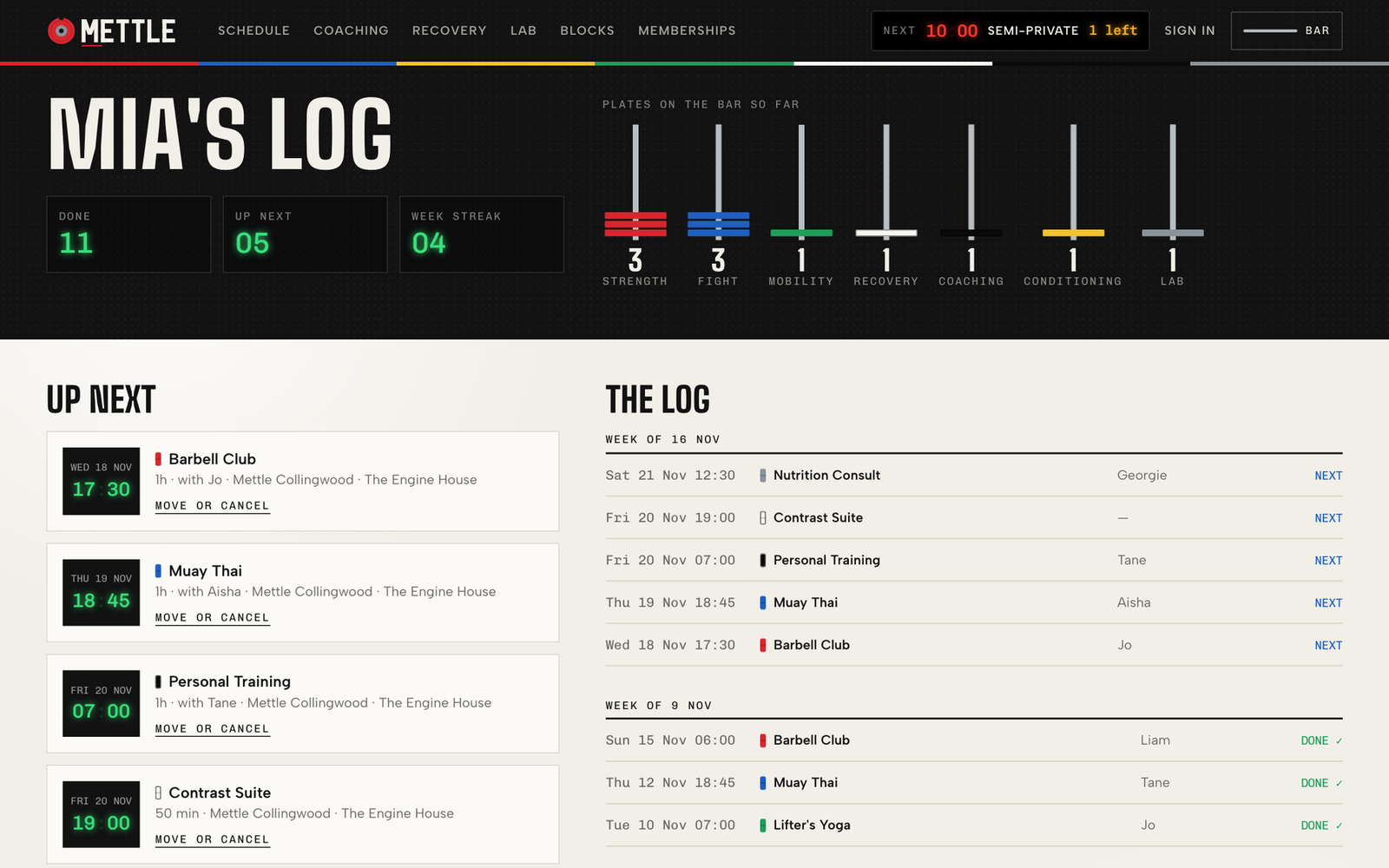
The account is a training log. Members see what's up next (with a Join link for Mettle Remote online sessions, and Move or Cancel up to 12 hours before), a stack of plates for every finished session by discipline, and every session written up week by week. It's the screen that makes a pay-as-you-go member feel like a regular. Sign-in is a 6-digit email code or a magic link, with no passwords.
Setting up a gym's timetable in Opencals
If you're an agency building this for a client, this is the part to get right. METTLE uses only existing Opencals features, through a few naming conventions:
| In the gym | In the Opencals store |
|---|---|
| A discipline (strength, fight) | A collection, with its plate colour in lib/site-config.ts |
| A weekly class | One product group per class, one variant per class × site × coach (barbell-club-collingwood-jo), each with its own weekly schedule and maxAttendees as the places |
| Personal training | One product per coach tier, 30-minute base, custom duration up to 90 minutes |
| A coach | A staff member, so one person can't be in a class and a PT session at once |
| Contrast suite, infrared, open floor | Products with no staff, capacity as places |
| Partner PT | One booking for two, sent as the custom attribute people = "2" |
| Training Blocks | Automatic discounts with a minimum purchase amount |
| PAR-Q, injuries, goal | Checkout questions |
Coach bios, class intensity and levels, "what to bring" and the block definitions live in lib/site-config.ts. Prices, capacities, schedules, extras and discounts live in the store, so the gym manager changes a price in the dashboard and the site follows.
Monthly bill for a gym on Opencals
The template is free. You can build and test the whole site on a free development store: every feature works and there's no card, but it's in test mode and can't take real payments. Live stores pay per booking or a fixed monthly plan (opencals.com/pricing, checked November 2026). Each session in an order is its own booking, so a Fight Week block is four.
| Bookings a month | Elastic ($0.99 each, every feature) | Custom ($14.98, 300 included, then $0.20) | Custom + flexible duration, group appointments, self-service |
|---|---|---|---|
| 300 | $297.00 | $14.98 | $47.44 |
| 1,000 | $990.00 | $154.98 | $187.44 |
| 3,000 | $2,970.00 | $554.98 | $587.44 |
A gym with a full timetable passes the break-even point (about 16 bookings a month) in its first morning, so Custom is the plan to pick once you're live. METTLE needs three of the Custom add-ons: flexible duration for 30/60/90-minute PT, group appointments for classes with places, and self-service so members can move and cancel. The pricing page lists them at $9.98, $7.49 and $14.99 a month; that's the right-hand column. The fixed plan covers up to 3 locations and 10 staff self-serve, so a gym with twelve coaches like the demo needs a custom plan; the pay-per-booking plan has no staff limit. Hosting (Vercel or any Node host) and Stripe's card fees are billed by them, not by us.
Memberships are a preview, not a product
Here's the limit, stated plainly, because it decides whether METTLE fits your gym.
- No monthly memberships yet. The demo's
/membershipspage shows three tiers (Iron, Steel and Mettle, "indicative from A$49 per week") marked "Launching 2027", and nothing on it is for sale. Memberships are in beta in Opencals, and there are no per-member class credits or "8 classes a month" allowances. A gym where most revenue is direct-debit members needs a membership platform such as Mindbody or Glofox, alongside METTLE or instead of it. (We compared those in Mindbody alternatives.) - No waitlist. When a class is full the template points to the next one with space; nobody gets auto-promoted when a place frees up.
- No door access or wearables. Check-in hardware and heart-rate screens live in your access-control and fitness-tech systems.
- No outgoing webhooks. Booking events reach other tools through Zapier.
- Currency follows the store. The demo charges in Australian dollars because its store was created in Australia. Create yours in your own country.
If you sell drop-ins, multi-session orders through Training Blocks, PT and recovery, none of these bite. If you sell memberships first, they all do.
Clone, seed and deploy METTLE in an afternoon
- Create a free development store at app.opencals.com in Australia to get the demo as it is, and choose the Boutique Gym dataset. It seeds the two sites and Mettle Remote, twelve coaches, the weekly timetable, PT, recovery, the Lab tests, four events, the extras, the PAR-Q checkout questions and the discounts, with sample bookings so some classes are already full.
- In the dashboard, create a private storefront key (it starts with
spk_) under your user's API keys. - Deploy with the button below and paste the key when Vercel asks.
| Variable | What goes in it |
|---|---|
OPENCALS_API_KEY | Your private storefront key (starts with spk_). The template forwards each visitor's IP with it, so rate limits count per visitor |
AUTH_SECRET | Any random string, used to encrypt member sessions |
NEXT_PUBLIC_SITE_URL | Optional. Your domain, for the sitemap, canonical URLs and Open Graph |
Card payments use the Stripe account connected to your store, so there's no Stripe variable to set. Put your deployed URL in Storefront Base URL (Settings → API) so the sign-in links in emails come back to your site.
To rebrand, edit lib/site-config.ts (name, disciplines and plate colours, coach tiers, blocks, copy) and the tokens in app/globals.css; the design rules are in DESIGN.md. The site ships ExerciseGym structured data per site, a sitemap and Open Graph. If you'd rather have an AI agent do the setup, the Opencals Agent Skills work in Claude Code, Cursor, Codex and Gemini CLI.
METTLE live demo
Open the Floor, tap a class and load the bar.
METTLE on GitHub
MIT-licensed source. Fork it for your gym or a client.

Open-source gym management software
Self-hosted gym tools compared, and where they stop.

Tensile: Pilates studio template
Reformer classes, beds left and privates sharing a room.

Afterglow: content gym template
The camera-first sibling: classes with photo and video add-ons.

VOLT: padel and squash template
Court grids, coaching and racket hire on the same engine.

Mindbody alternatives
Membership-first gym software, compared on fees.

Personal trainer booking software
Tools for PT sessions, packages and client booking.

Booking flow examples
Seven booking shapes, including the class timetable METTLE uses.
Opencals pricing
$0.99 per booking or $14.98 a month for 300.
Frequently Asked Questions
Get started
Ready to transform your service business?
Join 150+ businesses already using Opencals. Start on a free development store with every feature unlocked, and only pay once you go live.