

Tensile: a free, open-source reformer Pilates studio booking template

A reformer class is the only kind of class I know where the capacity is bolted to the floor. A yoga teacher can squeeze one more mat into the back row. A reformer studio with twelve machines in the room has twelve places, and the thirteenth person who turns up has paid for a class that physically can't happen. So the booking system isn't a convenience for these studios. It's the door.
Tensile is a full studio website built around that fact. Every class on the timetable shows how many beds are left, a full class says it's full and points to the next one with space, and booking a bed, a private or a workshop happens on the studio's own domain. It's MIT licensed, it's on GitHub, and the timetable, capacity, checkout and member accounts run on the Opencals API, so you aren't writing a booking engine to sell 50-minute classes.
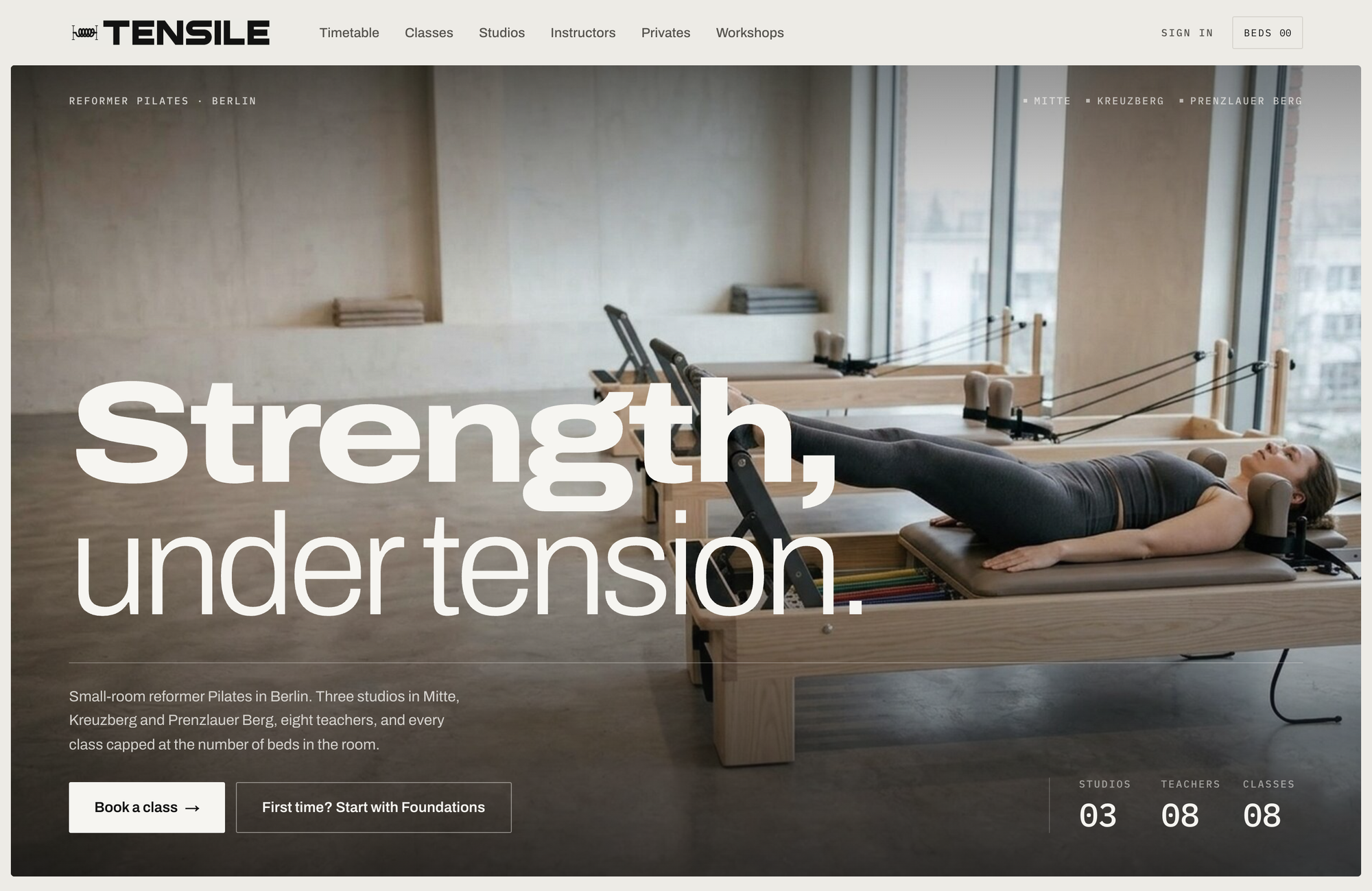
The demo studio is made up: Tensile, three small-room studios in Berlin (Mitte, Kreuzberg and Prenzlauer Berg) plus live online classes, eight instructors, prices in euros on Berlin time. Group classes on the demo run from €14 for a 30-minute online mat class to €38 for Tower. All of it is data in your Opencals store that you replace.
Tensile is a Next.js 15 frontend you own (MIT) on a booking backend you don't run (the Opencals Storefront API). It has a weekly timetable with beds left on every class, Full classes that stay visible with a link to the next one with space, a class sheet that books in place, private 1:1 and duet sessions, dated workshops, online classes with a Join button, and passwordless member accounts. It does not have class packs, memberships or a waitlist. Live demo at template-reformer.vercel.app.
Twelve beds means twelve places, and the data model says so
The obvious way to model a studio is one product per class: "Reformer Flow", with a schedule. It falls apart the moment the same class runs in two rooms with different teachers, because the timetable can no longer say who's teaching or how many beds are left in that room.
So Tensile uses one product group per class type and one variant per class × studio × instructor. flow-mitte-lena is Reformer Flow in Mitte with Lena. Each variant has its own weekly schedule, its studio as its only location, its instructor as its only staff member, and maxAttendees set to the number of beds in the room. Every row on the timetable can then name its teacher and its room, and every class has its own capacity, without a line of special-case code.
Rooms are the one thing the API doesn't model, so they live in the template. lib/site-config.ts gives each studio its rooms: the Long Room in Mitte has 12 reformers in two rows of six, the Tower Room has 6, the Canal Room in Kreuzberg has 10, the Mat Loft 16 mats, and the Courtyard Room in Prenzlauer Berg 8. The SVG room plans you see in the class sheet are drawn from those rows × columns. If your studio has a room of 9 beds in a three-by-three grid, you change two numbers.
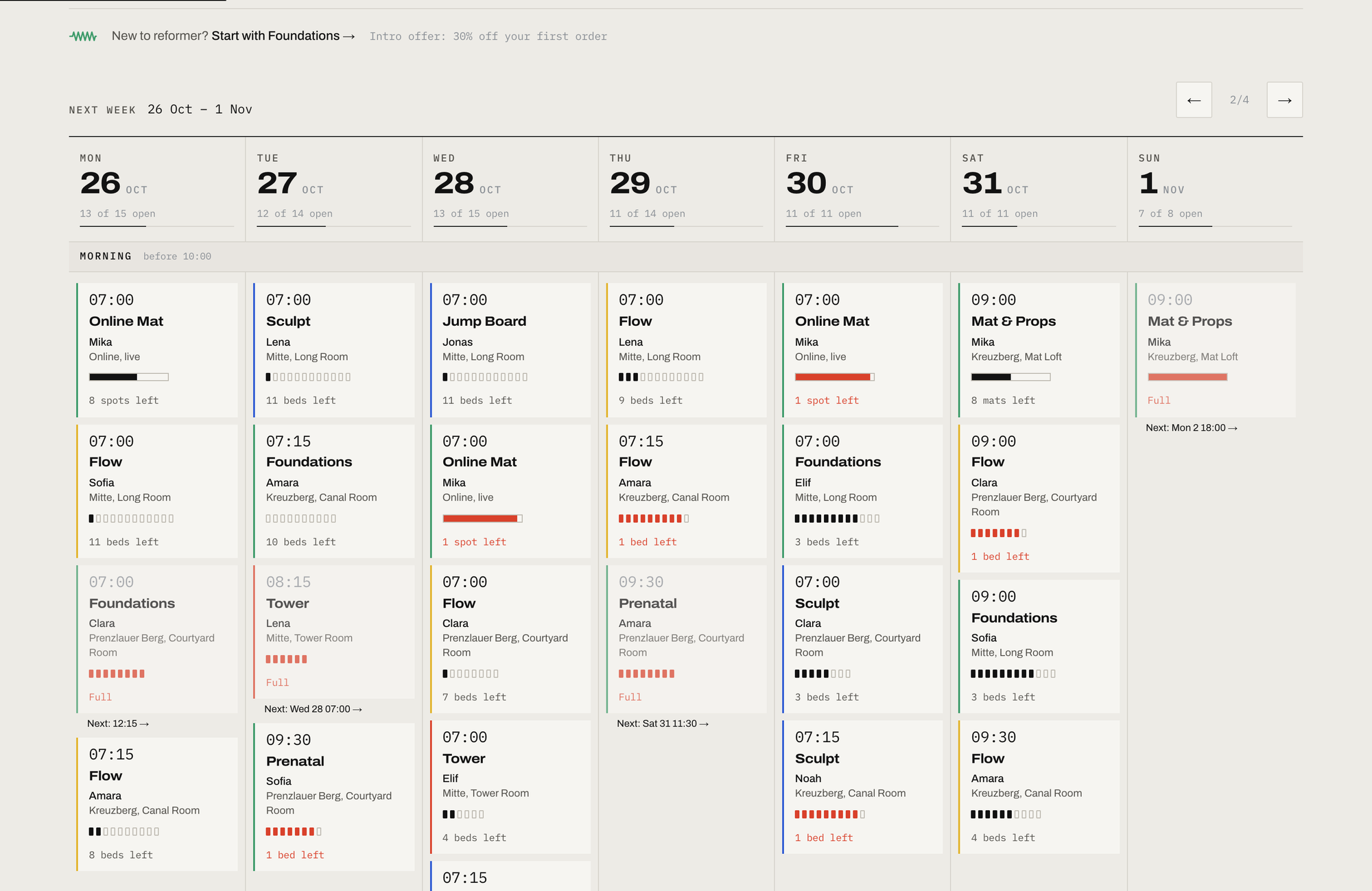
On a desktop the week is laid out like a poster: seven equal day columns, split into morning, midday and evening bands, so a 07:00 class always sits level with the other 07:00s. Filters for studio (online included), class, level, instructor and time of day all live in the URL, so a teacher can send someone /timetable?studio=kreuzberg&time=evening and they land on exactly that.
The API forgets full classes, so the timetable remembers them
This is the part of the template I'd read first if I were building something similar, because it took the most thought.
When a class fills up, the Opencals availability API stops returning that slot. That's correct for a booking engine, since there's nothing left to book. It's wrong for a studio timetable. A Tuesday 07:00 Sculpt that's full is the most useful thing a regular can see: it tells her the class exists, that it's popular, and that she should book Thursday's earlier. A gap where the class used to be just looks like the studio cancelled it.
Classes repeat weekly, so lib/timetable.ts learns each series' pattern (the Berlin weekday and local start time) from the weeks it can see, and where a week is missing a slot it should have, it adds that class back as Full. Each Full class then gets a "next with space →" link pointing at the next class of the same type, at any studio, that still has a bed. Patterns are keyed in local time, so the clock change on 25 October doesn't create phantom twin classes an hour apart, and there are vitest cases for exactly that in lib/timetable.test.ts.
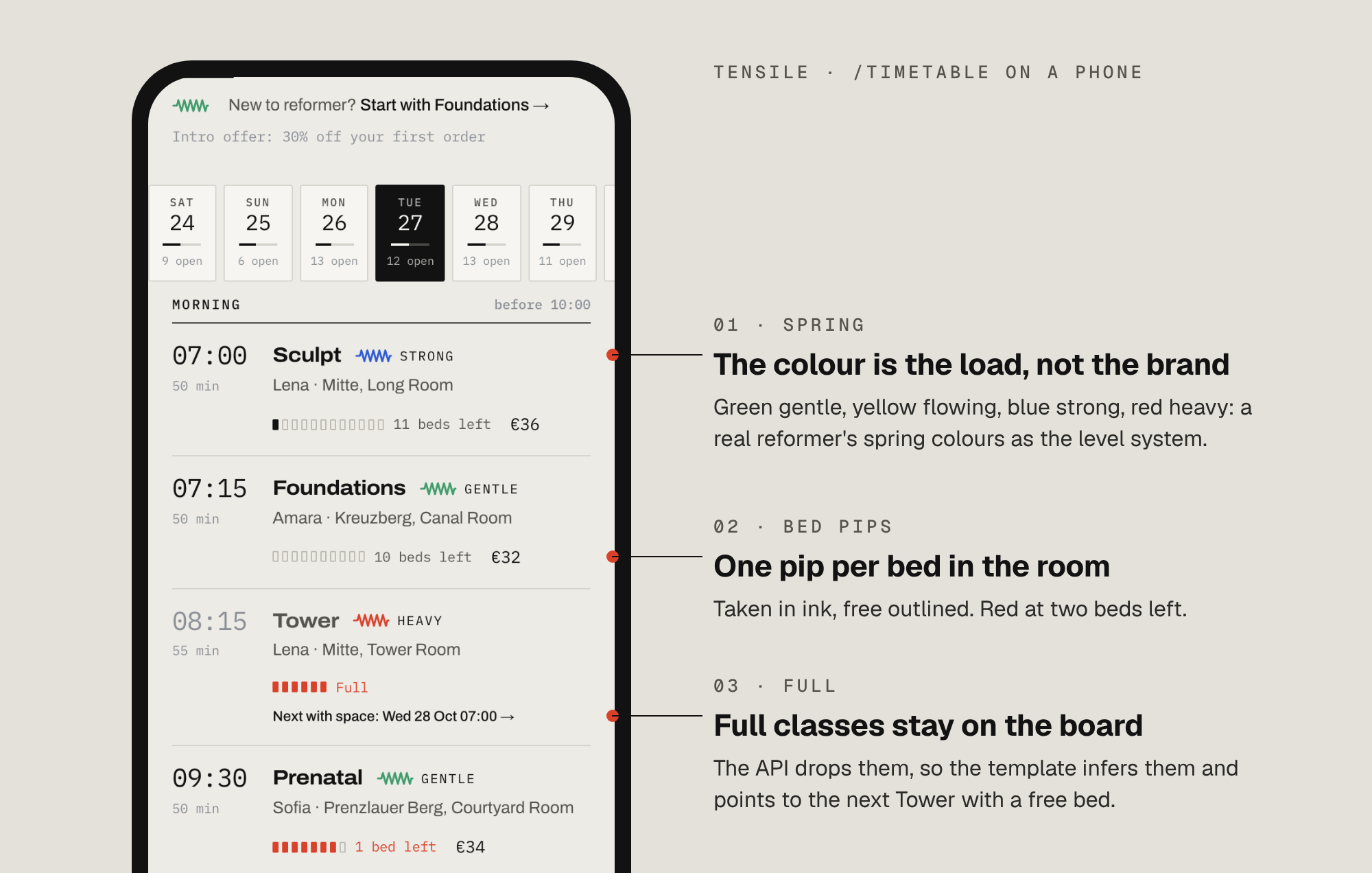
It's inference, and inference has edges, so here are the ones I know about. A cancelled or blocked class also reads as Full, because from the outside it looks the same. A series that is full in every week of the 21-day booking window has no observed slot to learn from, so it vanishes rather than showing Full. And the timetable is cached for five minutes, so the "2 beds left" on the board can be a few minutes old. The bed is only actually held when the cart call succeeds against the live API, which is the check that matters.
Workshops don't get any of this. They're dated, one-off sessions, so a full workshop simply drops off the list, and the page says how to hear about the next date.
Spring colours do the job of a level chart
Real reformers have colour-coded springs. Tensile borrows four of those colours as its whole intensity language, ordered light to heavy: green for gentle (Foundations, Prenatal, mat and online), yellow for flowing (Flow and the privates), blue for strong (Sculpt, Jump Board, the workshops) and red for heavy (Tower). Manufacturers don't all colour their springs the same way, so treat the mapping as the studio's own. The design rules in DESIGN.md keep them as the only saturated colours on the site, so a coloured edge on a timetable card always means load, never decoration. Red does double duty as urgency: two beds left, Full, a hold timer running out.
On top of that sits a level path: Foundations → Flow → Sculpt → Tower. A member unlocks Flow after one Foundations class, Sculpt after ten Flow classes and Tower after fifteen Sculpts, counted from their own completed bookings. It's guidance only. Nobody is ever blocked from booking Tower, because the studio, not the website, decides who's ready, but a Sculpt class sheet says "Before you book: around ten Flow classes first", and a newcomer gets a one-tap nudge to Foundations on the timetable.
From a tap on the timetable to a held bed
Tapping a class opens its sheet: a slide-over on desktop, a bottom sheet on a phone, and a deep link either way (/timetable?occ=flow-mitte-lena@2026-10-27T17:30:00.000Z), so an instructor can post a link to one specific class.
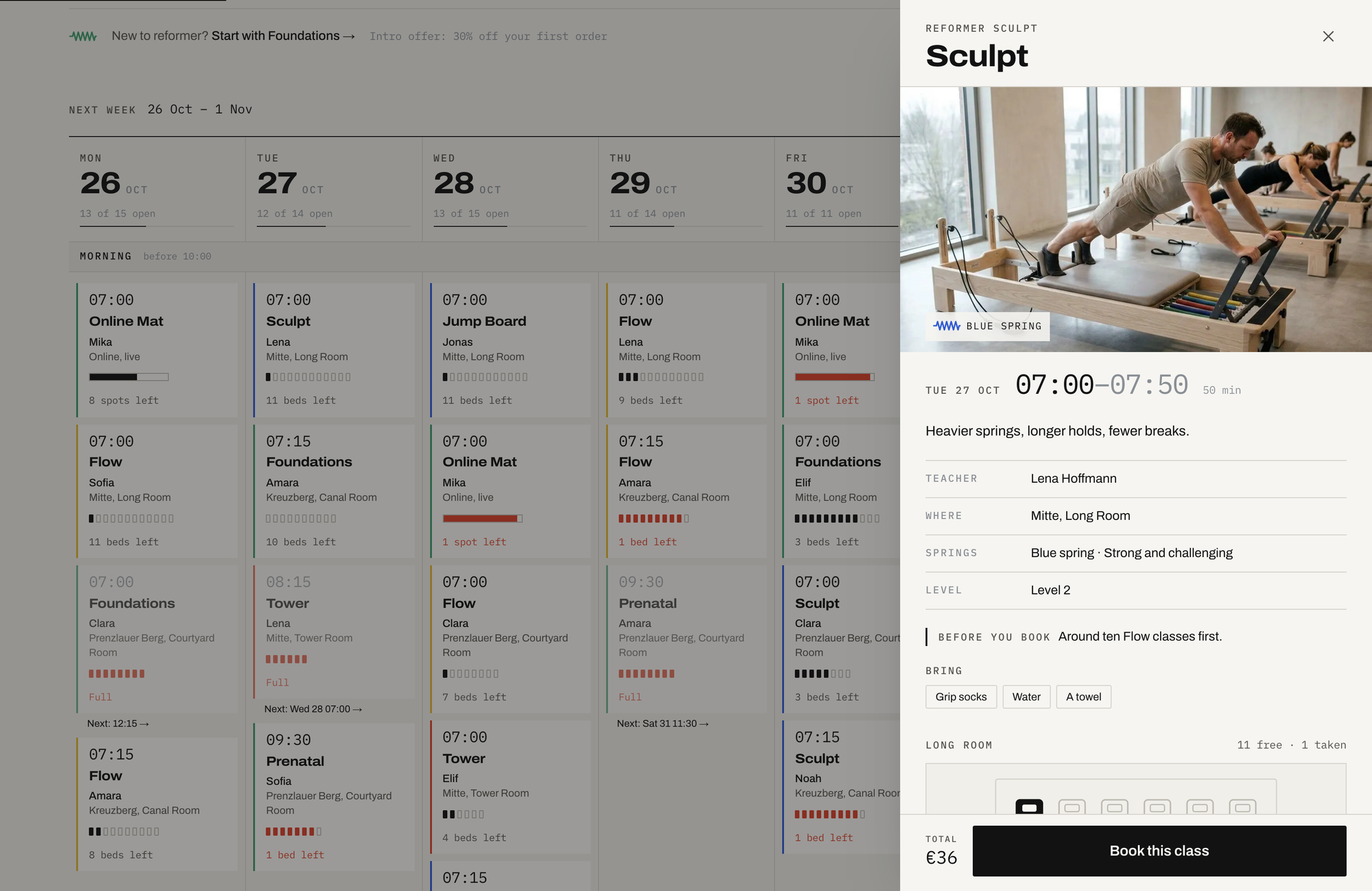
The sheet is a spec sheet for the class: time, teacher, room, spring, level and what to bring, then the room drawn bed by bed, taken in ink and free in outline, then extras with a stepper (grip socks, towel hire and a recovery shake in the demo), a price preview with the best offer applied, and the cancellation cutoff written as an exact time rather than "12 hours before". Book this class holds the bed in the cart, shows a short "Bed held" beat and hands over to /checkout.
Checkout collects the customer's details and the checkout questions, which in the demo include a required studio waiver and a pregnancy question, then a discount code, then payment through Stripe or at the studio desk. The confirmation is a check-in pass with a countdown, the room, and calendar links.
Discounts were a small design decision worth copying. The demo has three: an automatic 30% intro offer on a first order, an automatic 20% off-peak discount on weekday classes starting between 10:00 and 16:00, and a TENSILE10 code. They never stack. The best single one wins per class, and if a member types TENSILE10 while the intro offer is already doing better, checkout says a better offer is applied instead of pretending the code worked. That's one fewer email to the front desk asking why the code didn't change the price.
Privates share one room, so they can't collide
Private sessions get their own short wizard at /privates: studio, then 1:1 or Duet, then a teacher (or the first one free), then a day and time, then extras, with a live booking card alongside.
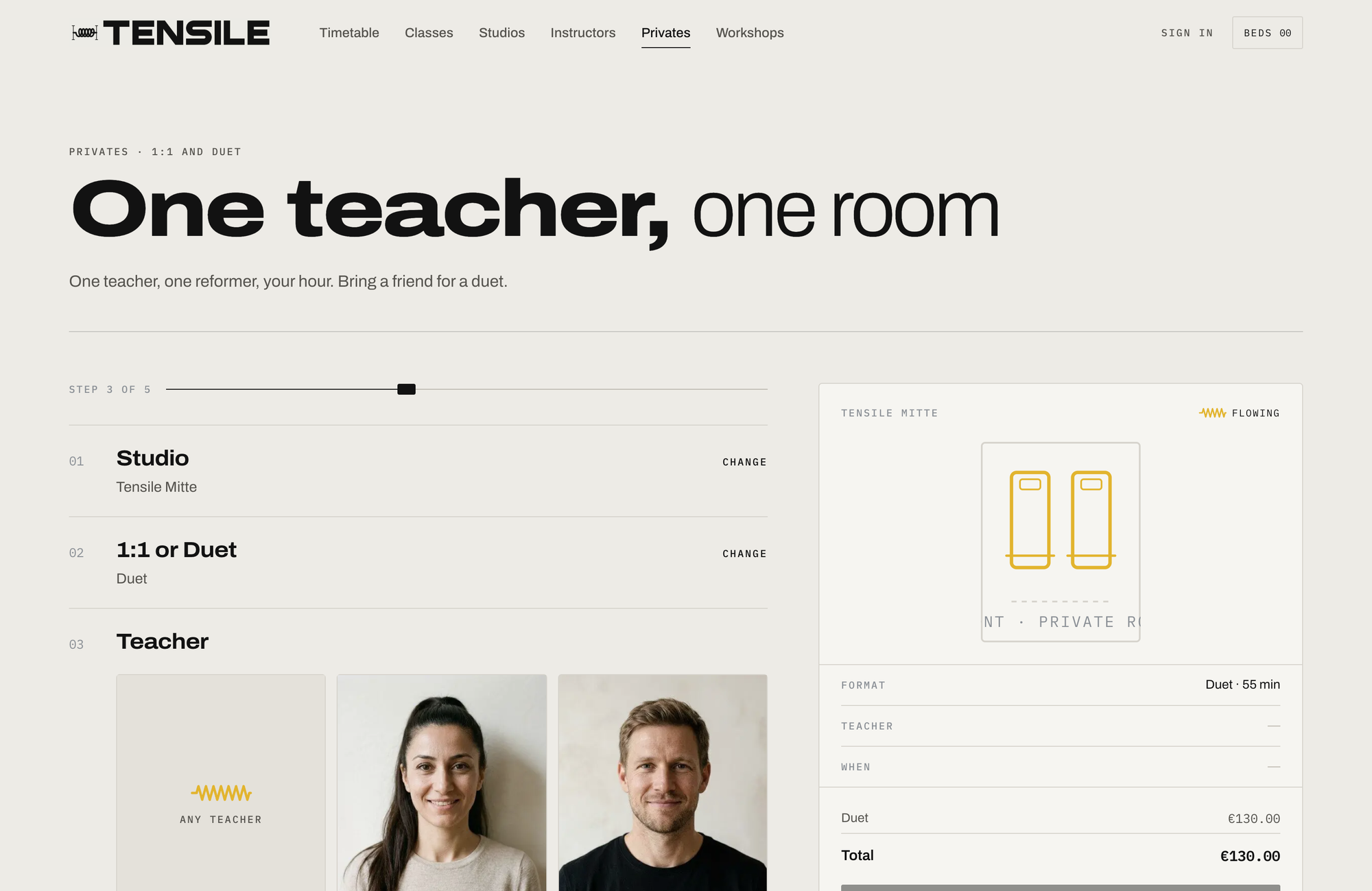
Each studio has one private room, and the model reflects that. The 1:1 and the duet are separate one-seat variants that share a product pool per studio, so a duet at 11:00 blocks a 1:1 at 11:00 in the same room, and you can't double-book the space with two different session types. A duet is one booking for two people: the head count travels as an appointment attribute (people = "2"), so it shows up on the booking in the Opencals dashboard without consuming a second seat. Deep links pre-fill the wizard, so an instructor page can send someone to /privates?instructor=lena-hoffmann.
Workshops are the third format: dated two-hour sessions laid out as editorial rows with a date block, the description, beds left as a segmented bar and "Hold your bed". The demo runs three, a spring-calibration session, reformer for runners and a teacher-training taster.
Members run their own week
Sign-in is passwordless, a 6-digit code by email or a one-time link. The account opens on Your week: the next seven Berlin days, rest days included, with every booking showing its time, class, spring, studio and teacher.
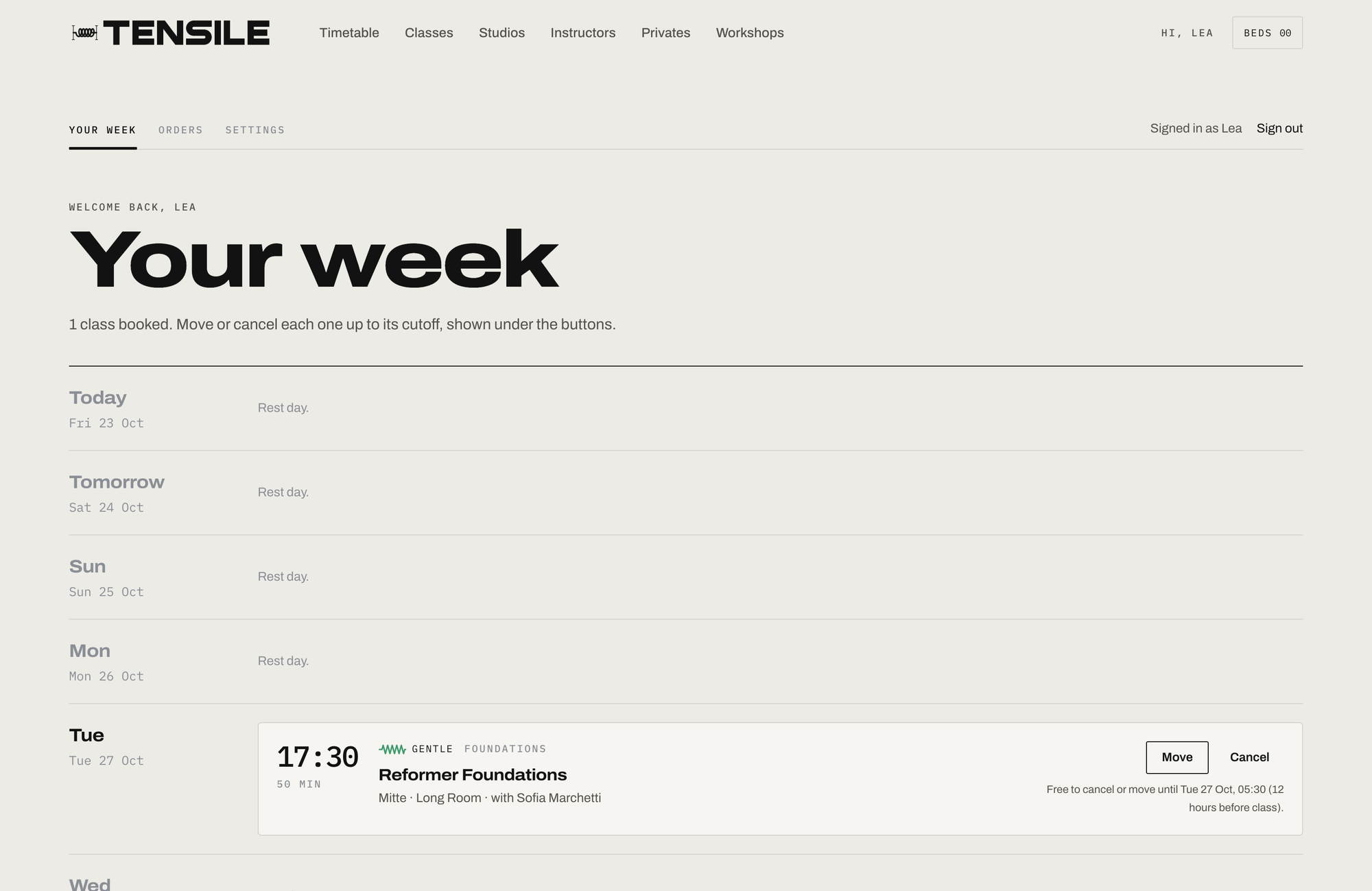
Members can Move or Cancel up to 12 hours before a class, with the exact cutoff printed under the buttons. Moving keeps the same series: a member can shift this Tuesday's Flow with Lena to another Flow with Lena in the same studio, but not swap it for a different class or teacher. Online classes get a Join button that goes live 10 minutes before the start, and after a class a "How was your class?" prompt collects feedback. Past classes sit beside the level path and the studios the member has trained in. Every link in Opencals emails (view, move, cancel, feedback) resolves through /link/[token], which signs the member in and drops them on the right page.
No class packs, no memberships, no waitlist
This is the section to read before you show the template to a studio owner, because the first two gaps are the ones they'll ask about.
There are no class packs or credits. Every booking is paid per class at checkout. A lot of reformer studios sell 5- and 10-class packs, and nothing here sells a pack, tracks a balance or redeems one. If the studio runs on packs, that's a feature to build, not a setting to switch on.
There are no memberships either. No recurring monthly plan, no "unlimited" tier, no member pricing. The intro offer and the off-peak discount are the only price levers in the template.
There's no waitlist. When a class is full, the template shows it as Full and points at the next one with a bed. It doesn't let anyone queue for a cancellation or promote them automatically when a bed frees up. A 07:00 class that's full on Sunday night can have a bed free by Tuesday morning, and with this template the member has to come back and look for it.
Members can't pick their bed. The room plan shows how many beds are taken, not which ones, and there's no seat selection.
Nothing connects it to the aggregator apps. If the studio also sells beds through Urban Sports Club or ClassPass, the template doesn't know about them. You'd hold those places back on the class capacity yourself, or sell the same bed twice.
Full-every-week series disappear, as described above, rather than showing as Full.
And the two that apply to every Opencals template: Opencals itself is not open source, only the templates and the SDK are, and the free Dev Store runs in test mode, so it can't take real payments until you move the store to production.
If packs, memberships and a waitlist are what the studio needs today, an all-in-one studio platform is the honest answer, and I've compared those in the Mindbody alternatives piece. Tensile is for the studio, or the developer building for one, that wants the booking site to be its own, and is fine selling single classes, privates and workshops.
1,170 bookings a month, priced out
The template costs nothing. The backend is a paid hosted service, priced in US dollars, from opencals.com/pricing, checked 24 October 2026:
| Elastic | Build your plan | |
|---|---|---|
| Base price | $0.99 per booking, no monthly fee | $14.98/month including 300 bookings |
| After that | $0.99 each | $0.20 per extra booking |
| Group classes | Included | Group appointments add-on, $7.49/month |
| Move and cancel in the account | Included | Customer self-service add-on, $14.99/month |
| Fits | A launch, or a studio mostly selling privates | Any studio with a full group timetable |
Each member booking a bed is a booking, so a reformer timetable runs up volume quickly. Take one room of 12 beds running 30 classes a week at about three-quarters full: that's roughly 270 bookings a week, or about 1,170 a month. On Elastic that's $1,158 a month, which is the wrong plan. On Build your plan it's $14.98, plus 870 extra bookings at $0.20 ($174), plus the two add-ons above ($22.48): $211.46 a month, before card processing, which Stripe charges you directly. Billing annually takes 10% off the plan.
For the same room, those 1,170 bookings at the demo's €32 to €36 a class are somewhere around €40,000 of classes a month, so the booking engine is about half a percent of it. The plan configurator in the dashboard shows the exact price for your own volume and add-ons.
Repainting it for your own studio
Two places carry nearly all the business-specific work. lib/site-config.ts holds the name, contact details, studios with their rooms, bed counts and photos, instructor bios, each class's spring, level, what to bring and which room it uses, the level path, the policies, the off-peak window and the extras copy. The bookable data, meaning classes, prices, capacities, schedules, instructors, extras, checkout questions and discounts, comes from your Opencals store.
Design tokens live in app/globals.css as Tailwind v4 @theme properties, and DESIGN.md writes up the whole system: the type scale, the motifs (spring chips, bed pips, room plans, tension cables, a carriage-rail progress line) and the motion. If your studio's springs are different colours, these are the lines to change:
@theme {
  --color-plaster: #edebe6;       /* page */
  --color-ink: #121212;           /* text and primary buttons */
  --color-spring-green: #3e9b6a;  /* gentle */
  --color-spring-yellow: #e2b42e; /* flowing */
  --color-spring-blue: #2f5bd3;   /* strong */
  --color-spring-red: #d9412b;    /* heavy, and urgency */
}
Class photos, instructor portraits, the banner and the logo come from your Opencals store. The editorial photography ships in public/images/ and the hero film in public/videos/, and any missing image falls back to a pale concrete placeholder rather than a broken box.
| Layer | What it uses |
|---|---|
| Framework | Next.js 15 (App Router), React Server Components |
| Styling | Tailwind CSS v4 |
| Type | Archivo (variable width axis) and IBM Plex Mono |
| Motion | Framer Motion + Lenis, with reduced-motion fallbacks |
| Data | SWR on the client, Server Components on the server |
| Forms | react-hook-form + Zod |
| Payments | Stripe Elements, loaded on demand |
| Auth | NextAuth.js v5, passwordless |
| Dates | moment-timezone, pinned to Europe/Berlin |
| Booking data | Opencals Storefront SDK v0.3.18 |
ExerciseGym structured data with a SportsActivityLocation per studio, Open Graph cards, robots.txt and sitemap.xml ship configured.
Three studios and a week of classes from one preset
Create a Dev Store with the Reformer Pilates Studio preset
Sign up at app.opencals.com, create a Dev Store and choose the Reformer Pilates Studio preset (category Pilates & fitness) when it asks for a dataset. It seeds the three studios and Tensile at Home, eight instructors, the weekly timetable with capacity set to the beds in each room, privates, three dated workshops, the extras, the checkout questions with the studio waiver, the intro and off-peak offers, the TENSILE10 code and sample bookings, so some classes are already full, as in the demo.
Generate a Storefront API key
In your Opencals account settings, generate a Storefront API key. It starts with sfk_. Leave allowed origins empty: the template calls the API from the server, and server requests send no Origin header.
Deploy to Vercel
Use the button below. Vercel asks for OPENCALS_API_KEY and AUTH_SECRET: paste the sfk_ key and any random string. Add NEXT_PUBLIC_STRIPE_PUBLISHABLE_KEY when you want card payments, and NEXT_PUBLIC_SITE_URL for your domain's sitemap and canonical URLs.
Set the Storefront Base URL before the first real member
In your Opencals dashboard (Settings → API), set Storefront Base URL to your deployed domain. Every emailed link (view, move or cancel a class, leave feedback) is built as {storefrontBaseUrl}/link/{token}. Left on localhost, they go nowhere.
The README covers local development and the checks (npm run typecheck, npm run lint, npm test). If you're building with an AI agent, the classes-and-lessons reference in the Opencals agent skills describes the same class, capacity and Full-class pattern.
Tensile is the eighth template in the series, and the closest relative is Fluently, the language school: also group classes with live seats, but with levels as variants and no rooms. VOLT books padel courts on a grid, Bali Villas and NOIR book by the night and the day, and Haar, Frisor and Clarity are one-to-one appointment templates built around staff. The full list is in the template docs.
Tensile on GitHub
The full source, MIT licensed, with the class model written up in the README.
Tensile live demo
Open the timetable, find a Full class, and book a bed end to end in test mode.

Fluently: language school template
The other class template: group sessions with live seats and levels as variants.
Opencals for sport and fitness
How studios, clubs and coaches use the booking engine behind the templates.
The question I'd put to a reformer studio owner is how many members a week look at a full class on your current booking page, see nothing, and assume it isn't running. If you build sites for studios, lib/timetable.ts is the piece worth lifting: about 380 lines that turn an availability API into a timetable that knows what's full.
Frequently Asked Questions
Get started
Ready to transform your service business?
Join 150+ businesses already using Opencals. Start on a free development store with every feature unlocked, and only pay once you go live.