

Gable: a free coworking booking template that sells the whole day

Search for a coworking space website template with booking and look at what the "booking" is. I opened the top results in October 2026. Nexus Coworking on Framer ($69) has "Book a Tour" buttons and lead forms. The WPForms coworking template collects the space and dates you want, then, in its own words, you "reach out to them to confirm availability." Neither knows whether the boardroom is free at 11.
Gable is the template we built for the other half of that sentence. It's a free, MIT-licensed Next.js site for a coworking network whose booking is wired to Opencals, the booking and checkout engine we build. If you run (or build sites for) a space that rents desks, meeting rooms, phone booths or studios by the hour or the day, Gable takes the booking and the payment. If what you need is a pretty page that collects tour requests, a Framer template is less work.
Gable is a free coworking booking website template (Next.js 15, MIT licence) on the Opencals API. Visitors plan a whole day: a desk, a meeting room for 11:00 and a phone booth after it go on one "day sheet", held for 15 minutes, and they pay once by card or at the front desk. The demo runs six buildings and 77 bookable spaces with live "seats free" counts, extras, discounts and a week-plan account. The template is free; bookings run on a free Opencals development store for testing, then cost $0.99 each or $14.98 a month for 300 (checked 28 October 2026).
A coworking day is three bookings, so Gable sells the day
Nobody books "a meeting room". They book a desk for the morning, a room for the 11 o'clock with the client, and somewhere quiet for the call after lunch. Most booking widgets make that three separate checkouts, and the second one is where people give up and email you.
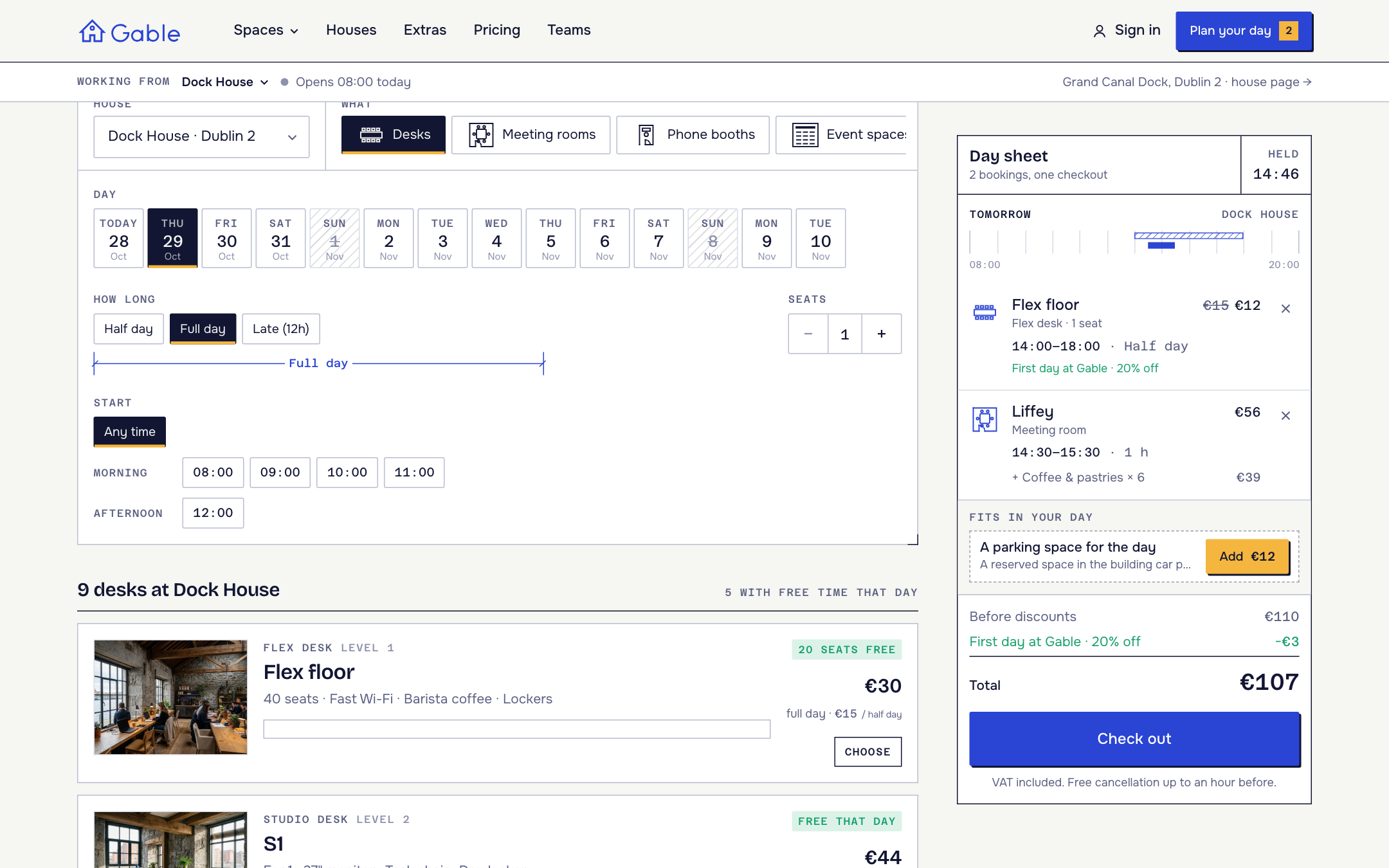
Gable's cart is a day sheet: a timeline of the day from 08:00 to 20:00 with every booking drawn on it as a block, its extras, the discount and the total. The planner at /book is a search, not a wizard. You pick a house, a day, how long, a start time and how many people, and it shows the spaces that fit, each with its price for that span and a day bar with the taken time hatched. Add one, then add the next. Everything on the sheet is held for 15 minutes while you plan the rest, and there's one checkout at the end.
Under the sheet, a "Fits in your day" box suggests what's missing:
- a desk around your meetings, on the same open floor
- a booth in the half hour between two meetings
- coffee or lunch for the number of people in the room
- a bigger room free at the same time ("Hanover is free too: 2 more seats")
- parking, at houses that have it
For an operator, those suggestions are the upsell your front desk would make if anyone asked them in person.
Seventy-seven spaces in six buildings, priced the way coworking already charges
The demo is a fictional network called Gable, six workspaces in restored buildings in Dublin, Cork and Galway: Dock House (Grand Canal Dock), Smithfield, Portobello, Harbour (Dún Laoghaire), Shandon (Cork) and Spanish Arch (Galway). This is its price schedule, read from the live demo on 28 October 2026. Prices include VAT and are seeded data, so treat them as a realistic starting point:
| Kind of space | In the demo | Seats | From | Per |
|---|---|---|---|---|
| Flex desks | 6 floors, one per house | 18–40 per floor | €15 | half day |
| Studio desks | 32 | 1 | €22 | half day |
| Meeting rooms | 20 | 4–16 | €14 | 30 min |
| Phone booths | 13 | 1 | €4 | 30 min |
| Studios | 2 | 4–6 | €55 | hour |
| Day offices | 2 | 4–6 | €70 | half day |
| Event spaces | 2 | 40–60 | €260 | half day |
Each space has a base length (30 minutes for rooms and booths, an hour for studios, a half day for desks, offices and events) and the price scales with it. The demo's "price a whole day" builder shows a team of four at Dock House for €262: four flex desks for the day (€120), the Boland room for two hours (€56), coffee and pastries (€26), a working lunch (€56) and a booth for half an hour (€4). That's €65.50 a head.
Discounts are seeded too: 20% off flex desks on a first order (applied automatically), the code GABLETEAM for 15% off meeting rooms, and 25% off rooms on Friday afternoons. Extras (16 in the seed) cover food and drink, kit for the room priced by the hour, and studio services.
"Free right now" answers the walk-in question
The homepage has a board that shows, for every house, how many seats are free on the open floor and which rooms you could walk into in the next hour. It's the question a walk-in asks at the door, and it's the one most coworking sites can't answer without a phone call.
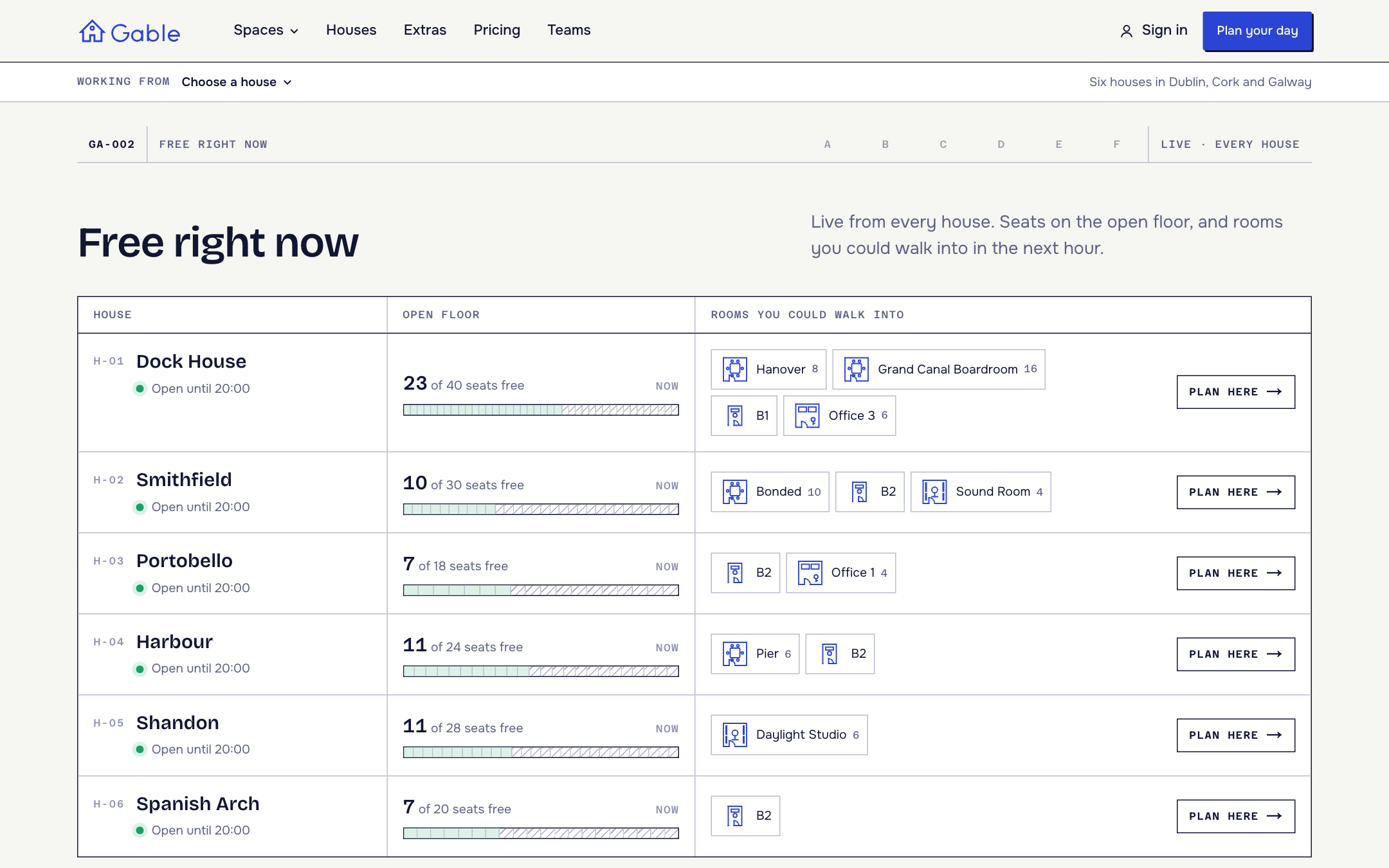
What I like about how it's built: the planner makes one request per house. The server reads every space's free time for the whole two-week booking window at once, caches it for 60 seconds, and the browser works out what fits, what's free now, the next free slot and the seats left. Changing the day, the length or the number of people never calls the API again. A booking, cancellation or reschedule clears the cache for the affected spaces straight away. For a network with 77 spaces, that's the difference between a planner that feels instant and one that spins.
The confirmation is a drawing of the building
The whole site is drawn like an architect's drawing set: numbered sheets, title blocks, dimension lines for booking lengths, hatching for booked time. The confirmation page takes that literally. It draws a section through the house with every booked space on its floor and a dashed route from the front door, next to a title block with the date, bookings, total and payment.
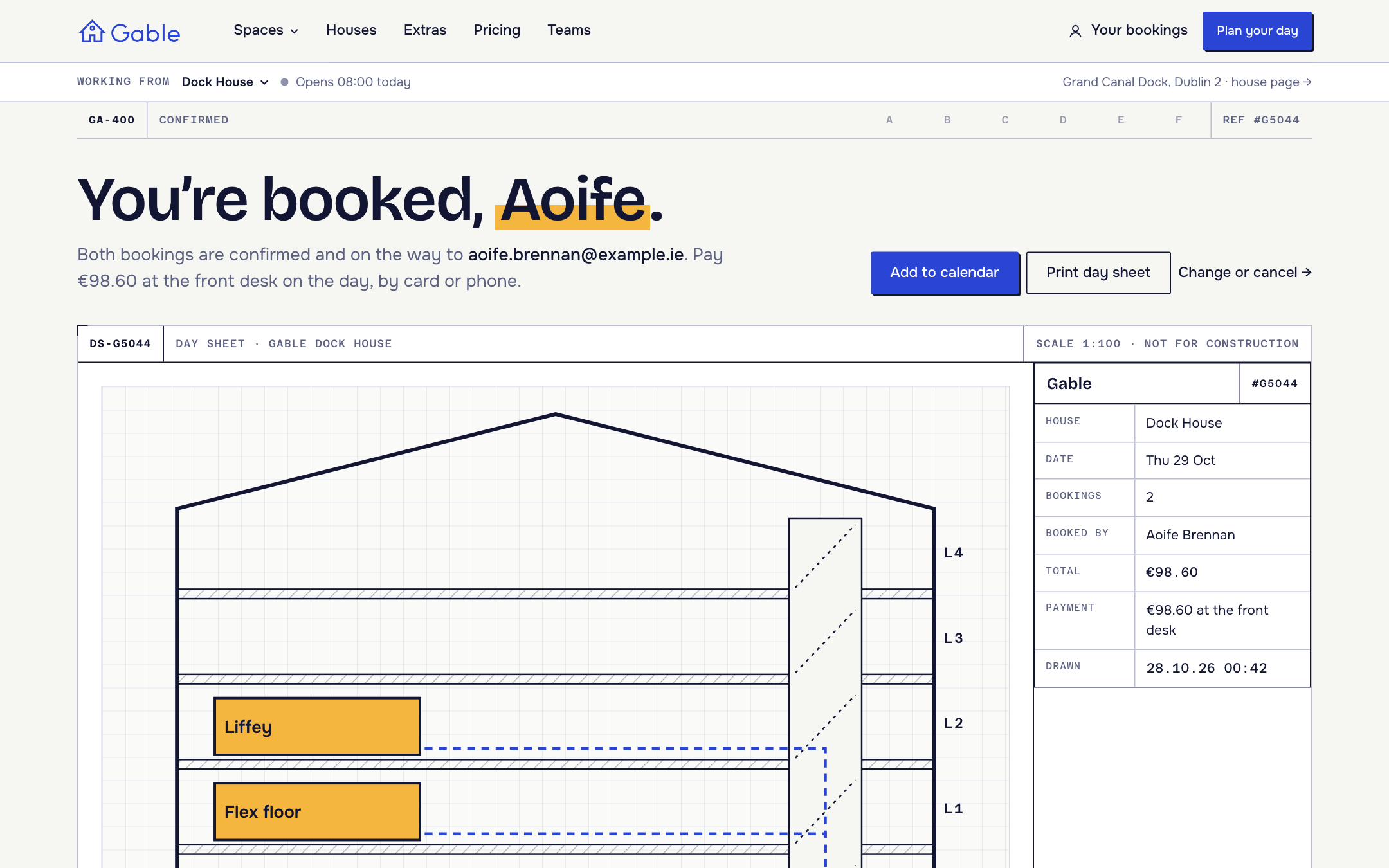
Under it are the practical bits a first-time visitor needs: reception and Wi-Fi, address, transit and parking, an add-to-calendar file and a "Print day sheet" button. Room bookings can invite guests by email, and they get the calendar invite too.
Checkout itself asks the store's own questions. The demo asks for a company name for the invoice, the meeting name for the door screen and dietary needs for catering. Payment is by card through Stripe, or "pay at the house".
Members see their week, not a list of bookings
People who work from a coworking space book in patterns: Monday and Thursday at the desk, the same room every Tuesday. So the account doesn't open on a list. It opens on a Week plan, seven columns with every booking drawn to scale, desks hatched and rooms solid.
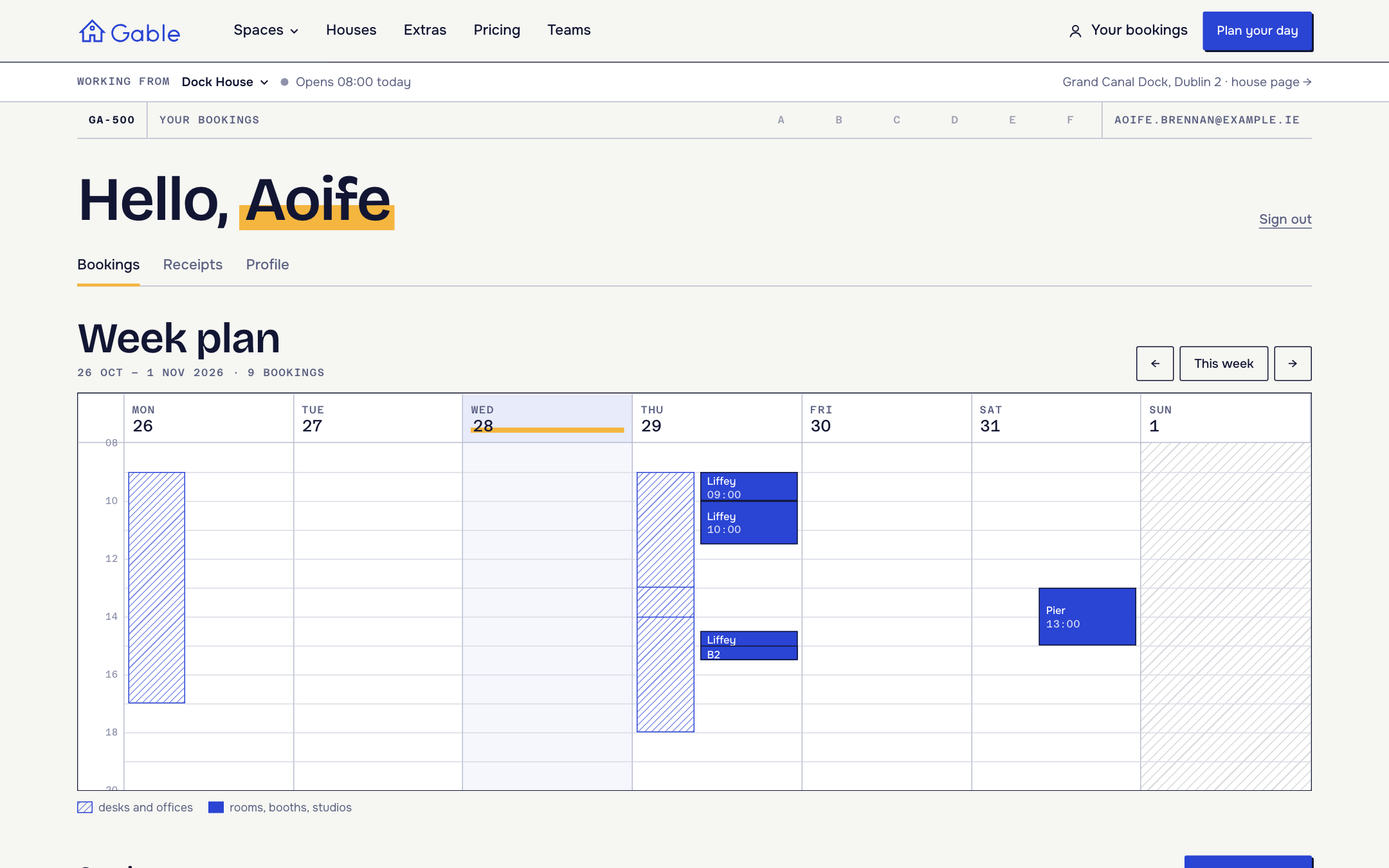
Below it, upcoming bookings have Change time, Stay longer, Invite and Cancel, and past ones have Book again. Sign-in is a 6-digit code sent by email (a password still works), and links in Opencals emails sign the customer straight into the right booking.
How a coworking network maps onto an Opencals store
Everything bookable lives in your Opencals store; the template reads it through a few conventions. If you're an agency setting this up for a client, this is the part to get right:
| In the coworking world | In the Opencals store |
|---|---|
| A building ("house") | A store location, with address and coordinates |
| A bookable space (Liffey, booth B1) | One product variant, assigned to one house, with no staff, so each space is its own resource |
| A kind of space (meeting rooms, booths) | A collection, mapped to a kind in lib/site-config.ts |
| Seats on the open floor | One flex-floor product per house with a seat count; a team books several seats at once |
| Meeting room capacity | Guests allowed on the booking; the guests are the invitees |
| Booking length and price | Custom duration on a base length, price × number of base lengths |
| Coffee, lunch, a projector | Add-ons scoped to products and locations, per person or per hour |
| First-day and team discounts | Store discounts, automatic or by code |
House photos, arrival notes, Wi-Fi and "getting there" copy sit in lib/site-config.ts, so the store stays the source of truth for what can be booked and the config file holds what the building looks like.
What it costs to run Gable on Opencals
The template costs nothing. You can build and test the whole site on a free development store: every feature works and there's no card, but it's in test mode and can't take real payments. Live stores pay per booking or a fixed monthly plan (opencals.com/pricing, checked 28 October 2026). Each space on a day sheet is its own booking, so a desk plus a room is two.
| Bookings a month | Elastic ($0.99 each, every feature) | Custom ($14.98, 300 included, then $0.20) | Custom + flexible duration, group appointments, self-service |
|---|---|---|---|
| 300 | $297.00 | $14.98 | $47.44 |
| 1,000 | $990.00 | $154.98 | $187.44 |
| 3,000 | $2,970.00 | $554.98 | $587.44 |
Elastic includes every feature and makes sense for the first weeks. Past about 16 bookings a month the Custom plan is cheaper, and a busy coworking floor passes that in its first days. Gable leans on custom booking lengths, multi-seat desk bookings and customers changing their own bookings, so on Custom check those add-ons in the plan builder; the pricing page lists them at $9.98, $7.49 and $14.99 a month. Hosting the site (Vercel or any Node host) and Stripe's card fees are billed by them, not by us.
Where Gable stops
Coworking software is a wide category, and Gable covers the booking and checkout part of it. Before you pick it, know what it doesn't do:
- Monthly memberships and credit allowances. Gable's model is pay-as-you-go: the demo's own pricing page says "No membership". Memberships are in beta in Opencals, and there are no per-member quotas or credits. If most of your revenue is monthly members with "10 room hours included", you need a membership platform alongside it or instead of it.
- Doors, Wi-Fi and printers. The template collects a meeting name "for the door screen" as a checkout question, but I found no door-access, Wi-Fi provisioning or printer integration in it. Those live in your access-control system.
- Booking events to other tools. Opencals doesn't send webhooks yet. Booking events reach other tools through Zapier.
- Currency follows the store. The demo store is created in Ireland, which is what makes it charge in euros. Create your store in your own country.
Set up your own copy on a free development store
- Create a free development store at app.opencals.com in Ireland if you want the demo as it is, and choose the Gable (Coworking) dataset. It seeds the six houses, 77 spaces, 16 extras, three discounts and the checkout questions.
- In the dashboard, open Users → your user → API Keys and create a private storefront key (it starts with
spk_). - Deploy with the button below and paste the key when Vercel asks.
| Variable | What goes in it |
|---|---|
OPENCALS_API_KEY | Your private storefront key (starts with spk_). The template forwards each visitor's IP with it, so rate limits count per visitor |
AUTH_SECRET | Any random string, used to encrypt customer sessions |
GABLE_PREVIEW | Optional. 1 serves the /preview screens in production |
One setting people miss: put your deployed URL in Storefront Base URL in the Opencals dashboard (Settings → API). Opencals builds every link in its emails (view, reschedule, cancel) from it, so without it those links won't point at your site.
To rebrand, edit lib/site-config.ts (names, houses, copy, FAQ) and the five colour tokens in app/globals.css. If you'd rather have an AI agent do the scaffolding, the Opencals Agent Skills work in Claude Code, Cursor, Codex and Gemini CLI.
Gable live demo
Plan a day at Dock House and watch the day sheet fill.
Gable on GitHub
MIT-licensed source. Fork it for your space or a client.

Open-source desk booking software
Self-hosted desk booking projects compared, and where they stop.

Open-source meeting room booking
Room booking tools you can host yourself, compared.

Tensile: Pilates studio template
Class timetables, beds left and privates on the same engine.

Haar: salon template
Stylist booking with held chairs and client accounts.

Headless booking system
How the API behind these templates fits your own front end.
Opencals pricing
$0.99 per booking or $14.98 a month for 300.
Frequently Asked Questions
Get started
Ready to transform your service business?
Join 150+ businesses already using Opencals. Start on a free development store with every feature unlocked, and only pay once you go live.