

Clarity: a free, open-source clinic booking template for Next.js

A clinic that wants online booking usually ends up choosing between two things it doesn't want. Either a practice-management suite that books appointments competently and gives you a website that looks like a 2011 patient portal, or a nice custom site from an agency with a booking widget bolted on that can't see your actual availability.
Clarity is a third option: a complete, working clinic website you deploy yourself and own outright. The code is MIT licensed and lives on GitHub. The booking backend runs on Opencals, so you're not building an availability engine or handling payments yourself. You get a real clinic site; you don't get a maintenance project.
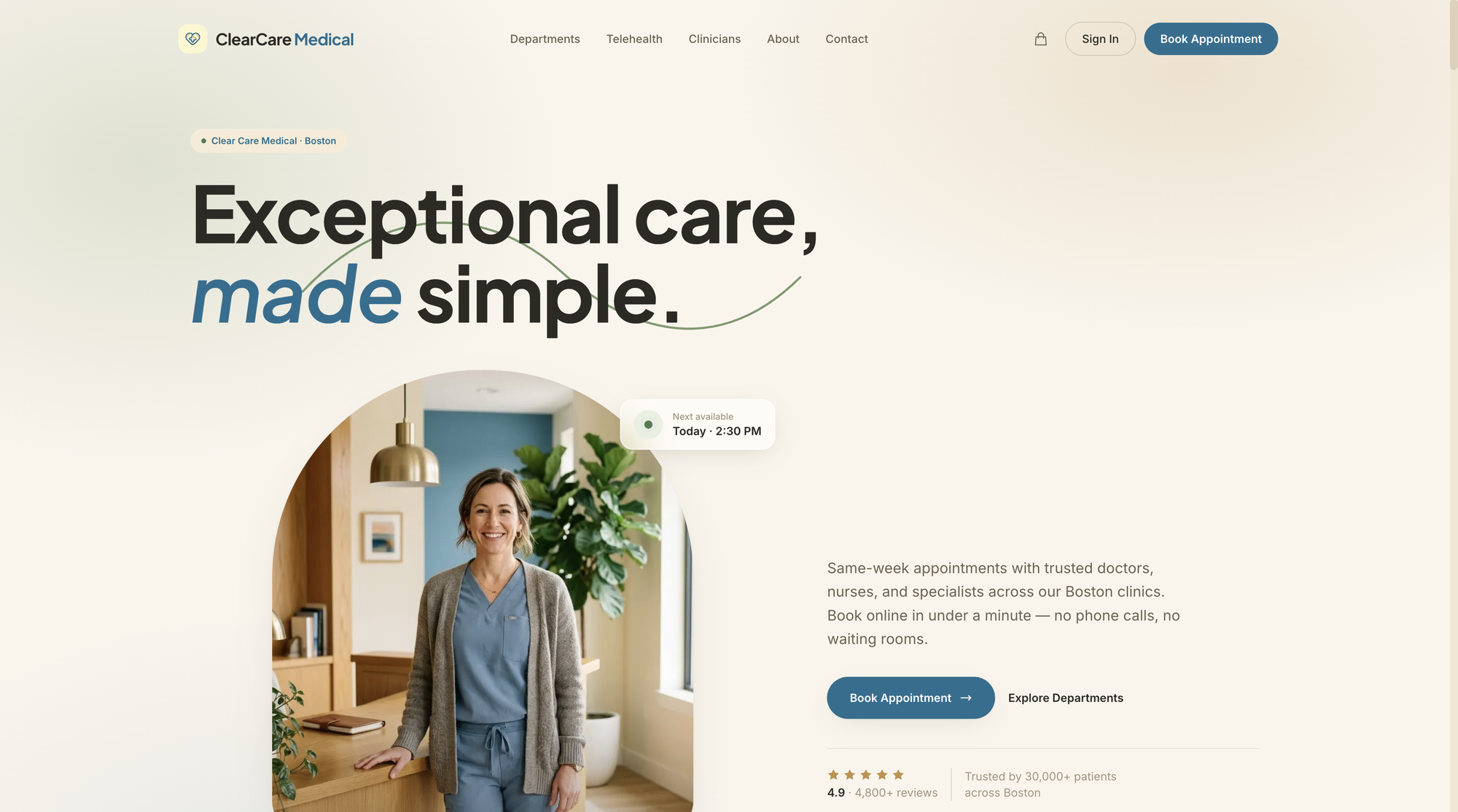
The demo clinic it ships with is Clear Care Medical, a fictional three-location practice in Boston. Nine departments, twenty-one clinicians, real services with real prices. Every word of that is config you replace with your own.
Who Clarity is for
Two audiences, honestly.
Clinics and practices that want a website patients actually enjoy using, and are comfortable editing a config file and deploying to Vercel. If nobody on your team will touch a codebase, a hosted booking page is the faster route and I'd say so — Clarity is for people who want to own the frontend.
Developers and agencies building for healthcare clients. Medical booking has a specific shape: intake questions, department-first navigation, multi-location clinician rosters, group sessions with capacity. Starting from a template that already models those beats starting from a blank Next.js project and discovering them one at a time.
Clarity is a frontend you own (MIT-licensed Next.js 15) plus a backend you don't have to run (the Opencals Storefront API). You customise the site freely; Opencals handles availability, capacity, payments, and patient accounts.
The third template in the series
Clarity isn't a one-off. It's the third open-source template showing what you can build when you take booking headless — the booking engine through an API, your own frontend on top.
Haar came first, a hair salon in a light editorial palette. Frisor followed, a Berlin barbershop in deep green and gold. Clarity is the clinical one: warm ivory, honey oak and brass with a dusty medical blue accent, which is a deliberate reaction against the cold blue-and-white of most healthcare software. All three run on the same Storefront SDK and look nothing alike — which is the entire point. The backend handles the hard parts; the design is yours.
If you want the wider map, the open-source booking systems guide covers where MIT templates sit relative to self-hosted platforms and SDKs.
Department-first booking
Patients don't think in services, they think in problems. Clarity's primary navigation is therefore the department, not a flat service list: General Medicine, Cardiology, Dermatology, Pediatrics, Physiotherapy, Dental, Mental Health, Nutrition, and Labs & Vaccinations.
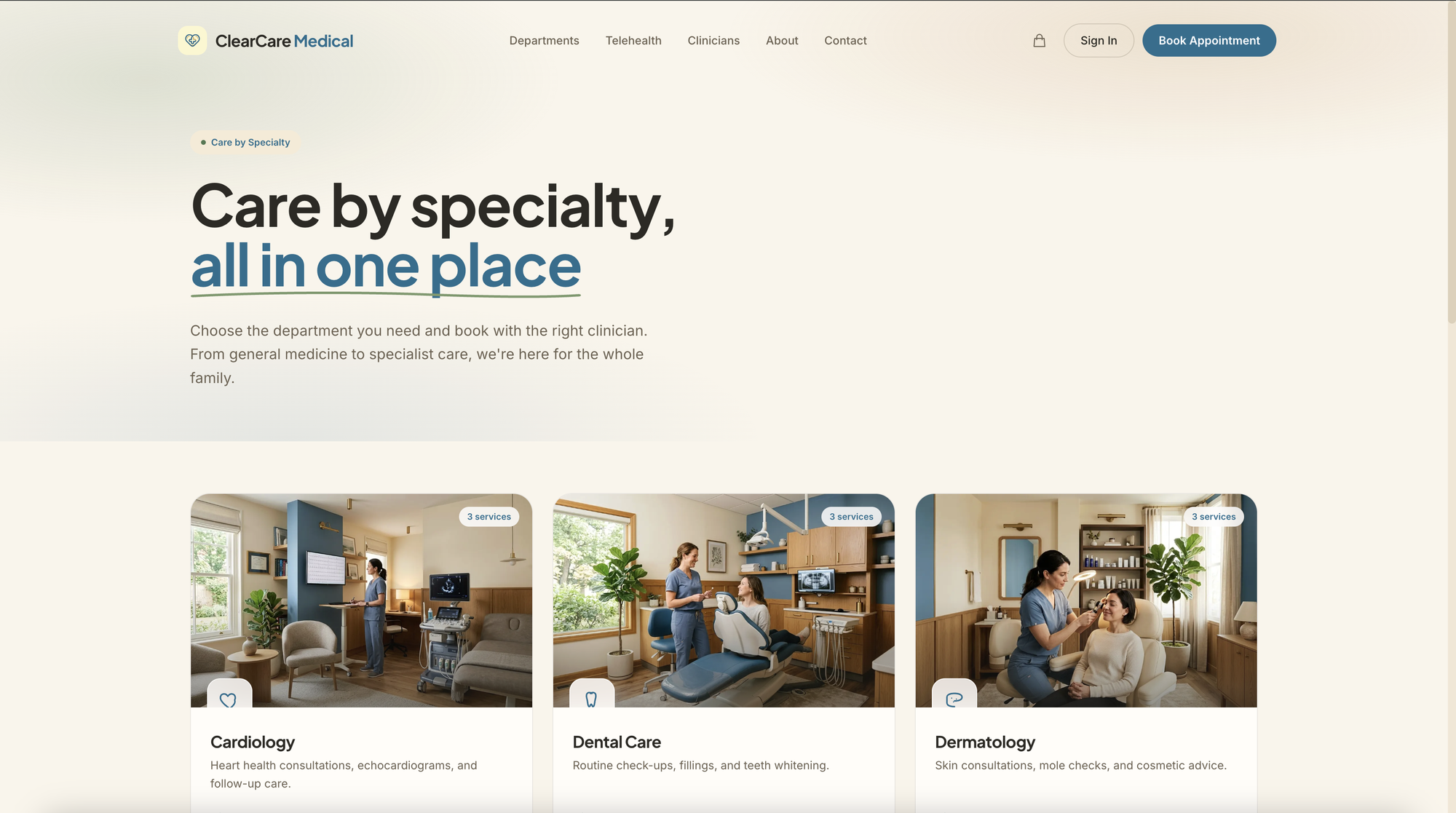
Each department is a product collection in your Opencals store, so the grid is driven by your data rather than hardcoded in the frontend. Add a department in the dashboard and it appears on the site. Nine is what the seed dataset ships; use three or fifteen.
The booking flow
This is where the template spends its design budget. Instead of a multi-page wizard, it's a single-page card-stack: service → clinician → date → time → medical intake → confirm. Sticky bottom CTA on mobile, sticky summary rail on desktop.
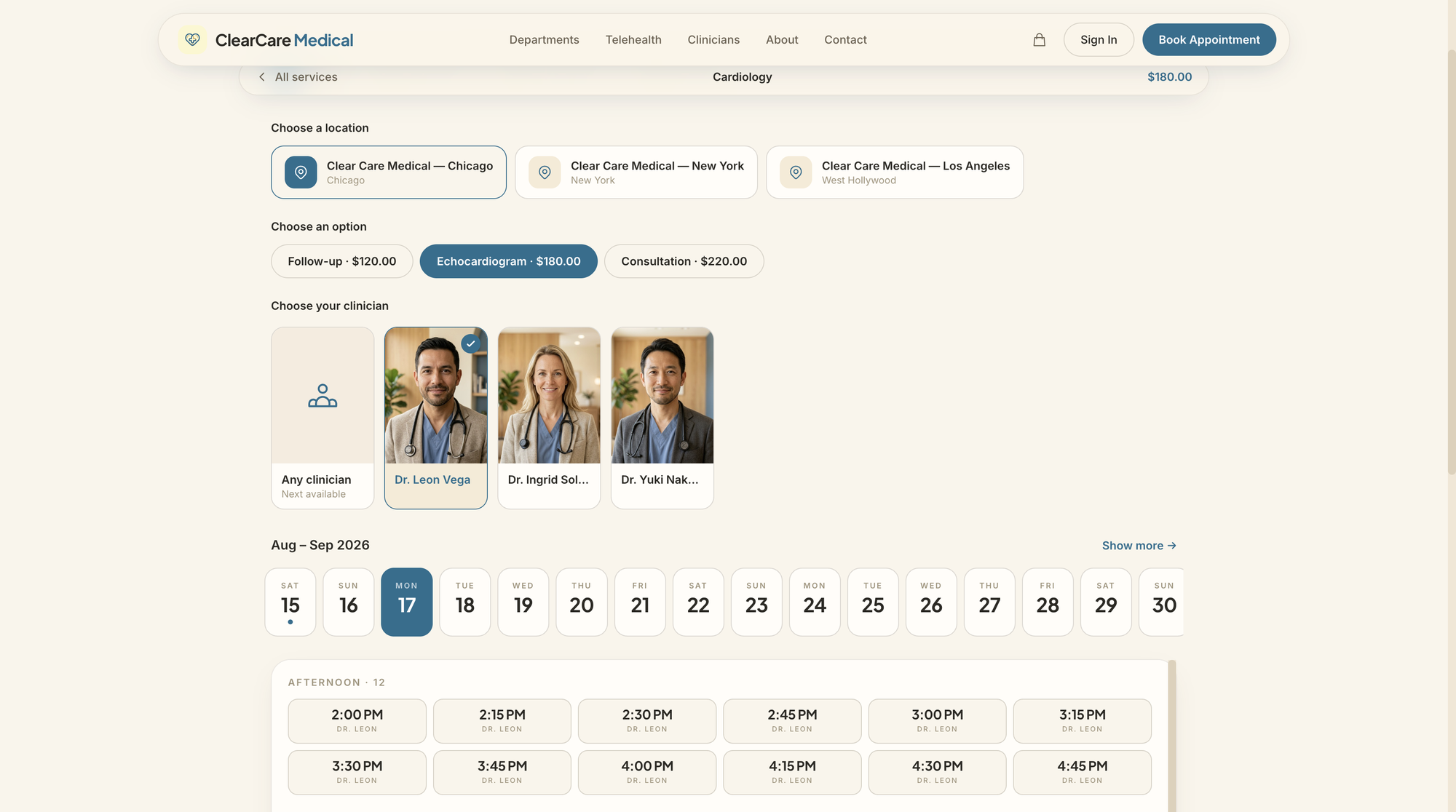
Four things in there are specific to healthcare and worth calling out.
Medical intake at checkout. Reason for visit, insurance provider, and whether the patient is new — captured as checkout questions and saved onto the appointment, so the clinician has context before the patient walks in. These are configured in your dashboard, not in the template, so you can ask what your practice actually needs.
"Any clinician" as a first-class option. The clinician picker leads with Any clinician — next available, because a patient with a rash next Tuesday usually cares more about Tuesday than about which dermatologist. Forcing a name-first choice is one of the quietest conversion killers in medical booking.
Group sessions with live capacity. Physiotherapy classes, nutrition workshops and group therapy are group services with multiple attendees. Slots show a live "N left" count and disappear when they fill.
Multi-location that actually resolves. A global location selector, clinicians filtered by the location you pick, and per-location availability across all three clinics. Locations are computed server-side, so the site never offers a slot with a clinician who isn't there that day.
Checkout runs on Stripe Elements and logs the patient in afterwards, so they land in their account with the appointment already there. Sign-in is passwordless by default — a six-digit code by email, with password sign-in as a fallback — and every emailed link (view, reschedule, cancel, leave feedback) resolves through a /link/[token] route that signs them in and drops them in the right place. In practice that means fewer phone calls, which is the main reason clinics adopt online booking in the first place.
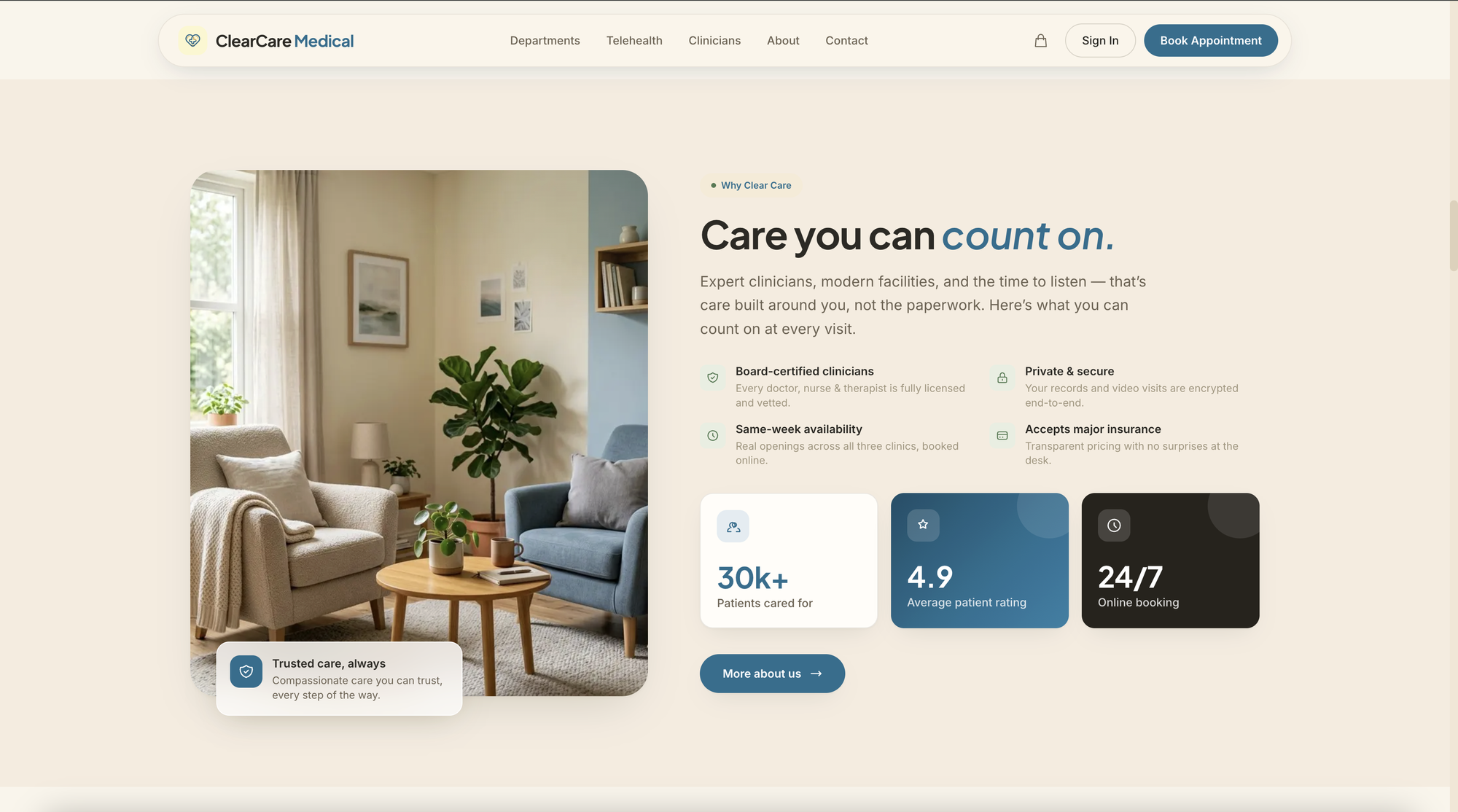
The trust section is deliberately mundane and it matters more in healthcare than anywhere else: board-certified clinicians, encrypted records, same-week availability, insurance accepted. Patients need reassurance before they'll book with someone new.
The tech stack
Deliberately conventional, so it's easy to read and extend:
| Layer | What it uses |
|---|---|
| Framework | Next.js 15 (App Router) |
| Styling | Tailwind CSS v4, design tokens in globals.css |
| Animation | Framer Motion |
| Forms | react-hook-form + Zod |
| Payments | Stripe Elements |
| Auth | NextAuth.js v5, passwordless by default |
| Dates | moment-timezone |
| Booking data | Opencals Storefront SDK v0.3.8 |
Per-page metadata, Open Graph cards, MedicalClinic structured data, robots.txt and sitemap.xml are configured out of the box, which saves the usual week of SEO plumbing on a clinic site.
Every Opencals API call is visible in the source, so Clarity doubles as a reference implementation even if you never ship it — a working example of building a booking frontend on the Storefront SDK.
Deploy your own in three steps
You don't need to clone anything locally to get a live site.
Create a Dev Store and seed it
Sign up at app.opencals.com, create a Dev Store, and choose the Medical / Clear Care Medical preset when prompted for a dataset. That seeds the departments, services, doctors, nurses, therapists and locations the template expects, so your site renders exactly like the demo.
Generate a Storefront API key
In your Opencals account settings, generate a Storefront API key. It starts with sfk_ and is scoped to that one store.
Deploy to Vercel
Use the one-click deploy button below, paste your sfk_ key and a random AUTH_SECRET when Vercel asks for environment variables, and your clinic site is live. Add a Stripe publishable key when you're ready to take real payments.
One setting worth doing on day one
Set Storefront Base URL in your Opencals dashboard (Settings → API) to your deployed domain. Opencals builds every patient link from that base URL plus /link/ and a one-time token, so if it still points at localhost, the reschedule and cancel links in your emails will go nowhere.
Making it yours
Two files do most of the work.
lib/site-config.ts holds every piece of clinic-specific copy — name, tagline, logo wordmark, hero text, departments, stats, testimonials, clinicians, address, hours, footer links. Rebranding the whole site is editing one file.
app/globals.css holds the design tokens as Tailwind v4 @theme properties. Token names are intentionally stable, so components keep working when you change the values. Swap --color-primary from the dusty blue to whatever your practice uses, adjust the ivory, change the display font, and the site follows. Keep the accent aligned with your storefront primary colour in Opencals so the booking emails match the site.
Clarity on GitHub
The full source, MIT licensed. Clone it, fork it, or one-click deploy.
Clarity live demo
The clinic template running end to end — pick a department and book.
Frisor — barbershop template
The same stack in deep green and gold, with a walk-in-shaped flow.
Opencals for developers
The Storefront API, SDK, and templates for building custom booking sites.
Where to start
Clarity is a starting point, not a product you're locked into. Clone it for your practice, or fork it into your own design system for client work. The nine departments, the Boston addresses, the ivory-and-brass palette — all config and CSS you control. The booking engine underneath stays managed, so the only thing you maintain is the part you actually care about: how your clinic feels online.
Grab it from GitHub, try the live demo, and if a salon or barbershop fits your case better, Haar and Frisor are the same idea in different clothes.
Frequently Asked Questions
Early Access — 3 Months Free
Ready to transform your service business?
Join 150+ businesses already using Opencals. Get 3 months completely free with all features unlocked.